


- Home
- Animate
- Discussions
- Re: Having Trouble Making Interface!!!!!! Please H...
- Re: Having Trouble Making Interface!!!!!! Please H...
Having Trouble Making Interface!!!!!! Please Help me......!

Copy link to clipboard
Copied
I think I understand how to make a interface but the problem is im unsure as to how to add it to my existing code!
To make a interface (as far as i know) You can create classes such as mainScreen, intructions and so on.
Ok i get that, make the classes then add ther buttons from the library i these classes.
But i followed a tutorial bu Emmanuel Feronto, and adapted that to the needs of my game.
So im unsure as how to add these 'Screens' to my current class, the I currently only have 1 class, Main which currently has 300 lines of code, and i dont know how to break it up into smaller classes. Thats the problem i think, The main is quite large, normally i have heard people keep this clear... But then say i made a bland main, and added the screens into that then how do i make the main that makes the game play on the play button?


 14
Replies
14
14
Replies
14


Copy link to clipboard
Copied
package { import flash.display.Sprite; import flash.utils.Timer; import flash.events.TimerEvent; import flash.events.MouseEvent; import flash.events.Event; import flash.text.TextField; public class Main extends Sprite { private var plantsArray:Array;// plants placed in the game field private var zombiesArray:Array;//zombies placed in the game field private var flowersTimer:Timer=new Timer(5000);// timer to make flowers fall down private var zombieTimer:Timer=new Timer(5000);// timer to make zombies come in private var sunContainer:Sprite=new Sprite();// container for all suns private var plantContainer:Sprite=new Sprite();// container for all plants public var bulletContainer:Sprite=new Sprite();// container for all bullets private var zombieContainer:Sprite=new Sprite();// container for all zombies private var overlayContainer:Sprite=new Sprite();// container of all overlays private var movingPlant:plantMc;// plant the player can drag on game field private var selector:selectorMc;// the selector square to show the playere where he's going to place the plant private var money:uint=100;// amout of money owned by the player, Change accordingly to level... private var moneyText:TextField=new TextField ;// dynamic text field where to show player's money private var playerMoving:Boolean=false;// Boolean variable to tell us if the player is moving a plant (true) or not (false) private var totalZombies:uint=0;//total amount of zombies placed in game public function Main():void { setupField(); drawField(); fallingSuns(); addPlants(); addZombies(); addEventListener(Event.ENTER_FRAME,onEnterFrm); } private function setupField():void { plantsArray=new Array(); zombiesArray=new Array(); for (var i:uint=0; i<5; i++) { plantsArray=new Array(); zombiesArray=new Array(); for (var j:uint=0; j<9; j++) { plantsArray
=0; } } } private function updateMoney():void { moneyText.text="Money: "+money.toString(); } private function drawField():void { var fieldSprite:Sprite=new Sprite(); var randomGreen:Number; addChild(fieldSprite); fieldSprite.graphics.lineStyle(1,0xFFFFFF); /*for (var i:uint=0; i<5; i++) { for (var j:uint=0; j<9; j++) { randomGreen=(105+Math.floor(Math.random()*50))*256; fieldSprite.graphics.beginFill(randomGreen); fieldSprite.graphics.drawRect(25+65*j,80+75*i,65,75); } } */ addChild(sunContainer); addChild(plantContainer); addChild(bulletContainer); addChild(zombieContainer); addChild(overlayContainer); overlayContainer.addChild(moneyText); updateMoney(); moneyText.textColor=0xFFFFFF; moneyText.height=20; } private function addZombies():void { zombieTimer.start(); zombieTimer.addEventListener(TimerEvent.TIMER,newZombie); } private function newZombie(e:TimerEvent):void { var zombie:zombieMc=new zombieMc();// constructs the zombie totalZombies++; zombieContainer.addChild(zombie);// adds the zombie zombie.zombieRow=Math.floor(Math.random()*5);// chooses a random row where to place the zombie zombie.name="zombie_"+totalZombies;//gives a name to the zombie zombiesArray[zombie.zombieRow].push(zombie.name);// adds the zombie in the row-th row zombie.x=660;// places the zombie on the board, outside the stage to the right zombie.y=zombie.zombieRow*75+115; } private function fallingSuns():void { flowersTimer.start(); flowersTimer.addEventListener(TimerEvent.TIMER, newSun); } private function newSun(e:TimerEvent):void { var sunRow:uint=Math.floor(Math.random()*5);// random row var sunCol:uint=Math.floor(Math.random()*9);// random column var sun:sunMc = new sunMc();// constructs the sun sun.buttonMode=true;// makes the mouse change shape when over the plant sunContainer.addChild(sun);// adds the sun sun.x=52+sunCol*65;// places the sun in the proper column sun.destinationY=130+sunRow*75;// definines the sun y destination point sun.y=-20;// places the sun out to the upper side of the stage sun.addEventListener(MouseEvent.CLICK,sunClicked);// listener to be triggered when the sun is clicked } private function sunClicked(e:MouseEvent):void { e.currentTarget.removeEventListener(MouseEvent.CLICK,sunClicked);// removes the CLICK listener money+=10;// makes the player earn money (5) updateMoney();// updates money text var sunToRemove:sunMc=e.currentTarget as sunMc;// defines which sun we need to remove sunContainer.removeChild(sunToRemove);// removes the sun } private function addPlants():void { var plant:plantMc=new plantMc();// constructs a new plant overlayContainer.addChild(plant);// adds the plant plant.buttonMode=true;// makes the mouse change shape when over the plant plant.x=90; plant.y=40; plant.addEventListener(MouseEvent.CLICK,onPlantClicked);// listener to be triggered once the plant is clicked } private function onPlantClicked(e:MouseEvent):void { // let's see if the player has enough money (10) to afford the plant and isn't currently dragging a plant if (money>=10&&! playerMoving) { money-=10;// pays the plant updateMoney();// updates money text selector=new selectorMc();// constructs a new selector selector.visible=false;// makes the selector invisible overlayContainer.addChild(selector);// adds the selector movingPlant=new plantMc();// constructs a new moving plant movingPlant.addEventListener(MouseEvent.CLICK,placePlant);// lister to be triggered once the moving plant is clicked overlayContainer.addChild(movingPlant);// adds the moving plant playerMoving=true;// tells the script the player is actually moving a plant } } private function placePlant(e:MouseEvent):void { var plantRow:int=Math.floor((mouseY-80)/75); var plantCol:int=Math.floor((mouseX-25)/65); // let's see if the tile is inside the game field and it's free if (plantRow>=0&&plantCol>=0&&plantRow<5&&plantCol<9&&plantsArray[plantRow][plantCol]==0) { var placedPlant:plantMc=new plantMc();// constructs the plant to be placed placedPlant.name="plant_"+plantRow+"_"+plantCol;// gives the plant a name placedPlant.fireRate=25;// plant fire rate, in frames placedPlant.recharge=0;// plant recharge. When recharge is equal to fireRate, the plant is ready to fire placedPlant.isFiring=false;// Boolean value to tell if the plant is firing placedPlant.plantRow=plantRow;// plant row plantContainer.addChild(placedPlant);// adds the plant placedPlant.x=plantCol*65+57; placedPlant.y=plantRow*75+115; playerMoving=false;// tells the script the player is no longer moving movingPlant.removeEventListener(MouseEvent.CLICK,placePlant);// removes the CLICK listener from the draggable plant overlayContainer.removeChild(selector);// removes the selector overlayContainer.removeChild(movingPlant);// removes the plant itself plantsArray[plantRow][plantCol]=1;// updates game array adding the new plant } } private function onEnterFrm(e:Event):void { var i:int; var j:int; // // plants management // for (i=0; i<plantContainer.numChildren; i++) { var currentPlant:plantMc=plantContainer.getChildAt(i) as plantMc; // let's see if the plant can fire if (currentPlant.recharge==currentPlant.fireRate&&! currentPlant.isFiring) { // let's see if there are zombies in the same row of the plant if (zombiesArray[currentPlant.plantRow].length>0) { // let's scan through all zombies for (j=0; j<zombiesArray[currentPlant.plantRow].length>0; j++) { var targetZombie:zombieMc=zombieContainer.getChildByName(zombiesArray[currentPlant.plantRow] ) as zombieMc;// gets the j-th zombie // if the zombie is on the right of the plant if (targetZombie.x>currentPlant.x) { var bullet:bulletMc=new bulletMc();// constructs a new bullet bulletContainer.addChild(bullet);// adds the bullet bullet.x=currentPlant.x; bullet.y=currentPlant.y; bullet.sonOf=currentPlant;// sets the bullet as a son of the current plant currentPlant.recharge=0;// the plant must recharge currentPlant.isFiring=true;// the plant is firing break;// exits the j for loop } } } } // let's see if the plant has to recharge if (currentPlant.recharge<currentPlant.fireRate) { currentPlant.recharge++;// recharges the plant } } for (i=0; i<bulletContainer.numChildren; i++) { var movingBullet:bulletMc=bulletContainer.getChildAt(i) as bulletMc; movingBullet.x+=3;//moves each bullet right by 3 pixels var firingPlant:plantMc=movingBullet.sonOf as plantMc;// finds the plant which shot the bullet // let's see if the bullet flew out of the screen if (movingBullet.x>650) { firingPlant.isFiring=false;// the plant is not longer firing bulletContainer.removeChild(movingBullet);// removes the bullet } else { for (j=0; j<zombieContainer.numChildren; j++) { var movingZombie:zombieMc=zombieContainer.getChildAt(j) as zombieMc; // let's see if a zombie has been hit by a bullet if (movingZombie.hitTestPoint(movingBullet.x,movingBullet.y,true)) { movingZombie.alpha-=0.3;// decreases zombie energy (alpha) firingPlant.isFiring=false;// the plant is not longer firing bulletContainer.removeChild(movingBullet);// removes the bullet // let's see if zombie's energy (alpha) reached zero if (movingZombie.alpha<0) { zombiesArray[movingZombie.zombieRow].splice(zombiesArray[movingZombie.zombieRow].indexOf(movingZombie.name),1);// remove the zombie from the row zombieContainer.removeChild(movingZombie);// removes the zombie } break; } } } } var zombieColumn:int; for (i=0; i<zombieContainer.numChildren; i++) { movingZombie=zombieContainer.getChildAt(i) as zombieMc; zombieColumn = Math.floor((movingZombie.x-25)/65);// gets zombie column // let's see if there is a plant in the same tile if (zombieColumn<0||zombieColumn>8||plantsArray[movingZombie.zombieRow][zombieColumn]==0) { movingZombie.x-=0.5;// moves each zombie left by 1/2 pixels } else { // the zombie attacks!! var attackedPlant:plantMc=plantContainer.getChildByName("plant_"+movingZombie.zombieRow+"_"+zombieColumn) as plantMc; attackedPlant.alpha-=0.01;// drains plant energy // let's see if the plant died if (attackedPlant.alpha<0) { plantsArray[movingZombie.zombieRow][zombieColumn]=0;//removes the plant from the array plantContainer.removeChild(attackedPlant);//removes the plant Display Object from Display List } } } for (i=0; i<sunContainer.numChildren; i++) { var fallingSun:sunMc=sunContainer.getChildAt(i) as sunMc; // let's see if the sun is still falling because it did not reach its destination if (fallingSun.y<fallingSun.destinationY) { fallingSun.y++;// moves the sun down by one pixel } else { fallingSun.alpha-=0.01;// makes the sun fade away // let's see if the sun disappeared if (fallingSun.alpha<0) { fallingSun.removeEventListener(MouseEvent.CLICK,sunClicked);// removes the CLICK listener from the sun sunContainer.removeChild(fallingSun);// removes the sun } } } if (playerMoving) { movingPlant.x=mouseX; movingPlant.y=mouseY; var plantRow:int=Math.floor((mouseY-80)/75); var plantCol:int=Math.floor((mouseX-25)/65); // let's see if the plant is inside the game field if (plantRow>=0&&plantCol>=0&&plantRow<5&&plantCol<9) { selector.visible=true;// shows the selector selector.x=25+plantCol*65; selector.y=80+plantRow*75; } else { selector.visible=false;// hide the selector } } } } } This is the class I am trying to import into my main!


Copy link to clipboard
Copied
did you assign Main to be your document class and is Main.as in the swf directory as your swf?
Copy link to clipboard
Copied
Hmm, Im confused now, That long piece of code above is currently my Document class(Main)
But i am aware i need to change the name, or make the document class something else.
I know i can create screens by using:
var_Sreen1 = new Screen1;
addChild(_Screen1)
But I need to know how to make a button that makes the game play?
Im probably confusing you.
Here is a screen shot:
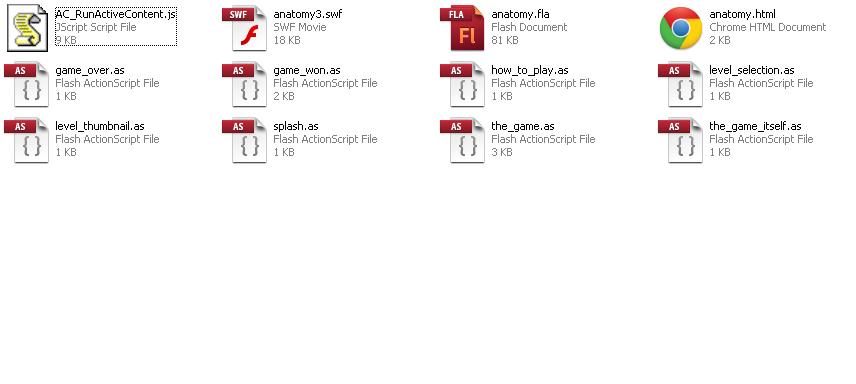
I Do not completely under stand the architecture of a game menu/interface. So i used a example of the internet. I would use all these classes to make the screens, but I need to add my Main.as file to this. then from the_game_itself class would need to then start game from the main.as file. I have tried to simply copy and paste my code form my main to the game its self class. but errors. I added my graphics from the main fla aswell but still errors.
here's a link to the anatomy of the main menu folder
https://rapidshare.com/files/2999715922/anatomy3333.zip
And the class i am trying to implement into this is above. I forgot to include my graphics from the fla that holds the document class above, let me know if you need to see this, its just a FLA with a few graphics exported for actionscript.
Thanks for taking the time to help me Kglad, i truly appreciate it. Looking forward to showing the forum what i have created.
Copy link to clipboard
Copied
is anatomy.fla publishing anatomy3.swf? click file/publish settings/formats to check.
where's Main.as?
Copy link to clipboard
Copied
kglad wrote:
is anatomy.fla publishing anatomy3.swf? click file/publish settings/formats to check.
where's Main.as?
Yes the anatomy3.fla is publising the anatomy 3.swf.
I hope these image will help you understand my situation.
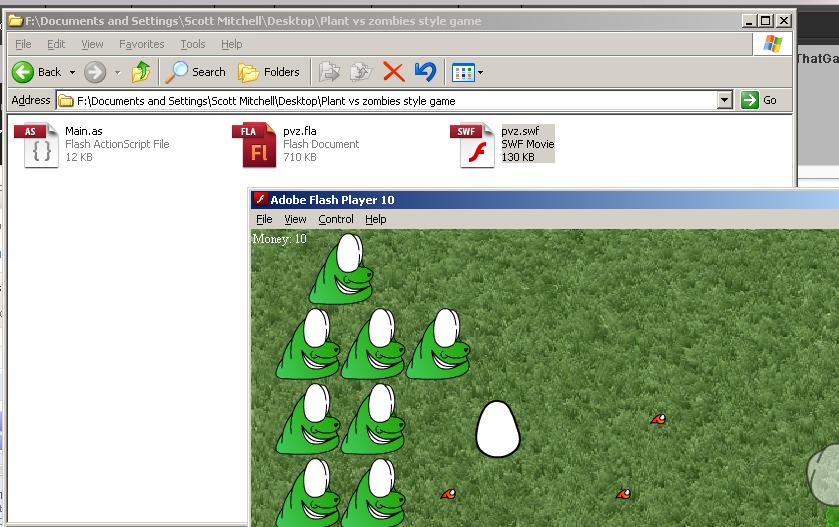
Above was my original folder, a small game witha a fla a and a main class.
I then looked into screen anatomy, architecture what ever your preferance on naming it is.
And produced this folder:

As you can see, i have all the classes that make up the screens, i then added the files from my previous folder (circled in picture) But have no idea how to add it to the screen architecture. I know I would have to add all my graphics from the pvz.fla to the anatomy fla, unless i can have two fla's? Not sure on that.
But the problem is i dont know how to make it so the_game_its self class makes the Main.as class start the game.
Incase you was wondering, the_game.as class just adds and removes the screens if buttons are pressed. And makes a instance of the_game_itself.
Now i have tried to copy and pase my main/
.as code into the_game_itslef class but that did not work.
Here is the game its self class:
package {
import flash.display.Sprite;
import flash.display.SimpleButton;
import flash.events.MouseEvent;
public class the_game_itself extends Sprite {
public var main_class:the_game;
public function the_game_itself(passed_class:the_game) {
main_class = passed_class;
die_button.addEventListener(MouseEvent.CLICK, on_die_button_clicked);
}
public function on_die_button_clicked(event:MouseEvent) {
main_class.show_game_over();
}
And the main.as class is above in this thread
}
}
Copy link to clipboard
Copied
you're very confused. and you're changing your setup so that will make it harder to help you.
in your first screenshot, there was no anatomy3.fla.
anyway, with your latest setup, what's your main fla's name?: anatomy.fla? anatomy3.fla? pvz.fla?
Copy link to clipboard
Copied
Sorry yes I am making thing harder for myself. This screen shot is the one I am actually usin now.
This screen architechture stuff is really giving me a headache.

If you know anothe way thats easier then please let me know.
But this is what I am using. anatomy.fla is the main fla, these are all classes that make the game. I repeat anatomy fla is the main fla. But pvz.fla is a fla that holds the graphics. There was know need for me to add this to the folder, i apoligize for making things more confusing. Main.as is the document class of pvz.fla, so does that matter (Forget pvz.fla existed) can i still use that class in the anatomy.fla, even though it has a seperate document class? The document class for anatomy.fla is the_game.
Here is the library for anatomy.fla:

Here is the library for the pvz.fla, i understnad i need to move my library from pvc.fla to anatomy.fla - Correct?

Thanks for all your help Kglad,
Copy link to clipboard
Copied
don't move anything.
open anatomy.fla, open the properties panel and click on an empty part of the stage or the backstage. where is says class or document class, type Main.
retest anatomy.fla or publish its swf and test the newly published swf.
Copy link to clipboard
Copied
Ok i done this, It just plays the game. No menu or aything.
Copy link to clipboard
Copied
so, you've solved your issue, correct? you're now using your Main class, correct?
Copy link to clipboard
Copied
I apoligize for my absolute annoyingness i have not explained my end out come in all this confusion.
I want to make a main menu for my game, with a few buttons for things like instructions. Thats the simplified way of saying it.
I am really struggling with this.
Copy link to clipboard
Copied
i don't think you're going to find anyone that will create your menu for you via a forum (unless you hire them).
if you work on your menu and need help with circumscribed problems that you encounter, you can get help via this forum.
Copy link to clipboard
Copied
I apoligize if my last response insinuated that. That was not my intesionsa at all, Im more looking for advice. I understnad actionscript pretty well, i can make a small game, but when I went to make the interface i started to confuse my self. Im pretty new to using classes, so i think i was doing the interface completely wrong.
I was looking into the OOP way of interfacing when i only just realised I dont think my game was coded in OOP im not sure what the dofference is really.
Take a look at this example of interfaceing, is this wrong? It works but is it the right way to do things for say a mobile game?
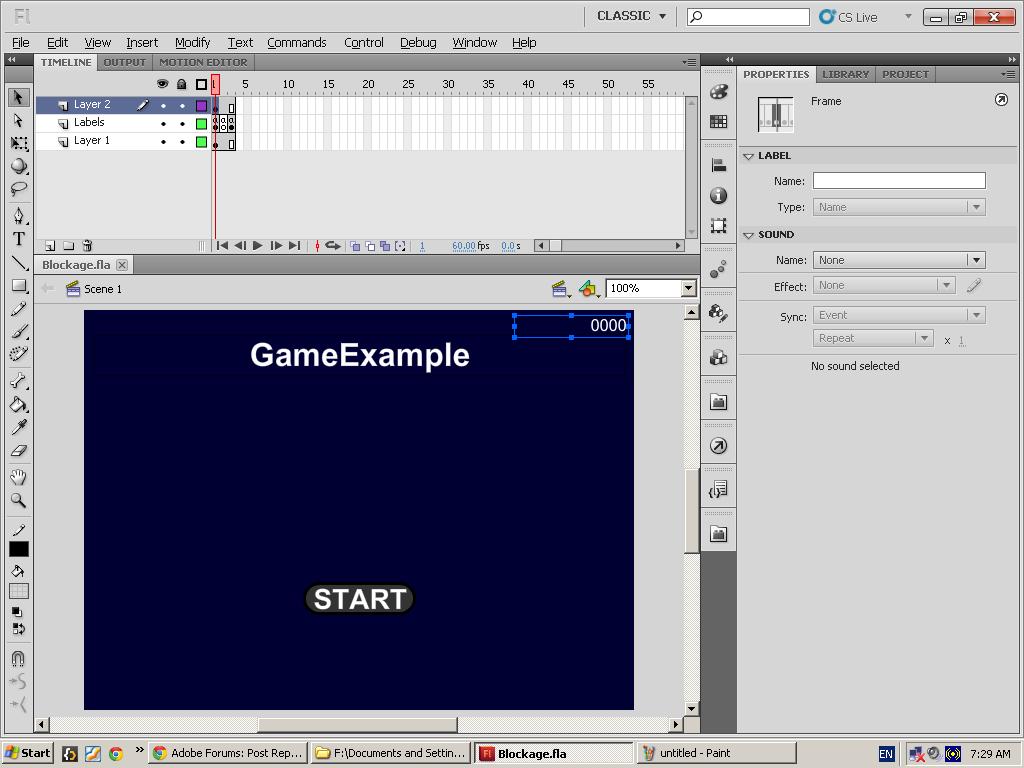
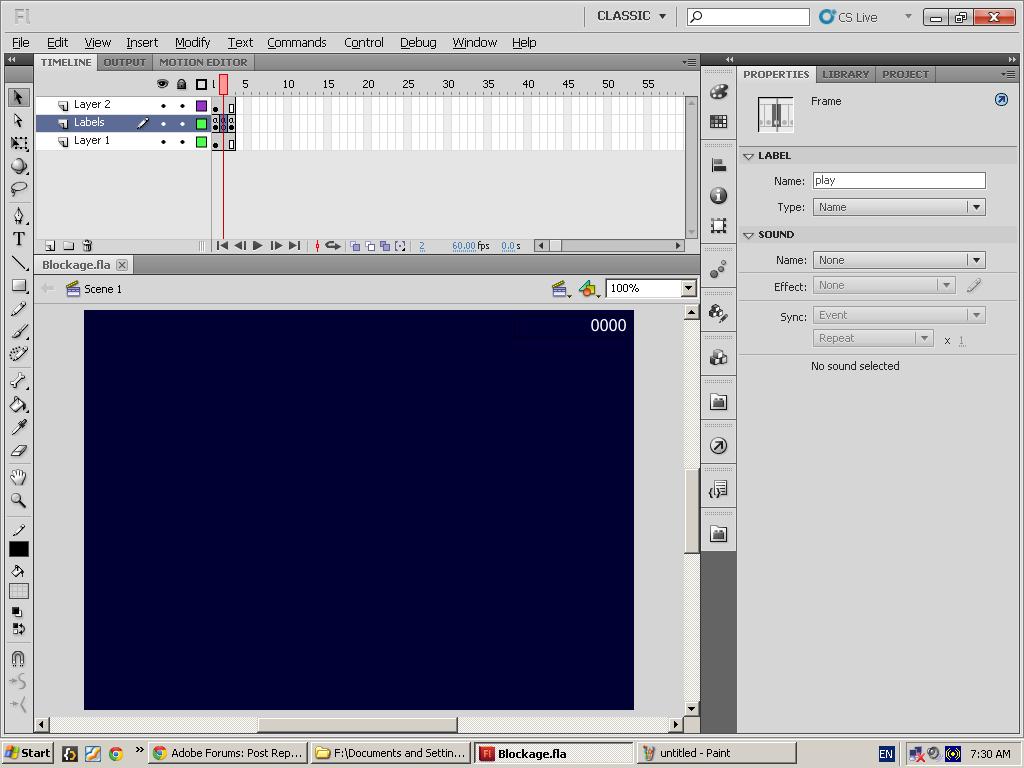
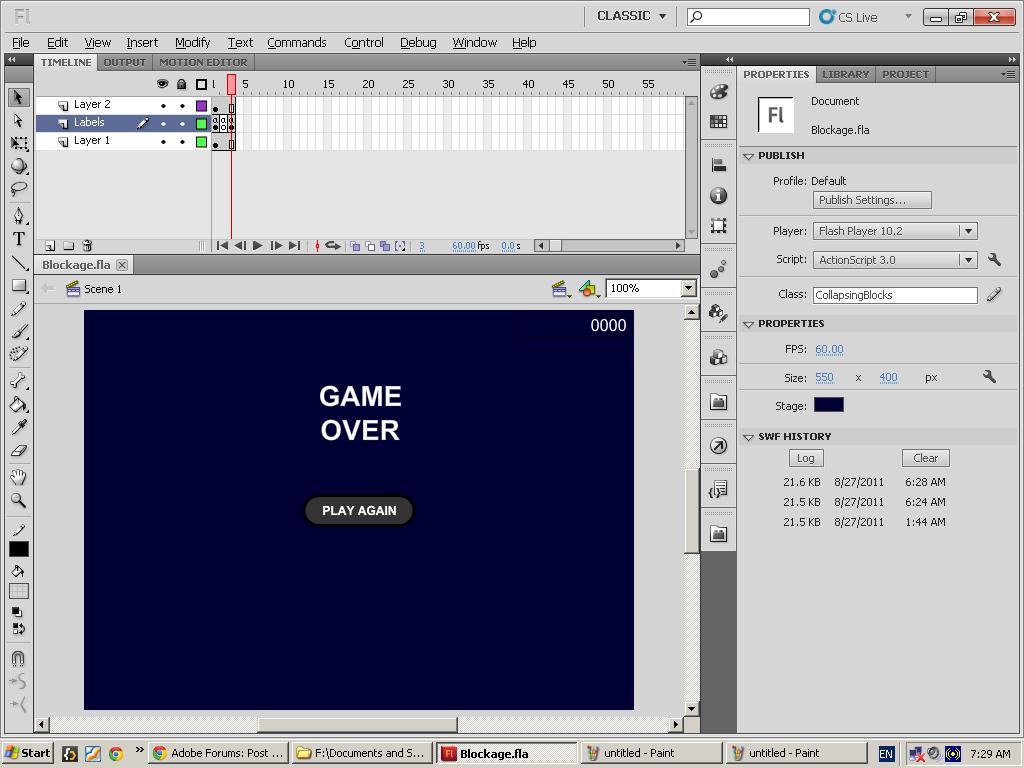
these are just three frames, on frame one, just the main interface with a play button. in the actions:
stop();
startButton.addEventListener(MouseEvent.CLICK,clickStart);
function clickStart(event:MouseEvent) {
gotoAndStop("play");
}
on frame two nothing graphical, in the actions:
startCollapsingBlocks();
collapsing blocks is the document class. So it starts it.
Then on frame three a game over screen. in the actions:
playAgainButton.addEventListener(MouseEvent.CLICK,clickPlayAgain);
function clickPlayAgain(event:MouseEvent) {
cleanUp();
gotoAndStop("play");
}
Copy link to clipboard
Copied
Please any Advice, critisicm or help is greatly appreciated.


Get ready! An upgraded Adobe Community experience is coming in January.
Learn more
 AdChoices