


- Home
- Animate
- Discussions
- How to import keyboard shortcuts into adobe animat...
- How to import keyboard shortcuts into adobe animat...

Copy link to clipboard
Copied
How to import keyboard shortcuts into adobe animate 2020? I can export by copy clipboard and paste the notepad file. But I cant import this file in the animate 2020. Please help me. Sorry to my english.


 2 Correct answers

Hi mate,
Here is the path to the shortcut file:
On Windows the path is:
C:\Users\YourUserName\AppData\Roaming\Adobe\Animate\2020\Shortcuts
On Mac the path is:
HD\Users\YourUserName\Library\Preferences\Adobe\Animate\2020\Shortcuts
Just copy/paste the shortcut XML file.
Also you can do that via the interface, but that will only work in 2020, so you won't be able to bring in shortcuts from 2019, for example.
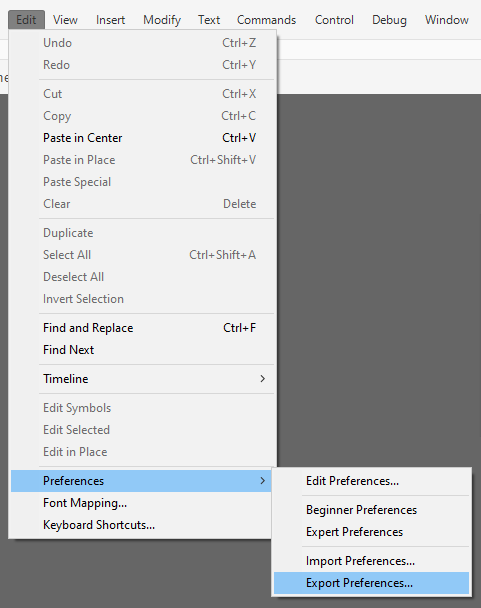

Find Roaming, not Local.
 8
Replies
8
8
Replies
8

Copy link to clipboard
Copied
Hi mate,
Here is the path to the shortcut file:
On Windows the path is:
C:\Users\YourUserName\AppData\Roaming\Adobe\Animate\2020\Shortcuts
On Mac the path is:
HD\Users\YourUserName\Library\Preferences\Adobe\Animate\2020\Shortcuts
Just copy/paste the shortcut XML file.
Also you can do that via the interface, but that will only work in 2020, so you won't be able to bring in shortcuts from 2019, for example.
Member of the Flanimate Power Tools team - extensions for character animation

Copy link to clipboard
Copied
Is this still avalible in the 2024 version? There doesn't seem to be a Shortcuts folder in my version.

Copy link to clipboard
Copied
Find Roaming, not Local.
Member of the Flanimate Power Tools team - extensions for character animation
Copy link to clipboard
Copied
Thank you so much, I was blind lol. You are a hero!
Copy link to clipboard
Copied
it is not working. it can not import the keybord shortcuts. i select "all" options. only import workspace. i think there is a problem.
Copy link to clipboard
Copied
After the import, you have to go to your Shortcuts dialog and choose the new set as current, mate!
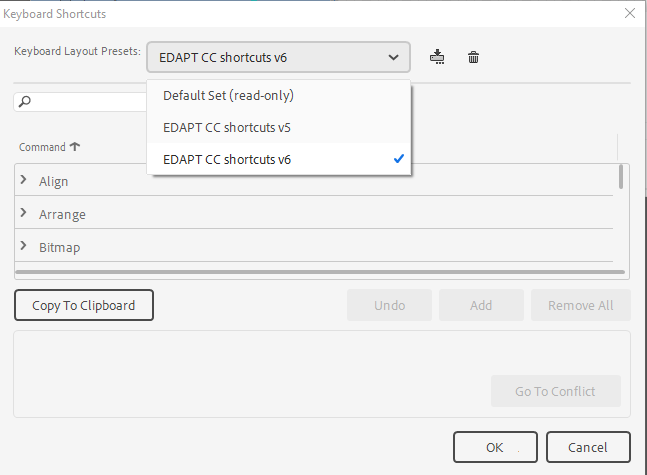
Or just copy / paste the XML in the folder and then again you have to choose it as current.
Member of the Flanimate Power Tools team - extensions for character animation
Copy link to clipboard
Copied
i made this by copy xml file. Thank you. But import/export still not working.
Copy link to clipboard
Copied
Glad to hear you managed to do it!
Well done! 🙂
Member of the Flanimate Power Tools team - extensions for character animation


Get ready! An upgraded Adobe Community experience is coming in January.
Learn more
 AdChoices