Exit
  • Global community
    • Language:
      • Deutsch
      • English
      • Español
      • Français
      • Português
  • 日本語コミュニティ
  • 한국 커뮤니티
0

Importing Video to Animate

New Here ,
Oct 02, 2023 Oct 02, 2023

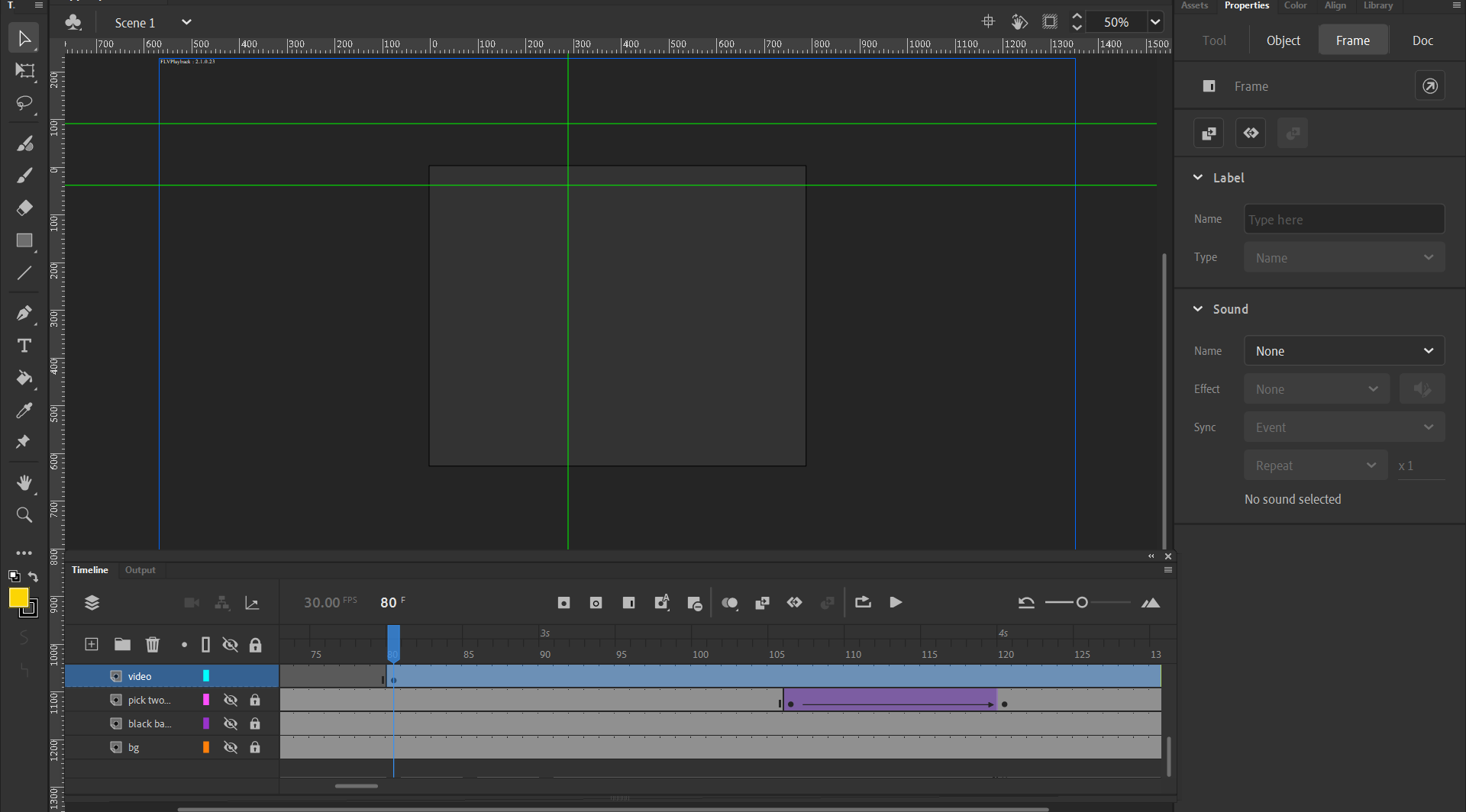
FLVPlayback: 2.1.0.2.3 Blue Error Box When Importing Video Into Animate. They are mp4 files, and have never had this issue before. 

This doesn't happen every time, usually when I have to take a video into a video editing program to remove the audio, even when I use Adobe Premiere Rush. 

Someone please help! I've been dealing with this off and on for a few weeks now. I have no idea what else to try. 

TOPICS
Import and export
2.1K
Translate
Report
Community guidelines
Be kind and respectful, give credit to the original source of content, and search for duplicates before posting. Learn more
community guidelines
Community Expert ,
Oct 02, 2023 Oct 02, 2023

you're importing an mp4 with what settings and seeing what error?

Translate
Report
Community guidelines
Be kind and respectful, give credit to the original source of content, and search for duplicates before posting. Learn more
community guidelines
New Here ,
Oct 02, 2023 Oct 02, 2023

To see the error I'm getting, please see the attached screenshot on my original post. As far as the settings I'm using, can you be more specific on what info. you're wanting? I'm fairly new to Animate. 

Translate
Report
Community guidelines
Be kind and respectful, give credit to the original source of content, and search for duplicates before posting. Learn more
community guidelines
Community Expert ,
Oct 02, 2023 Oct 02, 2023

i don't see an error message in your screenshot.

Translate
Report
Community guidelines
Be kind and respectful, give credit to the original source of content, and search for duplicates before posting. Learn more
community guidelines
New Here ,
Oct 02, 2023 Oct 02, 2023

Oh, I get a blue outlined box where the video should be. And it says FLV Playback 2.1.0.2.3 in the top left corner of that box.

Translate
Report
Community guidelines
Be kind and respectful, give credit to the original source of content, and search for duplicates before posting. Learn more
community guidelines
Community Expert ,
Oct 02, 2023 Oct 02, 2023

is that blue box in your screenshot?

Translate
Report
Community guidelines
Be kind and respectful, give credit to the original source of content, and search for duplicates before posting. Learn more
community guidelines
New Here ,
Oct 02, 2023 Oct 02, 2023

Yes. I've attached it again below.

Translate
Report
Community guidelines
Be kind and respectful, give credit to the original source of content, and search for duplicates before posting. Learn more
community guidelines
Community Expert ,
Oct 02, 2023 Oct 02, 2023

open the component parameters panel (window > component parameters) and take a screenshot of it after selecting that blue rectangle.


paste the screenshot in a message here.  do NOT attach like you did previously.

Translate
Report
Community guidelines
Be kind and respectful, give credit to the original source of content, and search for duplicates before posting. Learn more
community guidelines
New Here ,
Oct 03, 2023 Oct 03, 2023

Sierra27066321b62j_0-1696362004756.png


Translate
Report
Community guidelines
Be kind and respectful, give credit to the original source of content, and search for duplicates before posting. Learn more
community guidelines
Community Expert ,
Oct 03, 2023 Oct 03, 2023

canvas or as3 project?


what happens when you test?

Translate
Report
Community guidelines
Be kind and respectful, give credit to the original source of content, and search for duplicates before posting. Learn more
community guidelines
New Here ,
Oct 03, 2023 Oct 03, 2023

I create ads using Animate. This particular customer sent me an mp4 that they wanted text and their logo overlayed. They sent it with audio though, so I brought it into my video editing program I use to remove the audio, then import it into animate, put the text and logo where it needs to be, and then I export the whole thing as an mp4. The issue is when I try to import the mp4 after removing the audio, I get that blue outlined box. 

Translate
Report
Community guidelines
Be kind and respectful, give credit to the original source of content, and search for duplicates before posting. Learn more
community guidelines
Community Expert ,
Oct 03, 2023 Oct 03, 2023

what's the sound bit and sample rate?

Translate
Report
Community guidelines
Be kind and respectful, give credit to the original source of content, and search for duplicates before posting. Learn more
community guidelines
New Here ,
Oct 04, 2023 Oct 04, 2023

Sierra27066321b62j_0-1696436455611.png

Here's all the info for the video I'm trying to import into animate.

Translate
Report
Community guidelines
Be kind and respectful, give credit to the original source of content, and search for duplicates before posting. Learn more
community guidelines
Community Expert ,
Oct 04, 2023 Oct 04, 2023

open in audition and save with animate compatible parameters.

Translate
Report
Community guidelines
Be kind and respectful, give credit to the original source of content, and search for duplicates before posting. Learn more
community guidelines
New Here ,
Oct 04, 2023 Oct 04, 2023

What parameters would that be exactly? And I don't have Audition included in my plan. Is there a way to not use it?

Translate
Report
Community guidelines
Be kind and respectful, give credit to the original source of content, and search for duplicates before posting. Learn more
community guidelines
Community Expert ,
Oct 04, 2023 Oct 04, 2023
Translate
Report
Community guidelines
Be kind and respectful, give credit to the original source of content, and search for duplicates before posting. Learn more
community guidelines
New Here ,
Oct 04, 2023 Oct 04, 2023

I understand how to import the video into animate and mess with the audio, but importing the video isn't working like it's supposed to. I get that blue outlined box. But only with this video and other videos I have to remove the audio. 

Translate
Report
Community guidelines
Be kind and respectful, give credit to the original source of content, and search for duplicates before posting. Learn more
community guidelines
Community Expert ,
Oct 04, 2023 Oct 04, 2023

removing audio is typically used to allow a web-based video to autoplay.


is rhis an as3 project?


what do you see when testing?


Translate
Report
Community guidelines
Be kind and respectful, give credit to the original source of content, and search for duplicates before posting. Learn more
community guidelines
New Here ,
Oct 04, 2023 Oct 04, 2023

I don't think so. It's just an mp4 file that I was sent by a customer to overlay text and their logo as the video plays as their ad. 

Translate
Report
Community guidelines
Be kind and respectful, give credit to the original source of content, and search for duplicates before posting. Learn more
community guidelines
Community Expert ,
Oct 04, 2023 Oct 04, 2023
LATEST

create a new fla and import the video. test.


any problem?

Translate
Report
Community guidelines
Be kind and respectful, give credit to the original source of content, and search for duplicates before posting. Learn more
community guidelines
Community Expert ,
Oct 03, 2023 Oct 03, 2023

Make sure your Mp4 is compressed by the H264  encoder. 

Translate
Report
Community guidelines
Be kind and respectful, give credit to the original source of content, and search for duplicates before posting. Learn more
community guidelines
New Here ,
Oct 04, 2023 Oct 04, 2023

Are you talking about using AME?

Translate
Report
Community guidelines
Be kind and respectful, give credit to the original source of content, and search for duplicates before posting. Learn more
community guidelines