Exit
  • Global community
    • Language:
      • Deutsch
      • English
      • Español
      • Français
      • Português
  • 日本語コミュニティ
  • 한국 커뮤니티
0

JSFL - calculating Tint Color value

Engaged ,
Oct 12, 2019 Oct 12, 2019

Hi, guys!


I have a small JSFL pickle:
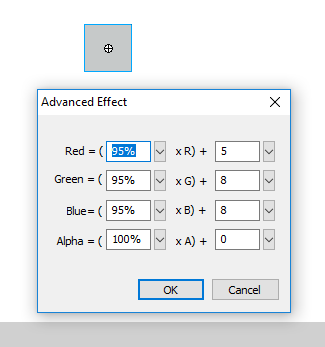
I need to extract a tint color and tint percent from given "advanced "color values. For example, a symbol instance has the following values in avdanced color mode:

colorRedPercent: 95, colorRedAmount: 5
colorGreenPercent: 95, colorGreenAmount: 8
colorBluePercent: 95, colorBlueAmount: 8
 

clipboard_image_0.png


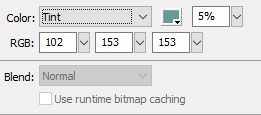
When I switch the instance color mode to "tint", the application shows me these values:
clipboard_image_1.png


red:102, green:153, blue:153
percent:5

Is it possible to calculate the tint and percent values?


- Vlad: UX and graphic design, Flash user since 1998
Member of Flanimate Power Tools team - extensions for character animation

777
Translate
Report
Community guidelines
Be kind and respectful, give credit to the original source of content, and search for duplicates before posting. Learn more
community guidelines

correct answers 1 Correct answer

LEGEND , Oct 12, 2019 Oct 12, 2019

Advanced values are not going to map directly to tint values. That's the entire point of Advanced mode. It lets you achieve color effects outside the gamut of the tint formula.

Translate
LEGEND ,
Oct 12, 2019 Oct 12, 2019

Advanced values are not going to map directly to tint values. That's the entire point of Advanced mode. It lets you achieve color effects outside the gamut of the tint formula.

Translate
Report
Community guidelines
Be kind and respectful, give credit to the original source of content, and search for duplicates before posting. Learn more
community guidelines
Engaged ,
Dec 01, 2019 Dec 01, 2019
LATEST

OK, I understood. Thanks!


- Vlad: UX and graphic design, Flash user since 1998
Member of Flanimate Power Tools team - extensions for character animation
Translate
Report
Community guidelines
Be kind and respectful, give credit to the original source of content, and search for duplicates before posting. Learn more
community guidelines
