Exit
  • Global community
    • Language:
      • Deutsch
      • English
      • Español
      • Français
      • Português
  • 日本語コミュニティ
  • 한국 커뮤니티
0

Missing tutorial assets

New Here ,
Apr 12, 2021 Apr 12, 2021

Hi all,


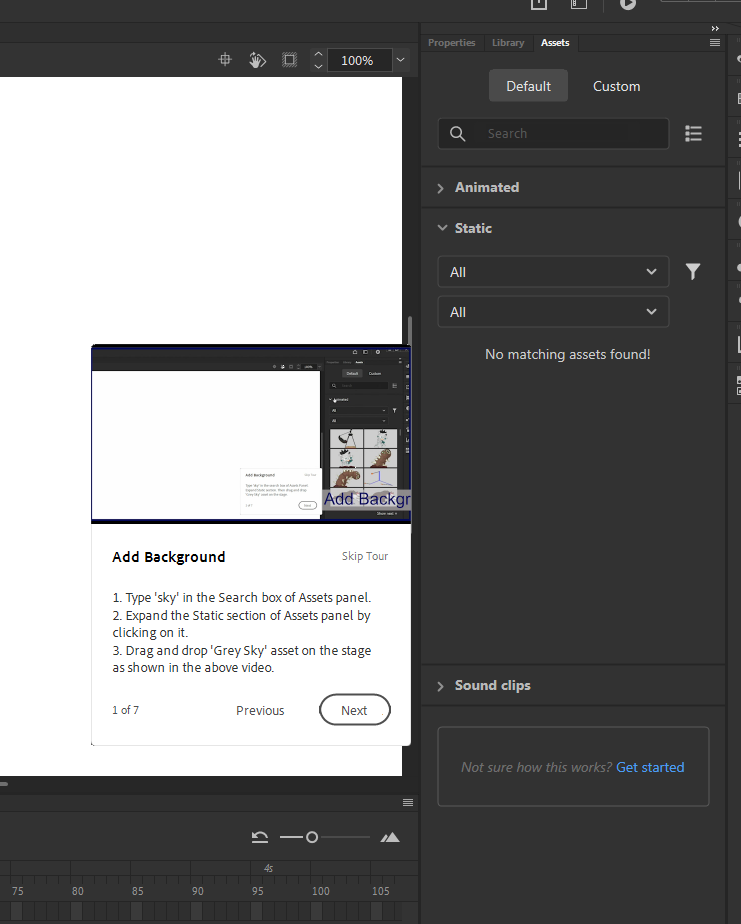
I'm sure I'm missing something very simple here but when I try and load in a new Animate tutorial from the dashboard (longtime Adobe user, first-time Animate!) I have no files coming up in assets in default or in custom. The cloud icon is greyed out at the bottom as well. 


This means I cannot actually get any of the assets to try and learn how to use the programme.


I've installed and reinstalled it to see if that was an issue but nothing helps.


Any ideas? I've attached a screenshot to highlight the area I mean.


TOPICS
How to , Product issue
3.4K
Translate
Report
Community guidelines
Be kind and respectful, give credit to the original source of content, and search for duplicates before posting. Learn more
community guidelines
Community Expert ,
Apr 13, 2021 Apr 13, 2021

what tutorial is that?


kglad_0-1618321765931.png


Translate
Report
Community guidelines
Be kind and respectful, give credit to the original source of content, and search for duplicates before posting. Learn more
community guidelines
New Here ,
Apr 13, 2021 Apr 13, 2021

Any of them. When I load up Animate I've tried a couple (pig run, farmer, icon) and none of them are showing the files in assets.

Translate
Report
Community guidelines
Be kind and respectful, give credit to the original source of content, and search for duplicates before posting. Learn more
community guidelines
Community Expert ,
Apr 13, 2021 Apr 13, 2021

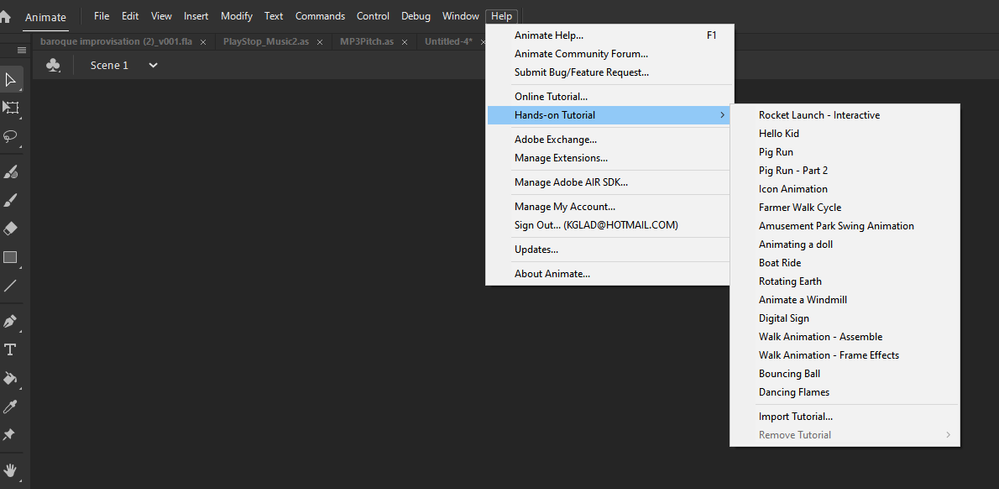
open animate>click help>hands-on tutorial>rocket launch - interactive.
 

kglad_0-1618324625605.png


what happens?

Translate
Report
Community guidelines
Be kind and respectful, give credit to the original source of content, and search for duplicates before posting. Learn more
community guidelines
New Here ,
Apr 13, 2021 Apr 13, 2021

So this one it loads up (as it did with the others) but where there is no interaction with the assets window there isn't an issue. When I tried the others it opens the file but when I go to drag something in from assets nothing is there.

Translate
Report
Community guidelines
Be kind and respectful, give credit to the original source of content, and search for duplicates before posting. Learn more
community guidelines
Community Expert ,
Apr 13, 2021 Apr 13, 2021

ok, so if you select the pig run hands-on tutorial, you are unable to drag the sky to the stage?


kglad_0-1618326131299.png


Translate
Report
Community guidelines
Be kind and respectful, give credit to the original source of content, and search for duplicates before posting. Learn more
community guidelines
New Here ,
Apr 13, 2021 Apr 13, 2021

That's correct. They don't even show up when I search for them. It's as if the files haven't installed but there was no option to do this on either install? 

Translate
Report
Community guidelines
Be kind and respectful, give credit to the original source of content, and search for duplicates before posting. Learn more
community guidelines
Community Expert ,
Apr 13, 2021 Apr 13, 2021

embed (per my first message) a screenshot of your static panel after searching for sky as shown in my previous screenshot

Translate
Report
Community guidelines
Be kind and respectful, give credit to the original source of content, and search for duplicates before posting. Learn more
community guidelines
New Here ,
Apr 13, 2021 Apr 13, 2021

Stuart5FB3_0-1618326843905.png


Translate
Report
Community guidelines
Be kind and respectful, give credit to the original source of content, and search for duplicates before posting. Learn more
community guidelines
Community Expert ,
Apr 13, 2021 Apr 13, 2021

i don't know why you're not downloading those assets, but your computer needs to be internet connected and you probably need to be signed into adobe.com.  if it is connected and you're signed in, you could try resetting your preferences and seeing if that makes a difference, https://helpx.adobe.com/animate/using/set-preferences.html


you can also use online tutorials which include downloadable files, View all Adobe Animate tutorials and Animate tutorials | Learn how to use Animate (adobe.com)

Translate
Report
Community guidelines
Be kind and respectful, give credit to the original source of content, and search for duplicates before posting. Learn more
community guidelines
New Here ,
Apr 13, 2021 Apr 13, 2021

I'm fully connected to the internet and signed in as well. I've checked preferences and reset them but no change and the sync settings are only valid on older versions it seems.

Translate
Report
Community guidelines
Be kind and respectful, give credit to the original source of content, and search for duplicates before posting. Learn more
community guidelines
Community Expert ,
Apr 13, 2021 Apr 13, 2021

i don't have anything synced via animate (it's not currently available) and the tutorial assets load for me.  i also see the cloud icon fade-out and unclickable.

Translate
Report
Community guidelines
Be kind and respectful, give credit to the original source of content, and search for duplicates before posting. Learn more
community guidelines
New Here ,
Jul 06, 2021 Jul 06, 2021

Hi, Stuart5FB3,


I was wondering if you ever figured this out? I'm having the same problem right now.


Translate
Report
Community guidelines
Be kind and respectful, give credit to the original source of content, and search for duplicates before posting. Learn more
community guidelines
New Here ,
Jul 06, 2021 Jul 06, 2021

Hi, really sorry but I didn't get any further with this. In the end I just used the machine that had installed the tutorials correctly (I was trying to setup my home machine to match my work one).


Sorry I couldn't be more help


Translate
Report
Community guidelines
Be kind and respectful, give credit to the original source of content, and search for duplicates before posting. Learn more
community guidelines
New Here ,
Sep 08, 2021 Sep 08, 2021

I just installed Animate and also having this issue.  Trying to go through the tutorial but no "Farmer" exists in the objects.

Translate
Report
Community guidelines
Be kind and respectful, give credit to the original source of content, and search for duplicates before posting. Learn more
community guidelines
Community Expert ,
Sep 08, 2021 Sep 08, 2021

While I can drag and drop the farmer character to the stage, there's an entire category missing. The tutorial says to go to Assets > Default > Animated > Rigs > Walk - but there's no "Rigs" section. Something is broken for sure.


Animator and content creator for Animate CC
Translate
Report
Community guidelines
Be kind and respectful, give credit to the original source of content, and search for duplicates before posting. Learn more
community guidelines
Community Expert ,
Sep 09, 2021 Sep 09, 2021

are you checking this dropdown


kglad_0-1631206707510.png


Translate
Report
Community guidelines
Be kind and respectful, give credit to the original source of content, and search for duplicates before posting. Learn more
community guidelines
New Here ,
Sep 09, 2021 Sep 09, 2021

I'm an idiot. I was looking in "Animated" objects, and the farmer isn't animated. I found him in the "Static" dropdown.  Thanks for the reply.

Translate
Report
Community guidelines
Be kind and respectful, give credit to the original source of content, and search for duplicates before posting. Learn more
community guidelines
Community Expert ,
Sep 09, 2021 Sep 09, 2021

you're welcome 

Translate
Report
Community guidelines
Be kind and respectful, give credit to the original source of content, and search for duplicates before posting. Learn more
community guidelines
New Here ,
Jan 21, 2023 Jan 21, 2023

i installed something in the custom tab but nothing pops up when I look there


Translate
Report
Community guidelines
Be kind and respectful, give credit to the original source of content, and search for duplicates before posting. Learn more
community guidelines
Community Expert ,
Jan 21, 2023 Jan 21, 2023
LATEST

use the online tutorials if you want to get started.

Translate
Report
Community guidelines
Be kind and respectful, give credit to the original source of content, and search for duplicates before posting. Learn more
community guidelines