


- Home
- Animate
- Discussions
- Re: problem about export window (edge animate 2018...
- Re: problem about export window (edge animate 2018...
problem about export window (edge animate 2018)

Copy link to clipboard
Copied
the export window is too large .I can't see the buttons at the bottom
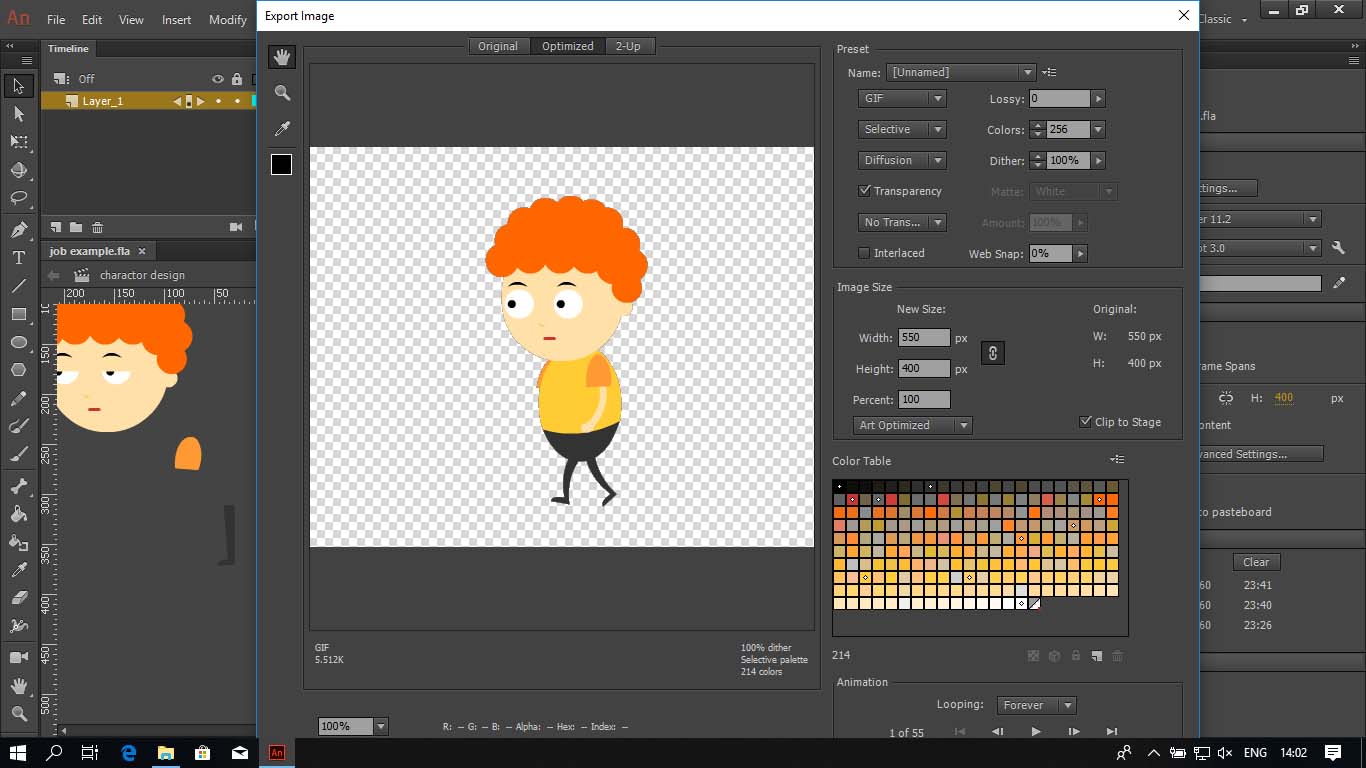
i've searching google and found thread https://forums.adobe.com/thread/2321103
i've try that answer by ClayUUID
but it's not work.
please help.


 4
Replies
4
4
Replies
4




Copy link to clipboard
Copied
You'll need to use a larger screen resolution on your device. Incidentally - this is Animate CC and NOT Edge Animate, so I am moving this to the correct forum.

Copy link to clipboard
Copied
JosephLabrecque wrote
Incidentally - this is Animate CC and NOT Edge Animate, so I am moving this to the correct forum.
*cough*
Copy link to clipboard
Copied
thank you for your answer.
my screen resolution is 1366 x 768 and this is maximum. I still can't see the buttons.
by the way I try this...
go to control panel > Appearance and Personalization > Taskbar and Navigation > Taskbar location on screen
I move taskbar to the right and now I can see some part of buttons and click it and job done! 

Copy link to clipboard
Copied
Hi there,
Please try the suggestion provided above by Joseph and let us know if that works out.
Thanks,
Ankush


Get ready! An upgraded Adobe Community experience is coming in January.
Learn more
 AdChoices