


Participating Frequently
February 25, 2020
Answered

Shifting fonts between Windows and Mac OS

  • February 25, 2020
  • 3 replies
  • 2192 views

I am having this compatibility issue in Animate between Windows and MacOS.
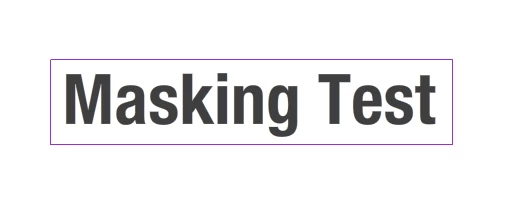
I create this text layer with the mask in Mac OS.
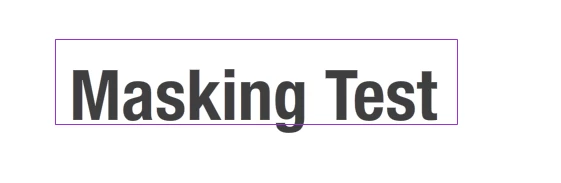
 

And then I open the same exact file in Windows. It has shifting position. 
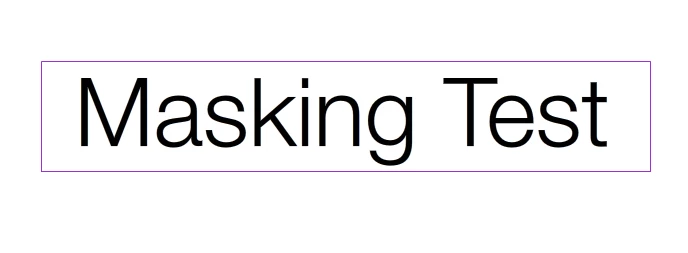
It is the same thing when I do the opposite. I create this text layer with the mask in Windows.
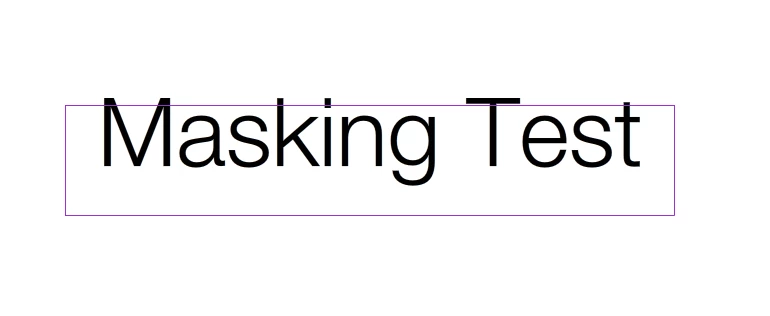
 

And then I open the same file in Mac OS. It is displaced.

I tried these two files in both AnimateCC 2019 and 2020.

This topic has been closed for replies.
Correct answer Nick Gioia

This is a tutorial on how to mask. https://youtu.be/8GHoAFeTYQc

Why are you going back and forth from Mac and windows? I did it with no issues. 

Are you using the latest OS for mac and windows? Remember Adobe animate 2020 is 64bit

3 replies

New Participant
November 3, 2022

This still seems to be a problem in the latest 2023 Animate release. I think I've identifed what is causing this issue when opening FLA files saved in the Windows version and then opened in the Mac OS version. Seems that any text that animates using the motion presets get shifted up when opened on a Mac. Text that is animated ising the classic tween does not get shifted at all. I bet I have at least a thousand instances within a hundred scenes where I'm using the motion presets and the text is shifting. Any ideas of how this can be easily fixed without having to convert all the presets to classic tweens? 

New Participant
January 11, 2023

Its's not only that. I use Animate in conjunction with greensock and dont use tools inside animtae to move objects. Still the texts are off between mac and pc systems. Some font rendering issue that is a major anoyance to me as I work on mac at office and pc at home.

kglad
Community Expert
January 11, 2023

@Silver278899141f5r 


the best you can do is to use identical embedded fonts. using identical fonts is more likely if you use a common font or search for fonts that render the same on mac and pc.

Nick GioiaCorrect answer
Community Expert
February 26, 2020

This is a tutorial on how to mask. https://youtu.be/8GHoAFeTYQc

Why are you going back and forth from Mac and windows? I did it with no issues. 

Are you using the latest OS for mac and windows? Remember Adobe animate 2020 is 64bit

Participating Frequently
February 26, 2020

I don't have detailed info about OS versions at the moment.

I was using two PC laptops. One was Windows 10 pro. Another one was Windows 10 home 10.0.17763 Build x64-based PC.

I think Mac OS version is pretty much recent. It hasnt been long since I updated it.

For AnimateCC, I used both versions of 2019 and 2020.

Does this make any difference in how the graphic looks from stage pannel though?

n. tilcheff
Brainiac
February 26, 2020

Animate is 64-bit and will not run on a 32-bit system.

Nick - Character Designer and Animator, Flash user since 1998 | Member of the Flanimate Power Tools team - extensions for character animation
n. tilcheff
Brainiac
February 26, 2020

Are you sure it's the mask that moves and not the font that renders differently?


Nick - Character Designer and Animator, Flash user since 1998 | Member of the Flanimate Power Tools team - extensions for character animation
Participating Frequently
February 26, 2020

Possibly! I will break the text layer and try again tomorrow. I dont have access to Mac OS right now.

Thank you.

n. tilcheff
Brainiac
February 26, 2020

Yeah, break the text apart to raw vector shapes or put some grid lines behind to try and identify what actually moves.


Nick - Character Designer and Animator, Flash user since 1998 | Member of the Flanimate Power Tools team - extensions for character animation