


Copy link to clipboard
Copied
I am trying to add a stop to a simple animation in Flash Professional CC. I created an action layer as the top layer. I put a keyframe on the last frame. I rightclicked and selected actions. I typed: stop(); in the action panel. However, the word "stop" is not blue, it shows as black and the animation does not stop when I test it in the browser. Any suggestions to help? I googled adding a stop and I can't see what I've done wrong.


 1 Correct answer

Sure, choose AS3 and you will be rid of the html beast. I don't know if you need to start a new file and select AS3 in the File -> New interface, but if so you should be able to copy and paste the timeline from the current one.

 8
Replies
8
8
Replies
8

Copy link to clipboard
Copied
The correct thing to type would be... stop();
Does it stop when you test in Flash?
Copy link to clipboard
Copied
Hi Ned, that code is what I used, but it doesn't seem to be being read. It isn't coloured blue when I type it in the actions panel, which I think is what actionscript should show as? The only option I have to test is the browser. Flash Professional is greyed out.
Copy link to clipboard
Copied
Are you publishing for HTML5?
Copy link to clipboard
Copied
I"m not sure what that means - pretty much a newbie with the program. I do get this error msg when I test for the browser:
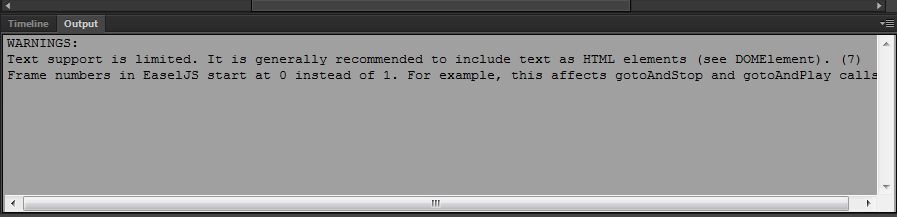
I imported my images, but also created text in flash, and I'm just using classic tweens to both the images and the text in and out.
Copy link to clipboard
Copied
From that message I am pretty sure this is something being published for HTML5 output - the EaseJS mention being the clue. In the main menu bar choose File -> Publish Settings. If the file format selected indicates Javascript/HTML then you are publishing for HTML5.
If this is the case I am at a loss to help as I have not used Flash CC for creating html content and I do not have any idea what works and what doesn't... I kinda wish they would split this aspect of Flash off into some other forum by itself because it is not Flash, it is html... it bugs me enough that they have abandoned Flash.
Copy link to clipboard
Copied
I checked and yes, the file format is Javascript/HTML. Is there another setting I can choose that will work with the Actionscript? This is just a simple animation with fading images and text. I assume Javascript/HTML is the default setting, as I didn't set it. Thanks so much for all this help!
Copy link to clipboard
Copied
Sure, choose AS3 and you will be rid of the html beast. I don't know if you need to start a new file and select AS3 in the File -> New interface, but if so you should be able to copy and paste the timeline from the current one.
Copy link to clipboard
Copied
Thank you! That worked perfectly. All the help is much appreciated. 


Get ready! An upgraded Adobe Community experience is coming in January.
Learn more
 AdChoices