



avid_body16B8
Legend
July 24, 2018
해결됨

Symbols in library disappeared but are still on the stage

  • July 24, 2018
  • 4 답변들
  • 1138 조회

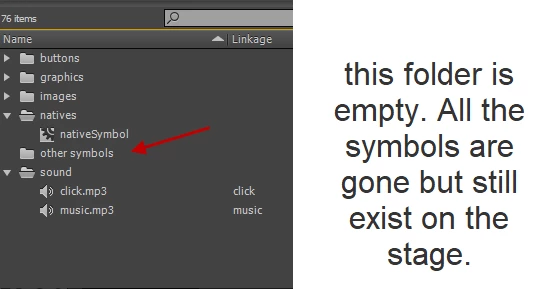
I created a symbol folder (other symbols) in the library and moved most of my symbols there. For some reason all the symbols are gone though they still exist on the stage. How can I get them back in the library?
    이 주제는 답변이 닫혔습니다.
    최고의 답변: avid_body16B8

    OK. Nevermind! I feel stupid. I actually decided to use graphics instead of symbols for some elements so of course they are not showing as symbols in the library.So, all my buttons and graphics are accounted for and so are the new symbols I created after.

    Sorry guys for the confusion!!!

    Thanks for your responses though.

    Sorry coming from Edge Animate, I am still dumb in many areas of ANCC.

    4 답변

    _keyframer
    Community Expert
    Community Expert
    July 24, 2018

    Glad you sorted it out. it's what this forum is for.

    Animator and content creator for Animate CC
    Legend
    July 24, 2018

    What happens when you right-click the symbols on the stage and select Show in Library?

    Inspiring
    July 24, 2018

    Someone else had similar (here) but it is not answered, though Preran was looking into it. Just thought I'd link it here to see if cross-referencing their experience might help narrow it down.

    _keyframer
    Community Expert
    Community Expert
    July 24, 2018

    What exactly is on the stage now? The only way this could happen is if the symbols on the stage were broken apart and then the library symbols were deleted. To get them back you could select each object on the stage and convert to a symbol again.

    Animator and content creator for Animate CC
    avid_body16B8
    avid_body16B8작성자
    Legend
    July 24, 2018

    No I did not brake anything appart. ALL MY SYMBOLS instances are on the stage intact as symbols but the corresponding symbols are not in the library