
Participating Frequently
May 6, 2020
Answered

[Adobe Audition CC 2020] Audio sounds weird after Export

  • May 6, 2020
  • 1 reply
  • 4393 views

Hey Guys,

im about to make some songs (I didnt made them xD) better quality in Adobe Auditon (some filter etc...).

To obtain the best possible quality, I want to export them as 24-bit PCM flac.

But everytime I export them, it sounds very weird. Inside Adobe Audition evreything sounds fine...

When I export as wav it also sounds good???

But I really would like to have the file as .flac.


Below two examples to show what I mean.


How it should sound (.wav mixdown; you may open it with VLC): https://drive.google.com/file/d/1ZJb6IztdZA7l-c532C7jzHhL-kzmimTj/view?usp=sharing


How it sounds (.flac mixdown): https://drive.google.com/file/d/1AVuvX4ooJRqRrl9X7_G0qjW7OnJvInp3/view?usp=sharing


Timothée
 

This topic has been closed for replies.
Correct answer SteveG_AudioMasters_

Turning what down? xD

Im very new to Audition...


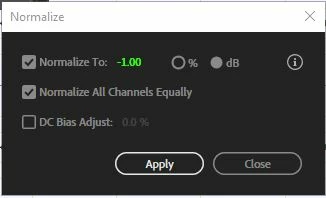
When you have finished 'improving' this, then export it as a 32-bit file and open it in Waveform view. Now go to Effects>Amplitude and Compression>Normalize. Set it like this, to -1dB and apply it:

This will stop all those red 'clip' lights appearing, and it's because it is doing this that it is distorted - you have tried to put signal above full scale, where there are no more digits available. When you've done this, save the file in whatever format you want, and it won't be distorted. Another problem that you really ought to do something about before you get that far though is the signal in the LS and RS channels - that really should be at a lower level (quieter) than the main channels (the first three).

1 reply

SteveG_AudioMasters_
Community Expert
Community Expert
May 6, 2020

If I open either of these files, I find a 6-channel recording with nothing on channel 4, and everything else is completely overloaded. This is inevitably going to distort - it doesn't have a choice about that!


You need to turn down the levels. And why this weird track formation? Is it supposed to be a surround mix?


DJ-TAuthor
Participating Frequently
May 6, 2020


Is it supposed to be a surround mix?


Yeah sort of xD

I just made a new multitrack session, added the song. copied it multiple times and everytime changed the directon where the music comes from (like on the picture).


Than I added it some bass and treble, and thats all.

In Multirack session settings, I choosed 5.1 (under master).


Thanks for your help 🙂 Im begining with Audition atm


Edit:


This is inevitably going to distort


But why isnt it destorted when I play the wav file?

DJ-TAuthor
Participating Frequently
May 6, 2020

I can't tell you the answer to that because here, it's equally distorted on both. Seriously. You have to turn this down! You gain absolutely nothing by banging the signal up against the end stop - just this horrible noise.


Turning what down? xD

Im very new to Audition...