
Known Participant
August 8, 2017
Answered

All Elements In Audition 3.0 Window

  • August 8, 2017
  • 1 reply
  • 1235 views

I've been using Audition 3.0 for several years. When I'd open it, it looked like this
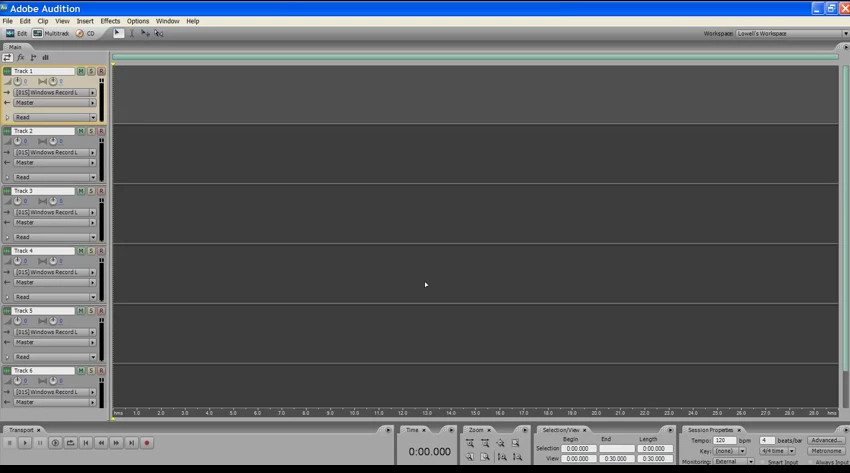
Today I clicked some wrong button somewhere and got a blank, empty window: Main, Transport, Time, Zoom, Selection/View, Sessions Properties are all missing.

How do I get them back? Is there some Default setting somewhere that sets up the window like above?

This topic has been closed for replies.
Correct answer ryclark

Try 'Reset Current Workspace' from bottom of the same Workspace menu. If that doesn't work you can always drag the panels back into there relevant positions by clicking on the name at the top of the panel and dragging it to where you want it. A blue potion frame will show up on the edge of the nearest where you want to replace the boxes.

1 reply

ryclark
Participating Frequently
August 9, 2017

Go to the Window menu, select Workspace and click on Multitrack View (Default).

Known Participant
August 9, 2017

Hi ryclark ~

Yes, but that still leaves me without the Main, Transport, Time, Zoom, Selection/View, and Sessions Properties tabs . . and when I choose Window > Transport, Zoom and Time they appear like this, which isn't what I want

What I want is to reset my untitled.ses so that it looks exactly like in my original image (original posting), which I assume (hope!) to be a default setup for a new .ses.

EDIT:

I've just discovered that Transport, Time, Zoom, and Selection/View are there in Edit view but not Multitrack view. How can I get them back in Multitrack view?

ryclark
ryclarkCorrect answer
Participating Frequently
August 10, 2017

Try 'Reset Current Workspace' from bottom of the same Workspace menu. If that doesn't work you can always drag the panels back into there relevant positions by clicking on the name at the top of the panel and dragging it to where you want it. A blue potion frame will show up on the edge of the nearest where you want to replace the boxes.