
Chhadd
Participant
November 13, 2018
Answered

Arm for record greyed out.

  • November 13, 2018
  • 1 reply
  • 6928 views

Hello,

Does anyone  know why the "arm for record" tab is greyed out? All the drivers are up-to-date, it is the latest version of audition and the same microphone works currently with voice-overs on premiere. I have been using audition for about 2 months to do podcasts and never had an issue but tonight this started happening.

I updated to the newest version of audition (12.0)and still nothing.

Please help!

    This topic has been closed for replies.
    Correct answer SteveG_AudioMasters_

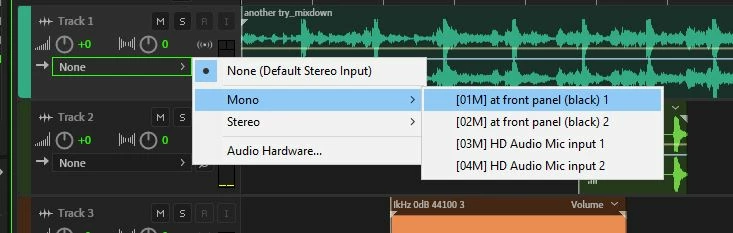
    Typically this happens when you haven't got a valid input selected for the track you want to record on:

    If it says 'none', then the record arm button is indeed greyed out...

    1 reply

    SteveG_AudioMasters_
    Community Expert
    SteveG_AudioMasters_Community ExpertCorrect answer
    Community Expert
    November 13, 2018

    Typically this happens when you haven't got a valid input selected for the track you want to record on:

    If it says 'none', then the record arm button is indeed greyed out...

    Chhadd
    ChhaddAuthor
    Participant
    November 13, 2018

    This is the reason. A very simple fix! Thanks for your help, it is greatly appreciated.