Participant
March 9, 2023
Question

Audio Gone

  • March 9, 2023
  • 2 replies
  • 384 views

Does anyone know how to fix this? Audition shut down and now it won't give me my audio back
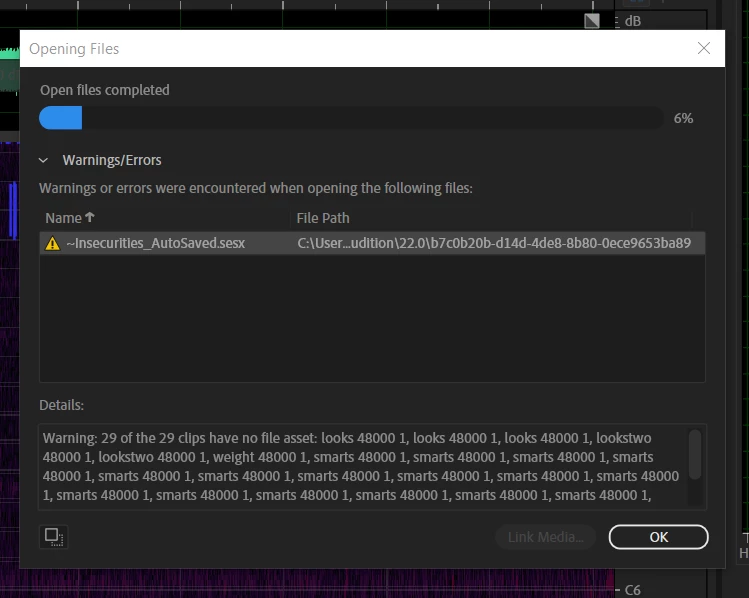
This topic has been closed for replies.

2 replies

SteveG_AudioMasters_
Community Expert
Community Expert
March 9, 2023

Where do you think the audio is stored?


In other words, if you go to the files location, do they appear to be there?

Participant
March 9, 2023

No, they do not

SteveG_AudioMasters_
Community Expert
Community Expert
March 9, 2023

Looking at the start of the files location, it would appear that they've been stored in what I'd describe as an inappropriate place - this looks like the start of either the program location, or the user preferences path. If this is the case, then it's possible that the files have been stored in a location that is by default hidden. Needless to say, you shouldn't be storing file here! You should store audio in locations that ideally can be directly accessed using Explorer, if it's Windows you are using. Usually what is safest is to start a new Audio folder on your C: drive, and put sub-folders in that for different projects. And also try to keep the audio and its session file in the same location if you can (although that doesn't always work easily with shared material).


So I'd say that the chances are that your files are there somewhere - but you might have to unhide the locations along that path to find them.

Participant
March 9, 2023

also nothing saved to adobe cloud
