
Participant
April 3, 2020
Answered

Audition 13 Doesn't Have The Voiceover A and B Compression Presets That Audition 3.0 Had

  • April 3, 2020
  • 1 reply
  • 835 views

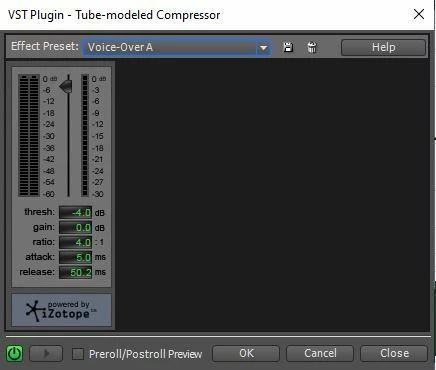
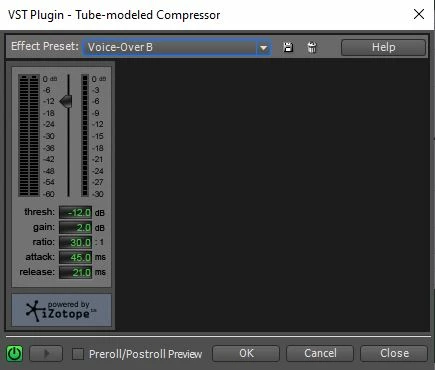
I'm a voiceover artist that used a stacked EFX rack in Adobe Audition 3.0. When I updated my system to Windows 10 and Audition (cloud) 13 version, I discovered when you now select the Effects tab -->Amplitude & Compression tab, then Tube-Modeled Compressor -->Voice Over that previously featured presets of Voiceover A and Voiceover B options were no longer included.  I used those settings a lot -- is there any way to get a plug-in for them ... or get the orginal settings data so I can create a preset effect to match them? Please advise. Thank you.
This topic has been closed for replies.
Correct answer SteveG_AudioMasters_

The one thing that I don't know is how faithfully these will transfer, because the engine behind the tube-modeled compressor was re-written after Audition 3.

1 reply

SteveG_AudioMasters_
Community Expert
SteveG_AudioMasters_Community ExpertCorrect answer
Community Expert
April 3, 2020

The one thing that I don't know is how faithfully these will transfer, because the engine behind the tube-modeled compressor was re-written after Audition 3.

iguanaBobAuthor
Participant
April 5, 2020

Hi SteveG...Thank you SO MUCH for taking the quality time to reply to me re: Audition 3.0 -->Audition 13 Voice-over Tube-modeled compression preset settings. Yes, I recall the image of the screen grab of the Voice-Over A tube-modeled compression option - and you nailed it. Now, since I'm stuck with Adobe Audition 13,  what can I do to replicate the previous 3.0 Voice-Over A preset? (Voice-Over B was a little TOO much even back when I had 3.0 version). Does Adobe Audition offer a "free" plug-in for subscribers, since they eliminated the Voice-Over A setting in the newer Audition 13? Is there a free "Izotope" setting (or something that Adobe Audiiton offers) that could be imported to Adobe Audition for use with Audition 13? I've got some tech skills - just enough to be dangerous (ha!ha!), and I don't even know how a plug-in works. All that said, Adobe Audition Team should offer a "work-a-round" of some sort to address this currently missing voice-over A option for Audition 13. Any comments/suggestions are welcome.

SteveG_AudioMasters_
Community Expert
Community Expert
April 5, 2020

All you have to do is put the numbers into the current Tube-modelled compressor and try them - they won't be that far different!