

Audition crash on startup
Hi all,
I can't seem to open Audition. It crashes in a few seconds after I try to start it.
I have not yet been able to open Audition at all since I installed Adobe.
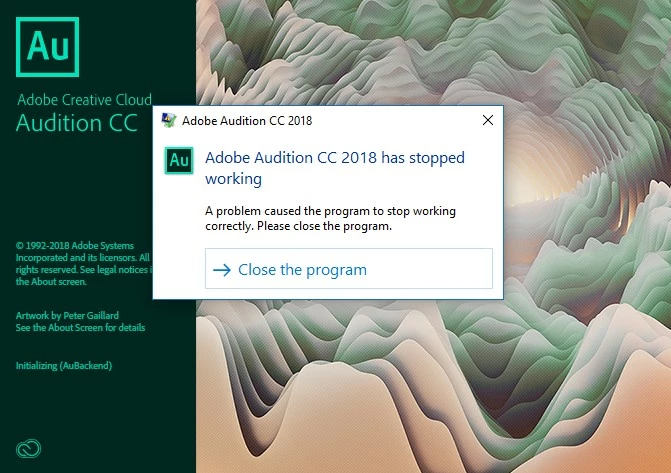
It always happens when it says 'Initializing (AuBackend)', but Googling it didn't make me any wiser.
What I tried to get past the crash
- Tried running the program with my soundcard turned on, off, enabled, disabled, disconnected, connected to different USB port. No difference whatsoever, the program always crashes.
- Holding down shift when starting the program. No result.
- Deleting the preference folder located in AppData\Roaming folder. No result.
- Creating a "Audition Log.txt" file. Audition doesn't write to it.
- Reinstall Audition. No result.
- Installing older version (Audition CC). Crashes on starting up as well. (on: "Initializing Required Application Components... (BE)")
Any help?
Thanks in advance!
Info on my pc:
OS Name Microsoft Windows 10 Home
Version 10.0.16299 Build 16299
Other OS Description Not Available
OS Manufacturer Microsoft Corporation
System Name JASPER-PC
System Manufacturer ASUS
System Model All Series
System Type x64-based PC
System SKU All
Processor Intel(R) Core(TM) i7-4790 CPU @ 3.60GHz, 3601 Mhz, 4 Core(s), 8 Logical Processor(s)
BIOS Version/Date American Megatrends Inc. 0326, 08/05/2014
SMBIOS Version 2.8
Embedded Controller Version 255.255
BIOS Mode Legacy
BaseBoard Manufacturer ASUSTeK COMPUTER INC.
BaseBoard Model Not Available
BaseBoard Name Base Board
Platform Role Desktop
Secure Boot State Unsupported
PCR7 Configuration Binding Not Possible
Windows Directory C:\WINDOWS
System Directory C:\WINDOWS\system32
Boot Device \Device\HarddiskVolume2
Locale Verenigd Koninkrijk
Hardware Abstraction Layer Version = "10.0.16299.248"
Username JASPER-PC\Jasper
Time Zone W. Europe Standard Time
Installed Physical Memory (RAM) 16.0 GB
Total Physical Memory 15.9 GB
Available Physical Memory 8.18 GB
Total Virtual Memory 24.9 GB
Available Virtual Memory 13.5 GB
Page File Space 9.00 GB
Page File C:\pagefile.sys
Device Encryption Support Reasons for failed automatic device encryption: TPM is not usable, PCR7 binding is not supported, Hardware Security Test Interface failed and the device is not InstantGo, Un-allowed DMA-capable bus/device(s) detected, Disabled by policy, TPM is not usable
Hyper-V - VM Monitor Mode Extensions Yes
Hyper-V - Second Level Address Translation Extensions Yes
Hyper-V - Virtualisation Enabled in Firmware No
Hyper-V - Data Execution Protection Yes
Info on sound device:
Name M-Audio Fast Track Pro
Manufacturer M-Audio
Status OK
PNP Device ID USB\VID_0763&PID_2012\5&DC4A972&0&9
Driver c:\windows\system32\drivers\maudiofasttrackpro.sys (5.10.0.5142, 180.23 KB (184,552 bytes), 10/06/2015 07:34)
Name Realtek High Definition Audio
Manufacturer Realtek
Status OK
PNP Device ID HDAUDIO\FUNC_01&VEN_10EC&DEV_0887&SUBSYS_10438616&REV_1003\4&24686CEE&0&0001
Driver c:\windows\system32\drivers\rtkvhd64.sys (6.0.1.7535, 4.30 MB (4,504,320 bytes), 29/07/2015 20:10)
Name NVIDIA High Definition Audio
Manufacturer NVIDIA
Status OK
PNP Device ID HDAUDIO\FUNC_01&VEN_10DE&DEV_0084&SUBSYS_1458371A&REV_1001\5&145129F3&0&0001
Driver c:\windows\system32\drivers\nvhda64v.sys (1.3.36.6, 221.45 KB (226,760 bytes), 09/10/2017 12:14)
Name Steam Streaming Microphone
Manufacturer Valve Corporation Audio DDK
Status OK
PNP Device ID ROOT\STEAMSTREAMINGMICROPHONE\0000
Driver c:\windows\system32\drivers\steamstreamingmicrophone.sys (, 39.78 KB (40,736 bytes), 17/09/2017 23:26)
Name Steam Streaming Speakers
Manufacturer Valve Corporation Audio DDK
Status OK
PNP Device ID ROOT\STEAMSTREAMINGSPEAKERS\0000
Driver c:\windows\system32\drivers\steamstreamingspeakers.sys (, 39.78 KB (40,736 bytes), 17/09/2017 23:26)
Name NVIDIA Virtual Audio Device (Wave Extensible) (WDM)
Manufacturer NVIDIA
Status OK
PNP Device ID ROOT\UNNAMED_DEVICE\0000
Driver c:\windows\system32\drivers\nvvad64v.sys (4.4.0.0, 57.85 KB (59,240 bytes), 27/09/2017 19:53)


 AdChoices