
Crussi
Known Participant
February 10, 2023
Question

Audition dark mode has the menu bar plain white

  • February 10, 2023
  • 1 reply
  • 1038 views

Hi, why is the menu bar of Audition white instead of dark ?
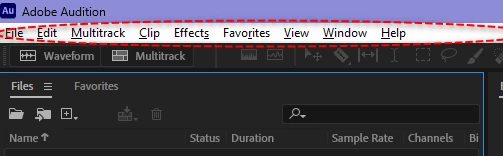
How can I make in black ? or at least hide it ?

It is disturbing to have a bright light on a full dark screen. In fact it completely disables the advantage of dark mode. Regards

1 reply

SteveG_AudioMasters_
Community Expert
Community Expert
February 10, 2023

If you go into Windows Settings, and choose to run in High Contrast mode, you can have the menu bar looking like this:

As far as I'm aware, that's the only way you can do this. The fact that you can alter this from outside the Audition environment rather indicates that it's under OS control rather than Audition's.


Also, you might prefer the desktop view in general if you go to Settings (right-click on the desktop and select Personalize) and change the Background settings to Dark.

Crussi
CrussiAuthor
Known Participant
February 12, 2023

If you go into Windows Settings, and choose to run in High Contrast mode,

This is changing the style of ALL windows appliication just for ONE SINGLE application not properly programmed: Audition. That's not an acceptable solution, even as a work around.


I wonder how such a large scale company can make such badly coded application.

Honestly there are hundred of application with the menu dark in black in dark mode. Just to name a few: Notepad++, Windows Notepad, Photoshop, Illustrator, Windows File Explorer, Total Commander. Why is Audition so not behaving like any others in dark mode ?

Participant
October 24, 2023

They just never updated the application type to handle it, which it desperately needs. It's starting to look like a Windows 98 program...