Inspiring
February 14, 2023
Answered

Audition Hz not above 10k?

  • February 14, 2023
  • 4 replies
  • 3143 views

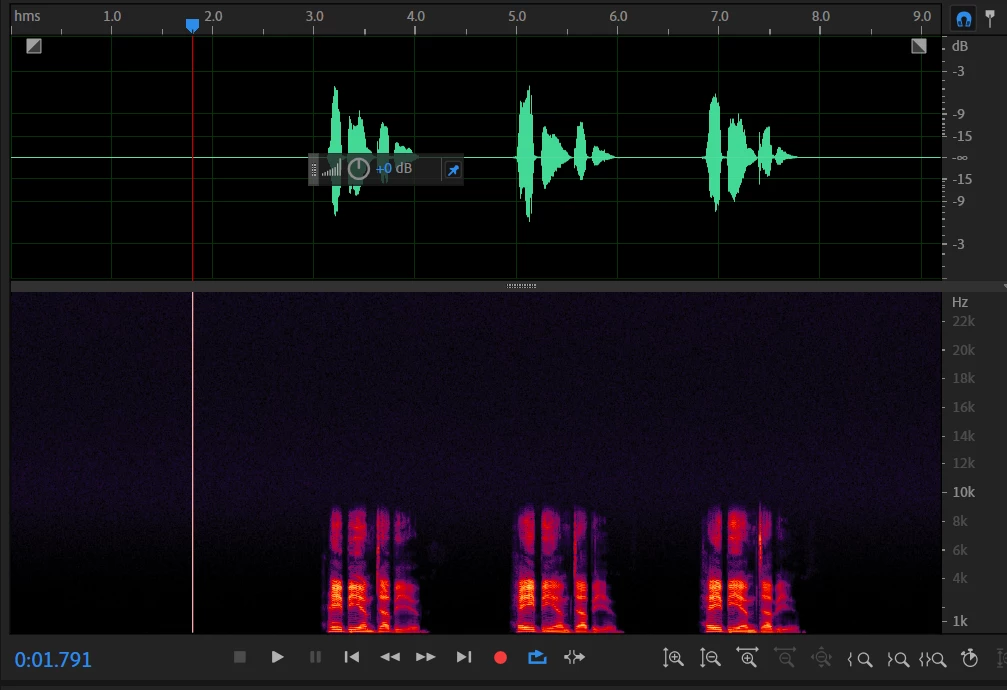
Hello, I'm pretty new to Audition so hoping this is an easy fix. My spectral frequency peaks are "cut off" at about 10k Hz. How do I adjust my settings so that this doesn't happen? I'm recording in 48000Hz, mono, 16 bit depth, and saving as .wav.
This topic has been closed for replies.
Correct answer Thanksgiving2023

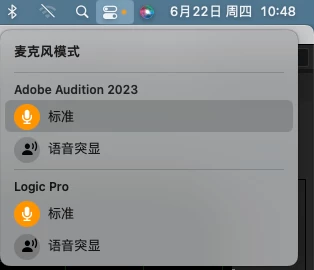
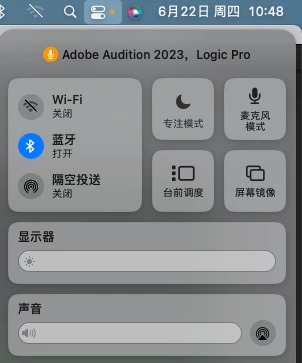
After my efforts, I finally found the solution to this problem. The issue was with the microphone mode in Mac OS. When the microphone mode is enabled, you need to choose between the Standard mode or Voice Enhancer mode. By simply accessing this option and selecting the Standard mode or turning off the microphone mode, the problem of frequencies above 10kHz being muted can be resolved. 


4 replies

Participant
May 7, 2024

I am having the same issue on my PC.  Where do I find the microphone mode?


SteveG_AudioMasters_
Community Expert
Community Expert
May 7, 2024

I think that 'microphone mode' is Mac-specific...

Thanksgiving2023Correct answer
Participating Frequently
June 22, 2023

After my efforts, I finally found the solution to this problem. The issue was with the microphone mode in Mac OS. When the microphone mode is enabled, you need to choose between the Standard mode or Voice Enhancer mode. By simply accessing this option and selecting the Standard mode or turning off the microphone mode, the problem of frequencies above 10kHz being muted can be resolved. 


SteveG_AudioMasters_
Community Expert
Community Expert
June 22, 2023

I might have guessed that it would be a Mac issue... 😉

Thanks for reporting back though!

Participant
April 10, 2023

I have the same issue, and interestingly enough I am using a Rode XLR through a Behringer. While those frequencies might fade due to voice variations it should not be blank like our problem is. The problem is missing information in those frequencies, not a lack of information to record. If you ever figure it out I would love to know the solution! 

Participant
April 10, 2023

I may have happened on to the solution for mine. I had to go into my computer's default recording settings and switched it from 48k mono to 48k stereo and now I have those missing frequencies. I am not saying that it makes sense... but that it worked for me, good luck!! 

Participating Frequently
June 20, 2023

I have the same problem with my audition, and it wasn't resolved even after changing to stereo settings.

Legend
February 14, 2023

Inevitable questions: what are you recording?  Is there actually any frequency above about 10kHz in your source audio?  How are you recording these sounds, mic plugged into your computer, or via an audio interface?  What mic are you using?  


Your record settings which you list are fundamentally fine so, since Audition faithfully records exactly what it is given any problem must be occuring in the signal chain before the audio reaches Audition.

Inspiring
February 14, 2023

Thanks for your response. I'm recording vocals via a RODE XLR mic with an Behringer audio interface. I have not tested any microphones, although I am going to try now with my other USB microphone.

SteveG_AudioMasters_
Community Expert
Community Expert
February 14, 2023

Yes, that is what I mean, thank you!


Without wishing to introduce gender issues, can you say whether you are male or female?  And in what environment are you recording?  If you are "male" and in a reasonably "controlled" recording space I think it is quite possible that you will not actually be creating any frequencies substantially above your 10kHz ceiling.


Just as a rather poor method of checking this I've opened a recording of a male voice made in a non-controlled environment (actually quite a large church) and although there is spectral frequency evidence of signal above 10kHz, isolating those frequencies shows almost no actual verbal content.  IOW, that content is simply "ambience".


However, your comment that A client asked that my voice over peaks above 16kHz to me, at least, makes no sense at all as it stands!  Unless your recording environment is too controlled and frequencies above about 9kHz are actually being, in effect , removed by your romm treatment.


Edited: to add, the new screenshot posted definitley shows there is signal in the range above 10kHz.  So where did your first screenshot come from?


Well there you go - two  people have told you pretty much the same thing! I think you might need a little chat with your client...