
WorkingDesignStudio
Participant
July 19, 2018
Question

Audition Replaced All My Audio with a Two-Second Loop

  • July 19, 2018
  • 2 replies
  • 1137 views

Hi,

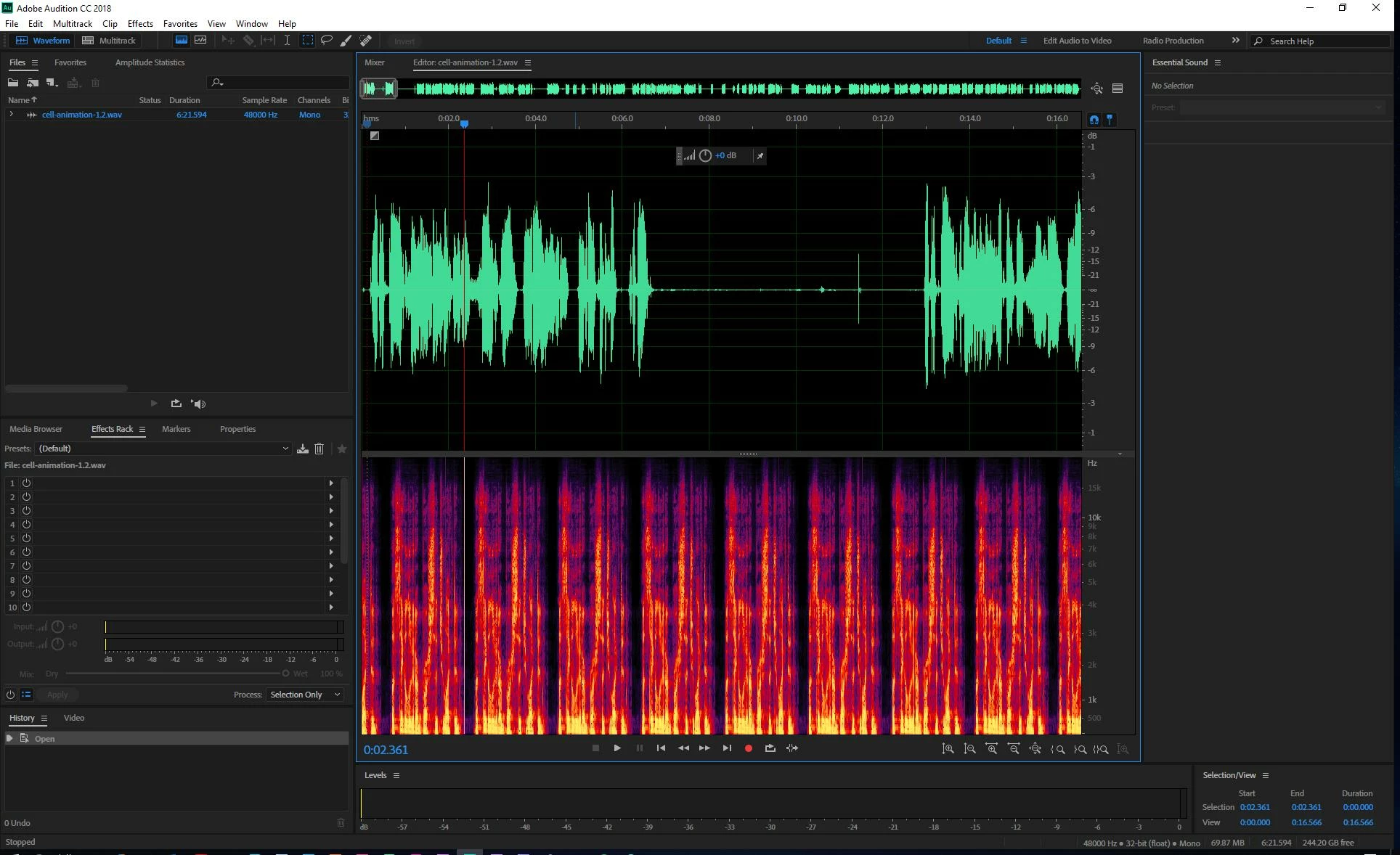
I've spent about two hours recording into Audion in this one file. I've trimmed the audio down to about 7 minutes and edited it.

Suddenly, all my work has been replaced with a two-second loop of audio from somewhere within the last 10 seconds of audio. It's weird because the waveform shows my original audio, but the spectral frequency display shows what's actually being played. If I drop the .wav in Premiere, it only plays the loop. The same thing happens if I play .wav in a media player.

I tried restarting all my Adobe programs, and my computer, but nothing has worked so far. Does anyone know what caused this? Is there any way to fix it? It would suck to lose all that work. Please help. Thanks!
This topic has been closed for replies.

2 replies

Participant
January 9, 2020

Hi folks,


I'm new to using Adobe and so far it's been a disaster for me! I'm a Journalism student and was putting together a 15 minute Radio documentary which consisted of several interviews, sound effects and music. I had finished all my edits, put everything together in the right sequence in the Multitrack and was about to hit 'Play' to play it back from the beginning when I got an error message telling me there was a problem with some files and that I shoud save the files immediately. As soon as I hit 'save' the files appeared to save but when I went to play them back, the content was totally corrupted and similar to the user above, was on some sort of weird feedback loop! Does anyone know if this happens often with Adobe and if there is any way of recovering the original data and edits? I have literally shed  tears over this as I had spent weeks on this project and was unable to submit the assignment.


Frustrating to say the least!


I'd appreciate any help at all. Thanks a lot!


Sorcha

Participant
April 1, 2020

I am having the same issue, but with the latest software. Adobe, is there a fix?

SteveG_AudioMasters_
Community Expert
Community Expert
April 1, 2020

This is a very old thread - several versions old now. If you have a current problem, please start a new thread with some pertinent details in - for a start, whether this is on a Mac or a PC, and as much detail as possible about what is happening.

ryclark
Participating Frequently
July 19, 2018

Which version of Audition and on which computer platform and OS?  Were you recording and editing in the Waveform or Multitrack view and where was the audio saved to? You do still have the original two hour recorded audio file don't you to go back to?

WorkingDesignStudio
Participant
July 20, 2018

Thanks for the reply.

  • I'm running Windows 10 Pro 64 bit (latest update as of 7/19/18) and Adobe Audition CC 2018 (latest update as of 7/19/18).
  • I was recording and editing in Waveform view and saving to my local D Drive which is backed up to Onedrive.
  • I don't have the 2-hours of audio— I've been editing and trimming it as I go. The entire file is about 7 minutes long.