
New Participant
January 15, 2018
Question

Audition won't recogize a wav file recorded on a different computer

  • January 15, 2018
  • 2 replies
  • 821 views

I am currently working on starting a podcast with a friend who lives in a different state. We were practicing talking via Skype while simultaneously recording on our respective computers. My plan was to take my friend's audio file and synch it with mine to be sure it sounds right. However, Audition always gives me the same error message no matter what I've tried doing:
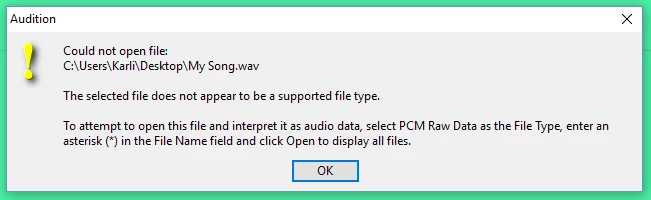
I record on an Asus using Audition. He records on a Mac using GarageBand. I figured having him send me a wav file would work just fine since it's a universally recognized file type, but I can't get this to work. I probably have a beginner understanding of all this, so any help is appreciated. Please feel free to ask for additional information.

Thanks you.

This topic has been closed for replies.

2 replies

Charles VW
Inspiring
January 17, 2018

This looks like an old version of Audition. Which version is this?

New Participant
January 17, 2018

Ah yea it is. It's version 3.0.1.

SteveG_AudioMasters_
Community Expert
January 15, 2018

Try getting him to send it as an .aiff and see if it works then... Audition shouldn't have any difficulty with these. If you still can't open it, he's probably doing something wrong when converting it.

New Participant
January 17, 2018

Audition doesn't seem to be recognizing that file type. Possibly on account to it being an older version.

SteveG_AudioMasters_
Community Expert
January 17, 2018

karliwalker  wrote

Audition doesn't seem to be recognizing that file type. Possibly on account to it being an older version.

That's not the reason; Audition 3 recognises .aif files. So if it's been sent as an .aiff try knocking off one of the 'f's, or alternatively, try what it says in the error message. For this to work, you'll need to know what the bit depth and sample rates are.