
Participating Frequently
February 16, 2022
Question

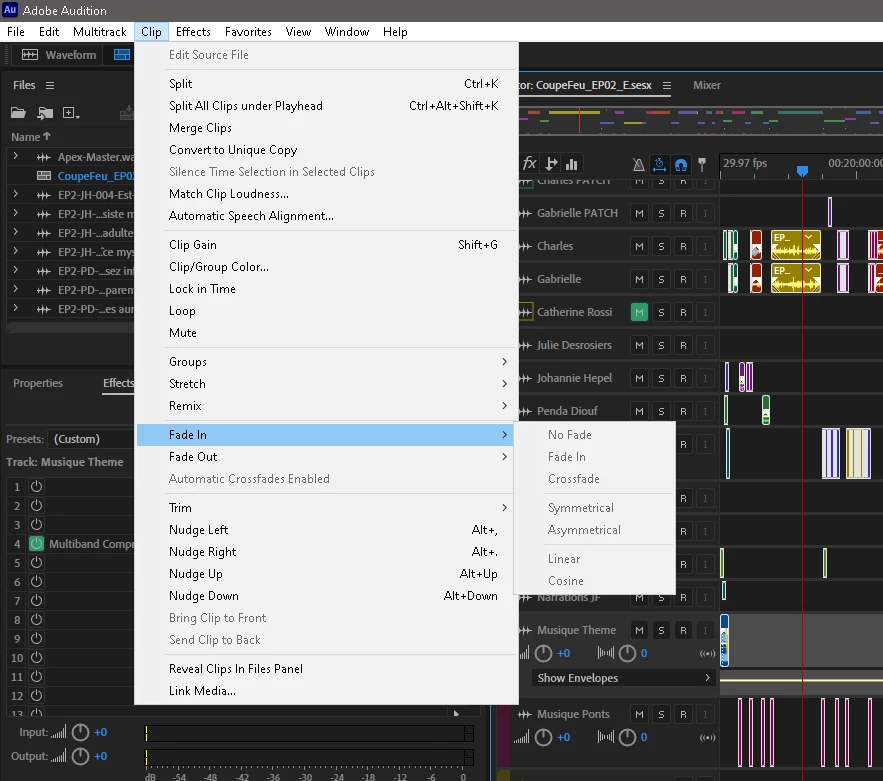
Automatic crossfade greyed only for one project?

  • February 16, 2022
  • 4 replies
  • 847 views

Hello forum!.


Looks like auto crossfade is grayed-out only for ONE project here... Cannot find how to re-activate it and I'm quite in an editing hurry for that project today, so asking for help...


Auto-Crossfade is checked in Audition's preferences... No keyboard is assigned to toggle aut-crossfade ON or OFF

I am also noticing that the "front" / "Back" state of overlapping clips is not reacting properly anymore... I mean when I click on a clip that is mostly "behind" another one, Audition does not bring it "front" anymore...


When opening another project, everything works as expected... troubles seems to be hapening in ONE project so far.


To complete my editing tasks today, this behavior is a real nightmare...


what am I overlooking? I'm stuck.


All of my apps and Windows are up-to-date.


Thanks!


This topic has been closed for replies.

4 replies

Participating Frequently
February 17, 2022

... and now, opening the problematic SESX file ... BOOM... all good.


So, final report: was able to reproduce a bug but somehow it sorted itself out!


I'll have a beer... 


Participating Frequently
February 17, 2022

OK! I think I have identify at least some kind of a cause. Was able to reproduce...


In my project session, I have a music BUS on wich I have TWO dynamics plugins connected via TWO dedicated side-chain channels.

My bus NARRATIONS feeds the side-chain going to the first plugin on my music bus

My other bus INTERVIEWS feeds the second dynamics plugin on, again, the music bus.


I am working on different episodes of the same session. So I have savec my FX RACKS presets for all my chanels and bus and I am reloading my effect racks presets as my mix evolves for all of my 5 episodes.


the AUTOCROSSFADE bug I am signaling here appears the minute I re-load my EFFECT RACK preset of my MUSIC bus (that's the bus with the 2 dynamics processing that are side-chained). I started noticing this when I understood that I had to reconnect my side-chain channels after re-loading my rack preset.


Thought it would be of interest to write this here.


Regards

Participating Frequently
February 17, 2022

Hello guys!


Thank you for all your replies. I did double check the "bring clip to front" option in PREFS meanwhile, and re-activated it. Bringing clip to front now works as expected.

I also opened the SESX file in VSCODE before you suggested it (and felt real smart, as I am not a developer... lol), and did a word search for "AutoCrossfade". Had several hits (409 in fact), and all of them were "true"... for the 40-50 hits i DID check at least...


I also did these searches:

clipAutoCrossfade="false"

AutoCrossfade="false"


No hits... Damn Microsoft! (LOL... just kidding...)


So... still stumped, and I guess i'll just feel the editing pain to finish this project.


Thank you,  @emmrecs , @SuiteSpot , @SteveG_AudioMasters_ I guess i'll just give up and get on with the job!


Legend
February 16, 2022

Possibly a corrupted .sesx file?


I have never personally experienced one but I know other users who have posted here have suffered with this problem.  If @SuiteSpot sees this thread he may offer to have a look at your .sesx session file.

SteveG_AudioMasters_
Community Expert
Community Expert
February 16, 2022

I looked at the options in a session file, and on the face of it, I can't find any that will grey out 'Automatic Crossfades Enabled'... but the OP also says that clip layering isn't working correctly as well, so it would be quite useful to see what's set in Edit>Preferences>Multitrack Clips at this point.


However you look at it, it is a bit of a mystery at present. I like the session file idea though, because the OP says that it's only happening on one session.