
Can I Change Zoom/Mouse Scroll Hotkey Combinations in Audition?
Hello!
I'm using Audition on a Windows laptop, and I've run into kind of a sticky situation I haven't been able to find an immediate answer to online that also aligns with my lack of Admin privileges to easily download and install new apps (I'm using a work computer with Admin restrictions).
Here's what's up: On Windows 10, my Zoom In/Out is tied to the Alt key (Vertical/Amplitude zoom in the Multitrack Editor, Horizontal/Time in the wave form editor).
I'll often zoom in and out (or enlarge/decrease wave form size) while editing, but whenever I press the Alt key, it accesses the Menu at the top of the screen, so when I press spacebar again to stop playback, the result is the Menu being selected, rather than stopping playback. (see below link to the below screen recording I put on YouTube)
I do the zooming by pressing Alt and scrolling my mouse wheel. I hence thought an easy solution would be changing the Zoom's hotkey from Alt to something else, e.g. Shift; however, I don't think you can tie the scroll wheel to new hotkey combinations.
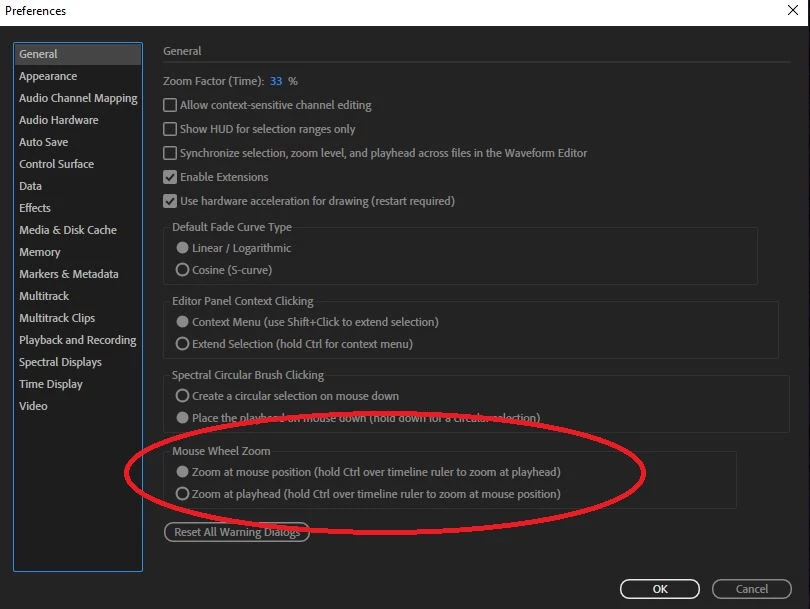
Likewise, the only functionality I could find in Audition related to the scroll wheel is tied exclusively to the Control key in the General Preferences).
I'm aware that with a little work, this Alt menu function CAN be disabled/toggled, but because this is a work computer, I can't (a.) get into the necessary menus/apps to make this change or (b.) download and install an app such as AutoHotkey because of my lack of Admin privileges.
So, my question is,
In Audition, can you change what keys are tied to your mouse's scroll wheel behavior and set up a new zoom hotkey that doesn't use the Alt key?
Thanks so much, any help/guidance would be so appreciated!
Tony
 AdChoices