m_bryant
Participant
April 8, 2018
Question

Crossfades not working correctly

  • April 8, 2018
  • 2 replies
  • 1518 views

For the past few days, crossfades in audition haven't been working correctly. Instead of a smooth transition between two clips, I get a volume boost in the middle of the crossfade.

To demonstrate the issue, I've inserted a clip into a new multitrack session, added a split in the middle, and overlapped the two clips, as shown below.
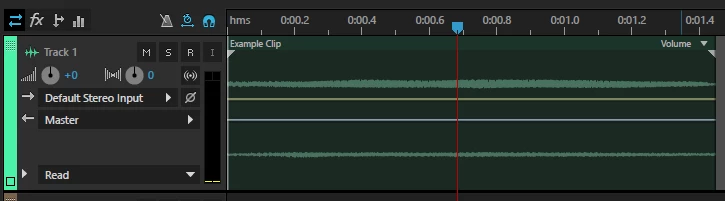
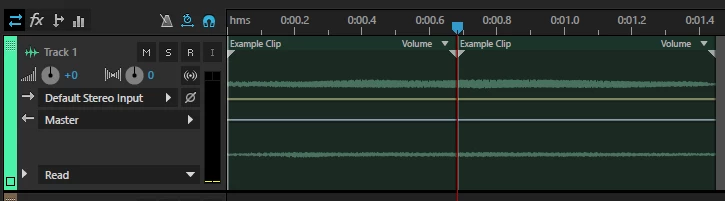
This is a clip crossfading into an identical clip, so in theory, when it's mixed down it should be identical to the original clip. However, when you compare the original with the mixdown, you can see a volume bump where the crossfade is

Original:
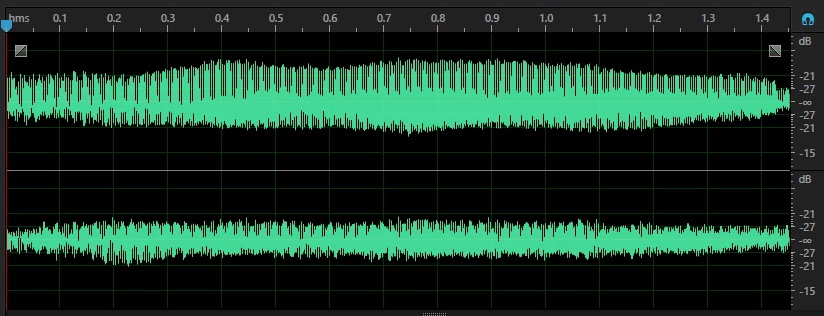
Mixdown:
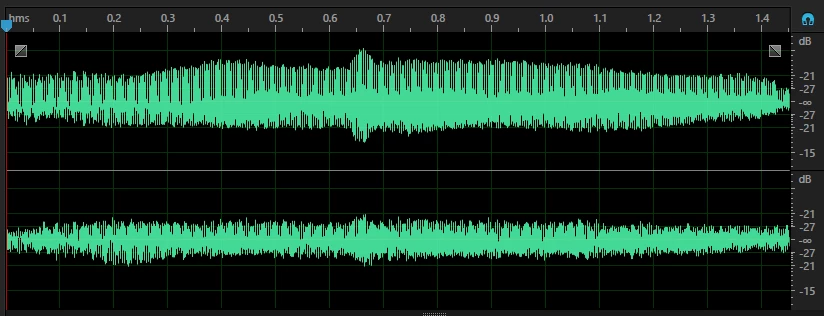
Any idea what would be causing this, and how to fix it?

    This topic has been closed for replies.

    2 replies

    m_bryant
    m_bryantAuthor
    Participant
    April 8, 2018

    Yes, they've always worked previously. I can't think of anything that has changed between then and now (although I assume something must have).

    ryclark
    Participating Frequently
    April 8, 2018

    You will always tend to get a bit of a lift in level if you are crossfading absolutely sample identical audio unless you are very careful with the crossfade curves. Normally a crossfade is expected to be used with audio clips that aren't actually identical so the addition of the two won't give a boost in level. You can change the type of crossfade curve from the Clip menu Fade In and Fade Out selections.

    m_bryant
    m_bryantAuthor
    Participant
    April 9, 2018

    Like I said, this is happening with all crossfades, not just identical clips. Using identical clips was just to illustrate the problem. The exact same thing happens with every single automatic crossfade. This has never happened before in the years I've been using Audition. The normal behaviour for automatic crossfades is to automatically create a crossfade curve that keeps a constant volume (assume the two clips are of roughly the same volume of course).

    Here's the same thing happening with a crossfade between two separate clips of generated white noise:

    No matter what clips I use, there is consistantly a rise of about 2 to 3 dB in the centre of the crossfade. The only way I've found to get a crossfade with a consistant volume is to manually set the crossfade to symmetrical and set the fade in/out value to 0... i.e. a straight-line crossfade:

    Under normal circumstances, a straight-line cross-fade should actually result in a slight dip in volume, so clearly something is going wrong.

    ryclark
    Participating Frequently
    April 8, 2018

    Have you had your crossfades working OK previously as you seem to imply by saying 'for the past few days'? Did something change between the times when crossfades worked OK and now that they don't?