

RMV1414
Inspiring
March 24, 2020
Question

Editor Controls - What Does The Sound Waive Icon Do?

  • March 24, 2020
  • 1 reply
  • 367 views

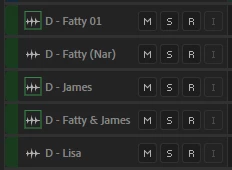
In the Editor Window of Audition, to the left of the Track Name, there is an Icon (a wave for audio files, film reel for the video file).  I am able to select the icon in mulitple tracks and it places a box around each  icon.  What does this do?
 

This topic has been closed for replies.

1 reply

SteveG_AudioMasters_
Community Expert
Community Expert
March 24, 2020

It's a toggle - it expands and contracts the track window. In your screengrab, they are all shrunk, but by clicking on them, they should expand the track out to its default size. If this doesn't happen, the only thing I can think of to try is turning the video hardware acceleration setting to its other option (if it's on, turn it off and if it's off, turn it on):

RMV1414
RMV1414Author
Inspiring
April 1, 2020

Thank you.  That explains it.