

mandicreally
Inspiring
December 11, 2017
Answered

Effect Rack Presets - Suddenly Empty

  • December 11, 2017
  • 2 replies
  • 5183 views

So I've encountered a new and weird situation. While editing a video I was throwing the audio over the Audition and editing it.  Went fine for a few hours.  Suddenly the Effect Rack in Audition is acting up.

I have a Preset I use for certain audio clips that I put together.  It only has Equalizer presets in it, but its tuned how I like it to save me a lot of time.  I load it, apply, then do whatever else I need to do.  Well all of a sudden when I load my Preset, the steps are blank.  See the attached photo for reference.  If I close Audition and reopen it between every file it works fine.  However If I load a second file into an already open audition, bam, the effect preset is blank.
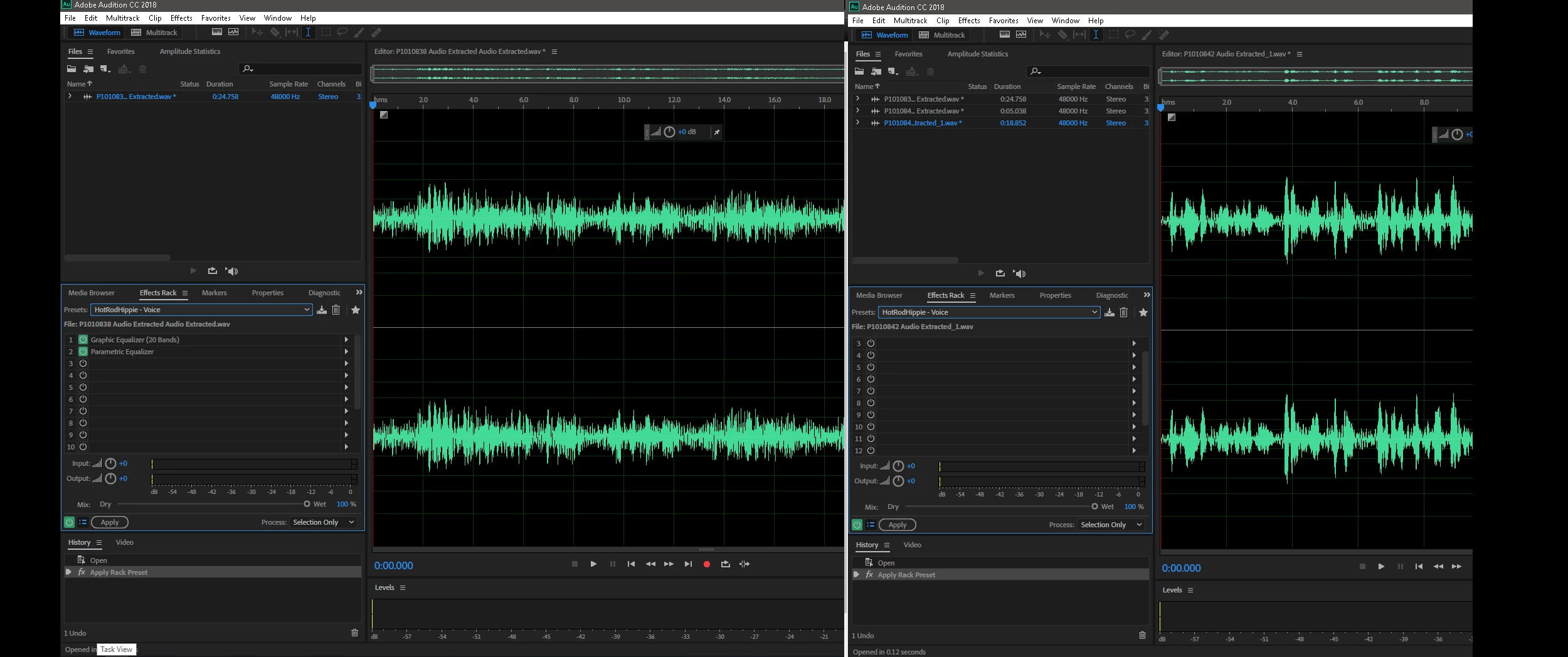
Now I realize I've found a way to address it, but I shouldn't have to close and reopen audition every single time I use it.  And when I'm editing 20-30 audio files from a video, that is almost as tedious as manually applying the effects in the preset. (ok not quite)

Has anyone encountered this issue before?  it isn't just this one preset either.  I loaded up a few other ones and they too were suddenly blank.

This topic has been closed for replies.
Correct answer SteveG_AudioMasters_

Well, this is happening with the current release, and there are a number of display-related issues with it. They are acknowledged, and hopefully a patch will be along soon. Meanwhile, if it's causing a serious productivity issue, it's possible using the CC app to revert to the previous version until it's fixed.

2 replies

mandicreally
Inspiring
July 21, 2018

Over 7 months later and this is still a massive issue.  In fact is worse now.  Now between EVERY audio file I have to close Adobe Audition and restart it or else the Effects Rack presets I made just clear out.  Sometimes I fail to notice and wonder why the equalizing on my audio files sounds off.  "Oh right Audition screwed up AGAIN."

Seriously frustrating that a known bug just seems to go ignored for more than half a year.

ryclark
Participating Frequently
July 21, 2018

Which actual version of Audition are you running? You should be on CC 2018 v. 11.1.1.3 by now which is several versions on from what was available at the end of 2017 with lots of bug fixes.

unauthorizedrob
Inspiring
August 26, 2018

Except, according to CC I am up to date, and running 11.1.0.184 -- is that older than the 11.1.1.3?  

SteveG_AudioMasters_
Community Expert
SteveG_AudioMasters_Community ExpertCorrect answer
Community Expert
December 11, 2017

Well, this is happening with the current release, and there are a number of display-related issues with it. They are acknowledged, and hopefully a patch will be along soon. Meanwhile, if it's causing a serious productivity issue, it's possible using the CC app to revert to the previous version until it's fixed.