Participant
November 2, 2022
Question

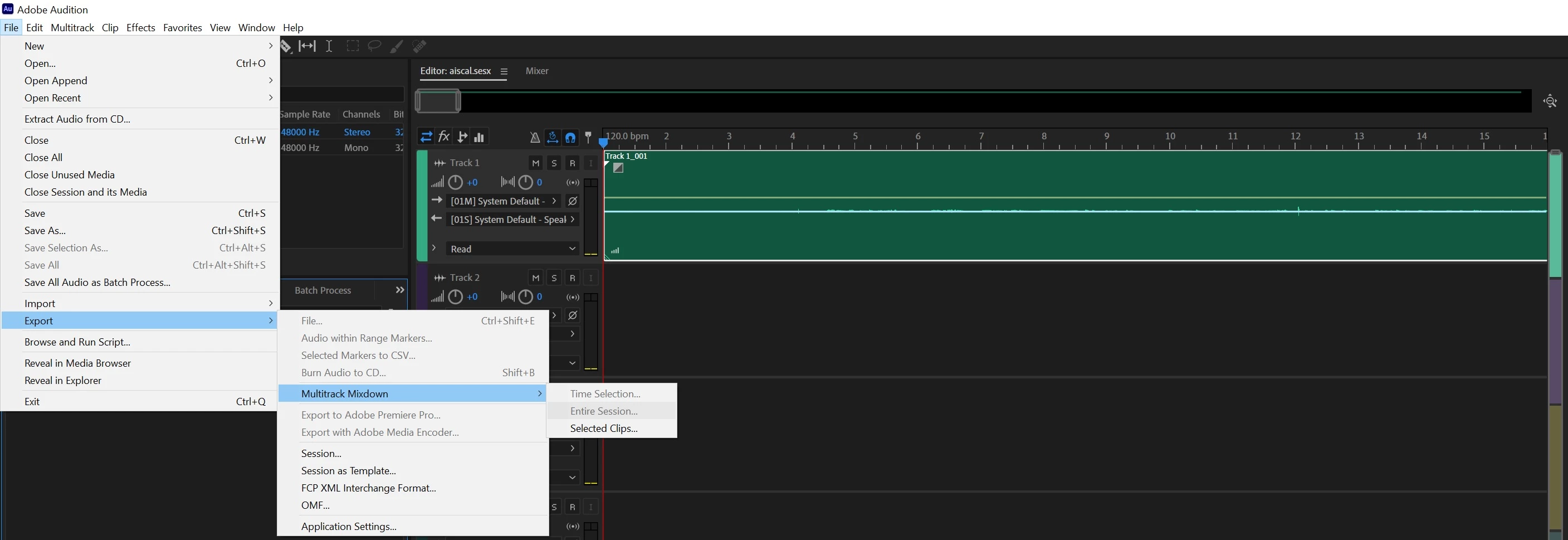
Export multitrack mixdown greyed out

  • November 2, 2022
  • 3 replies
  • 7363 views

I am having an issue i can no longer today export my entire mixdown as  mp3.

When i try the option entire session is greyed out. Note i am in multitrack

Appreciate if someone has  a solution

3 replies

Participant
January 4, 2024

had the same problem. Just change the output for each track to "Mix" and you'll be able to export w/ multitrack mixdown.

Participating Frequently
November 6, 2022

Replying direct to the poster. Change your "out" on each track to MIX. This should allow you to export entire session. I just figured it out for myself.

Participant
November 6, 2022

Hello 


You have a screenshot 

Participating Frequently
November 6, 2022

Change that setting to Mix. That should do it if this was indeed your screen.

SteveG_AudioMasters_
Community Expert
Community Expert
November 3, 2022

You haven't said whether this is on a PC or a Mac. There have been a couple of reports of this happening on Macs but none on PCs, and certainly here on a PC the export options are correctly displayed in Multitrack. The other complaints are also about exactly the same option being missing.


There are a few things to try: Try copying the files into a new session and see if the same thing happens - this is just an attempt to find out whether a corrupted session file is behind this (we've asked others to do this but not had any definitive response from them). If it's just the same, then it's possible that a corrupted Preferences file is to blame. Unfortunately the cure for this will remove any custom settings you've made, but it's easy to implement - you just stop Audition and restart it with the Shift key held down. The most comprehensive way of resetting Audition is to clear out your installation using the CC cleaner app instead of the Microsoft uninstaller and then reinstalling, but that really is a last-ditch solution.


One of the problems here is that if this was a genuine bug as such, there would be loads of complaints about it - and apart from a few Mac ones, there haven't been. This makes it rather hard to determine whether it actually is one or not. If none of the above works for you, it might well be worth reporting this on the Audition Beta forum, where the developers are far more likely to see it, and perhaps respond...

Participating Frequently
November 6, 2022

I am currently experiencing this on Win 10. Really frustrating. 

Participating Frequently
November 6, 2022

Replying to myself because I can't edit I guess... I found my issue. I noticed my Master Mix had no audio going through it. Checked my "out" settings on my tracks and they were all set to to system default output - Once I switched them to Mix I was then able to Multi Track Mixdown,Export, Entire Session. Took me an hour! uhg...