
Participating Frequently
August 1, 2019
Answered

Extension Won't Install

  • August 1, 2019
  • 5 replies
  • 1432 views

Hi

My Audition works fine. I decided to add 2 extensions from the Adobe site. The first time I installed immediately. When I went to Audition - no extensions.

I looked in support and found Extension Manager. So I downloaded one of the extensions. This time I got an error message.
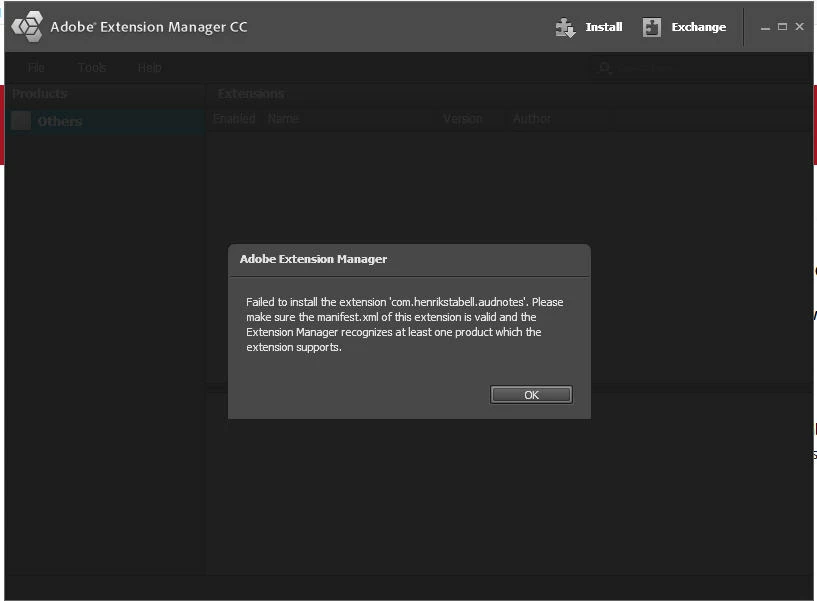
I've rebooted, uninstalled then reinstalled - same error message!

I've searched for an explanation and I can't find anything. I went on chat support for help and they redirected me to this forum!

I have an Asus ROG laptop GL753VE-BS71, Windows 10 pre-installed, a 7th-generation Intel® Core™ i7 quad-core processor, NVIDIA® GeForce® GTX 1050Ti graphics and full Microsoft® DirectX® 12, 32 GB RAM, 120 GB C drive and 1 TB D drive. All my apps have been installed on D because Microsoft is a PIG! LOL

I did install them using CC and I redirected all the folders in preferencees to D

Can anybody help me solve this?

Thanks

Janice

This topic has been closed for replies.
Correct answer _durin_

I looked at the settings for the Notes panel extension and see the author put the maximum version as 12.0.  This means it won't show up in the more recent 12.1.x release of Audition.  I'll reach out to the author and let them know of the issue, as well as how to resolve it so there's no maximum version requirement

5 replies

mahmoudosalem7007
Participant
February 1, 2020

I am having the same issue with photoshop, the same error message appears with all extensions

_durin_
Community Manager
_durin_Community ManagerCorrect answer
Community Manager
August 19, 2019

I looked at the settings for the Notes panel extension and see the author put the maximum version as 12.0.  This means it won't show up in the more recent 12.1.x release of Audition.  I'll reach out to the author and let them know of the issue, as well as how to resolve it so there's no maximum version requirement

Shivangi_Gupta
Community Manager
Community Manager
August 19, 2019

Thanks for following up on this, Durin!

Shivangi_Gupta
Community Manager
Community Manager
August 2, 2019

Hi there,

Thanks for reaching out and sharing all the information.

Thanks,

Shivangi

ccubed.meAuthor
Participating Frequently
August 10, 2019
bojoey
Participating Frequently
August 1, 2019

Generally, Audition won't see new plugins if it's not scanned from Extensions Manager. See if that works.

http://www.cinemasound.com

bojoey
Participating Frequently
August 1, 2019

Good question.

Did you rescan the plugins from the Extension Manager?

http://www.cinemasound.com

ccubed.meAuthor
Participating Frequently
August 1, 2019

I uninstalled them and then reinstalled them.

I tried unzipping the extension myself in the correct Audition folder but, of course, the zip file is proprietary and wouldn't let me unzip without the extension manager - and it doesn't like the file!