
Eric Holtz
Known Participant
January 9, 2017
Question

Frequency Analysis: Sub 20Hz Frequencies Shown Across All Files

  • January 9, 2017
  • 2 replies
  • 4748 views

Hello,

I am running Audition CS6 in Windows 7 Professional 64 bit on an HP dv7-7000 Quad Core Edition laptop. All audio files show a bump below 20Hz in the Frequency Analysis window. This occurs across all files, no matter the source, i.e., personal recordings, ripped Cds, etc.

Here is an image using a CD file:
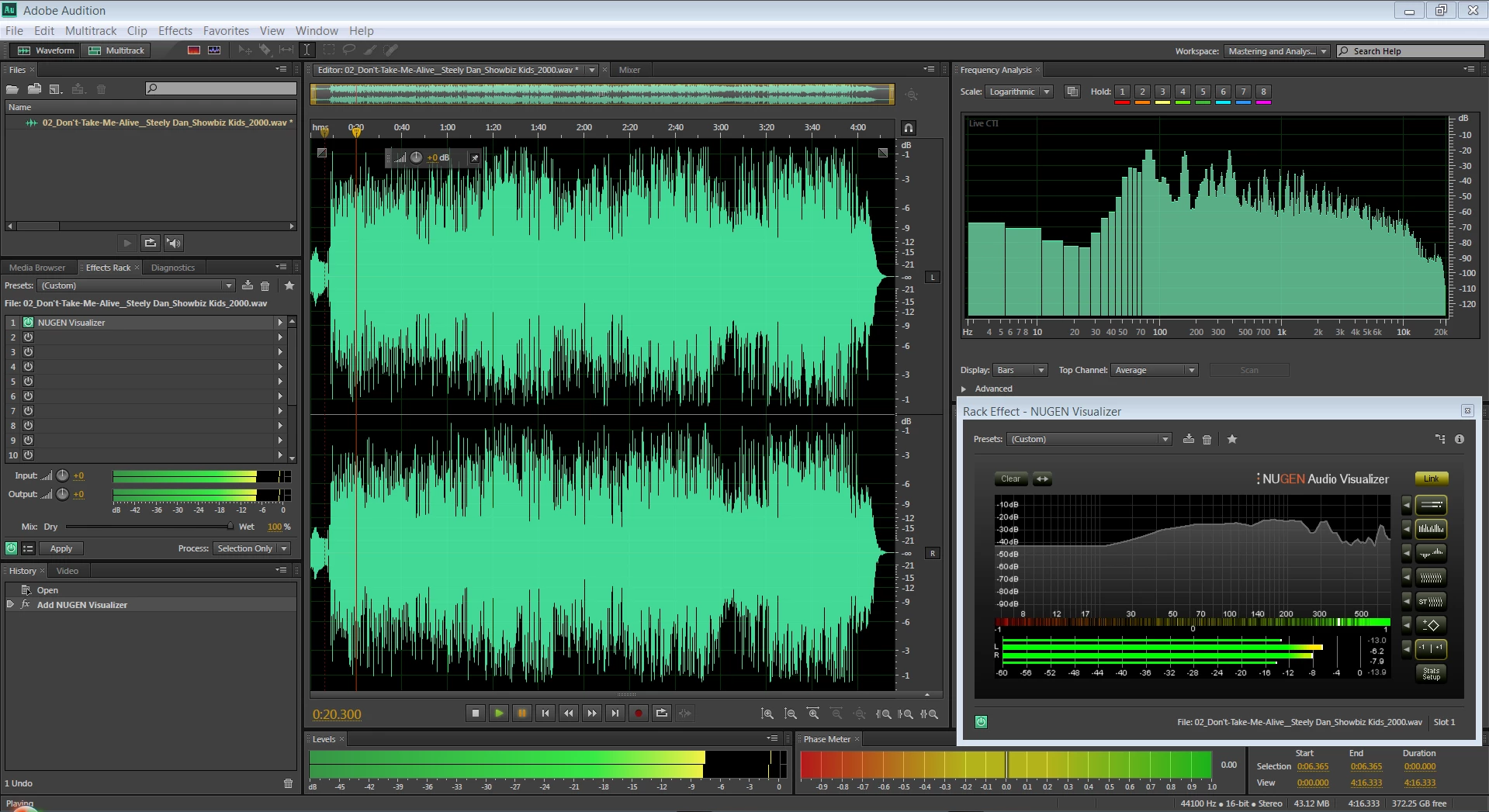
What could be causing the noise below 20Hz? This occurs on any file type, no matter whether I'm using the laptop's sound card or a USB audio interface.

Any comments and suggestions are greatly appreciated.

Thank you,

Eric

This topic has been closed for replies.

2 replies

Charles VW
Inspiring
January 10, 2017

this might be an indication of a DC component to your signal (mathematically the same as 0 Hz) and that it isn't centered around zero.

Eric Holtz
Known Participant
January 10, 2017

Charles VW​ - I was wondering whether there might be something happening "under the hood" in regards to the DC component. How would I alleviate a zero centering issue?

Eric Holtz
Known Participant
January 11, 2017

Those sub 30Hz spikes showing in the Steely Dan Spectral view are indicative to me of some peak level intermodulation distortion components. So a bit of HP filtering could reduce those but I doubt whether they are likely to cause any problems with the amount that is there, unless you have your sub woofer turned way up.


ryclark​ - The sub 30Hz spikes probably wouldn't cause me any problems, but I don't know what systems my customers have, so it could pose issues if they are running subs. Plus, I simply do not want recordings with any unnecessary noise, even if not audible.

Incidentally, I did an analysis of a track off of Joe Jackson's "Big World" CD. I was curious, as the CD is a live, direct-to-digital recording.

It too shows the sub 30Hz noise, prominently around 5Hz:

It may not be that important, being that far down in frequency, but I would really like to know what could be possibly be causing all of the low frequency noise.

SteveG_AudioMasters_
Community Expert
Community Expert
January 9, 2017

In the Audition Frequency Analysis window, can you show us the advanced settings? Can't comment about your plugin, but response anomalies at the bottom of a FFT window aren't that unusual. Also, if you shift the waveform up so that we can see the Spectral Frequency display with the spectral resolution increased to max, (Ctrl+Shift+Up Arrow) do you get the same result?

Eric Holtz
Known Participant
January 9, 2017

Hello Steve. Here is image 02 showing advanced settings, along with the Spectral Frequency display:

The first 8 sec. are solo electric guitar notes.

Side note: I've noticed that Amplitude Statistics shows Measured Bit Depth as 32, thought this is a 16 bit file. Is that normal? This occurs after I select Repair DC Offset.

Eric