
August 1, 2017
Answered

Getting rid of harsh ess sounds in speech

  • August 1, 2017
  • 2 replies
  • 14778 views

Hi all,

So, I'm pretty new to all of this and was hoping some kind people who have knowledge and experience could lend me a hand.

I've been asked to read out some books and record in order to make them into audio-books. The problem is that naturally when I speak the 's' sound comes out quite harsh. Now, I've done all the recording already (and it took a while to do) and also I've been speaking this was for many, many years (so it'll be very difficult for me to not have this harsh 's' while still sounding natural) so it's not really practical for me to go back and re-record it all. Is there a way of fixing this through audition? I've tried using the 'de-esser' function for the whole track but it doesn't seem to do a lot. I've also tried highlighting the target frequency for each sound and reducing the volume of it and, while this works well, it'll take a lot of time to do it for all of the audio I need to get through.

Any ideas? Any help or suggestions would be very much appreciated.

Thanks,

Suddhiko.
    This topic has been closed for replies.
    Correct answer SteveG_AudioMasters_

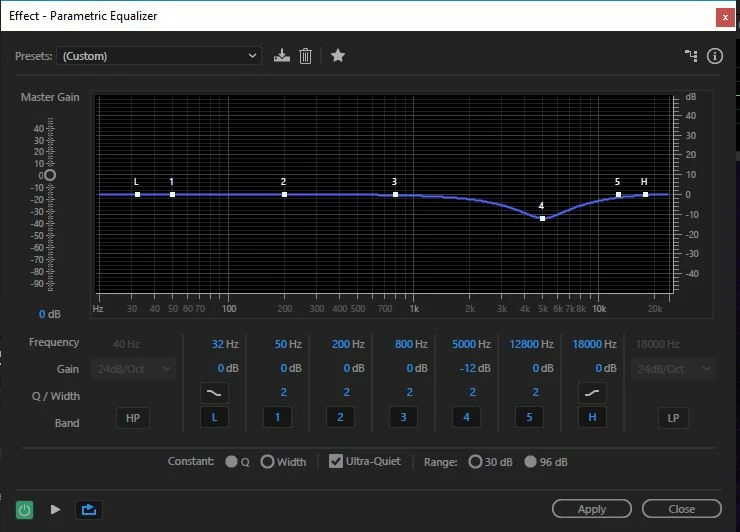
    Yes, your Dropbox link works fine, and I've listened (and looked) at it, and you can improve this quite dramatically with one very simple step, and that's simply to EQ the offending part of the audio spectrum. This works well on this file because you've used a sensible recording level, and nothing actually overloads as such; that's where the de-esser is a little more useful, and why it doesn't work so well on your file. So what did I do? I used the Parametric EQ, and arranged the settings like this:

    So that's a flat response, apart from band 4, where you need to change the numbers. The file would also benefit from some background noise reduction, but that's another discussion, and there are recent posts about that on the forum anyway - you might like to peruse them. For instance, Noise Reduction Destruction

    2 replies

    Participant
    December 26, 2018

    Xiaomi Redmi 5a stound problem

    SteveG_AudioMasters_
    Community Expert
    Community Expert
    August 1, 2017

    You need to use Dropbox, or something like it, to give us a link to a sample of what you're trying to deal with, I think. The forum doesn't support audio uploads directly (on an audio forum - go figure!)

    August 6, 2017

    Thanks for your suggestion Steve. Here is the link to one of the talks: Dropbox - 1. The World and the Heart.mp3

    I've never used dropbox before so I hope it works.

    As a way of explanation, I'm a Buddhist monk in Thailand, so this is why the content of the talk is Buddhisty. My teacher asked a few of us to record the books of his teachings that have already been translated into English. Hope it isn't too strange for you. It also explains my slow reply - the internet connection in Thai forests isn't so good.

    So, any help you could give would be greatly appreciated.

    Thanks!

    Suddhiko.

    SteveG_AudioMasters_
    Community Expert
    SteveG_AudioMasters_Community ExpertCorrect answer
    Community Expert
    August 6, 2017

    Yes, your Dropbox link works fine, and I've listened (and looked) at it, and you can improve this quite dramatically with one very simple step, and that's simply to EQ the offending part of the audio spectrum. This works well on this file because you've used a sensible recording level, and nothing actually overloads as such; that's where the de-esser is a little more useful, and why it doesn't work so well on your file. So what did I do? I used the Parametric EQ, and arranged the settings like this:

    So that's a flat response, apart from band 4, where you need to change the numbers. The file would also benefit from some background noise reduction, but that's another discussion, and there are recent posts about that on the forum anyway - you might like to peruse them. For instance, Noise Reduction Destruction