Exit
  • Global community
    • Language:
      • Deutsch
      • English
      • Español
      • Français
      • Português
  • 日本語コミュニティ
  • 한국 커뮤니티
0

How do I change my cursor back to normal? Screenshot included

New Here ,
Mar 12, 2020 Mar 12, 2020

I rested my hand on my Mac keyboard and accidentally did this to my cursor. What does it do, and how do I change it back? It's the little cursor thingy in the pink channel, with a blue slash running through it.


EDIT: Nevermind, I figured it out! Turns out I managed to get myself into Slip Mode. Fixed it.


Thanks,

Adam
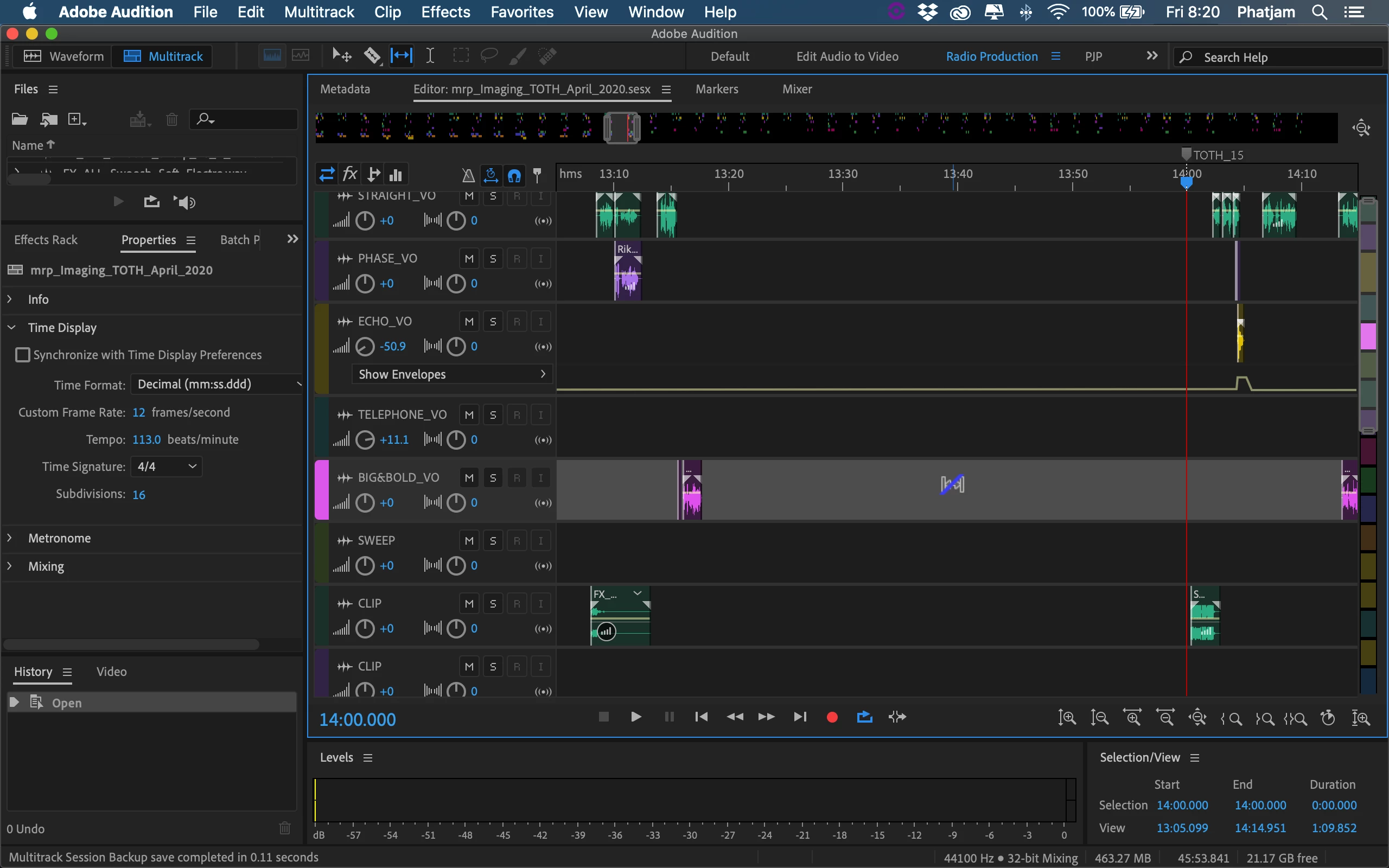
 

The little cursor on the pink channel with a blue slash running through it.The little cursor on the pink channel with a blue slash running through it.

4.2K
Translate
Report
Community guidelines
Be kind and respectful, give credit to the original source of content, and search for duplicates before posting. Learn more
community guidelines
no replies

Have something to add?

Join the conversation