

How do I restore a WAV version of my Multitrack session? Only isolated clips show up.
I am -- for the first time as a non-engineer -- recording, editing and mastering an audiobook. I have learned a lot and have pretty much mastered the process to bring in a wav file that conforms (exceeds, actually) the ACX/Audible requirements for RMS statistics. BUT....
I am struggling with a chapter which seems to have come adrift from its source media. I have a fully edited and clean Multitrack version, but I cannot seem to sync it with the corresponding WAV file. I have assumed that each multitrack session (I have only one track, actually, plus room tone), would have a synced and complete corresponding assembly of source clips that I could then use for statistical analysis and final output to WAV. But this ornery chapter does not. It only brings up isolated clips, which end at the point where it runs into a mistake and we did the punch-and-roll.
I tried doing a multi-track mixdown, and then exporting that as a WAV, but it won't let me; the option is grayed out.
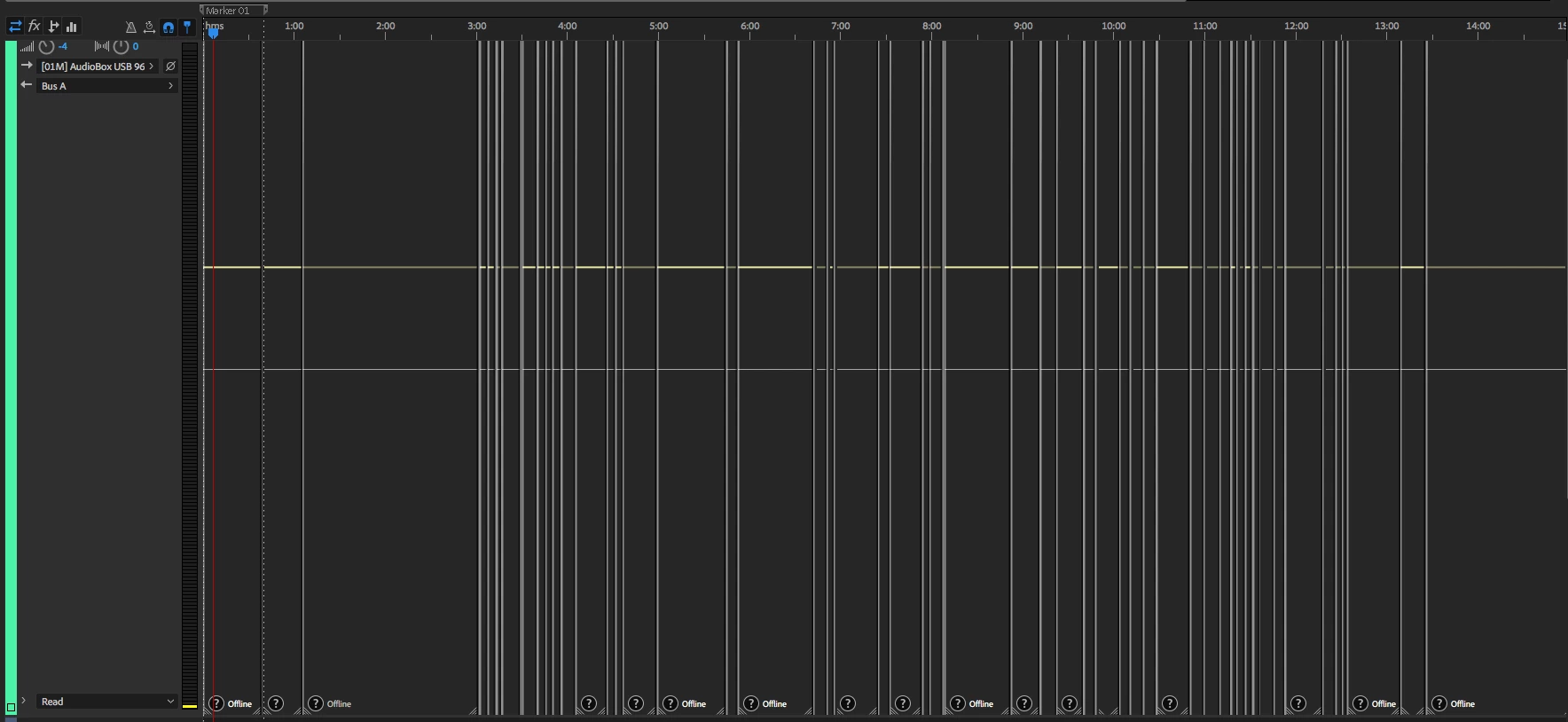
How do I reconnect my media, so the multitrack and wav versions are in sync? I have tried linking media, and link all media, but after going through the whole chapter clip-by-clip, saving it, re-opening -- it is back to the old problem, only the WAV file for the immediate clip, not a complete version of the recordings. Just now, when I went to click on "link all media," I got a window of my multitrack view with all clips shown as "offline," I know they are there, but why can't the program help me relink them and save that?
Obviously, I am missing something major here.
My system details are below. Thanks in advance for any help!
Rob
When I try to "link all media," I get this daunting image:
Rob Wilson
UnAuthorized Films
Audio Editing hardware/Software
Hardware Overview:
Model Name: iMac
Model Identifier: iMac14,4
Processor Name: Intel Core i5
Processor Speed: 1.4 GHz
Number of Processors: 1
Total Number of Cores: 2
L2 Cache (per Core): 256 KB
L3 Cache: 3 MB
Memory: 8 GB
Boot ROM Version: IM144.0189.B00
SMC Version (system): 2.21f92
Serial Number (system): C02PC3LJFY0T
Hardware UUID: C20D7D89-56EB-59A6-B813-49158E1B037C
PreSonus AudioBox USB 96 Audio InterfaceTech Specs
Computer Connectivity: | USB |
Form Factor: | Portable, Desktop |
Simultaneous I/O: | 2 x 2 |
Number of Preamps: | 2 |
Phantom Power: | Yes |
A/D Resolution: | 24-bit/96kHz |
Built In DSP/FX: | 20 Native effect plug-ins |
Analog Inputs: | 2 x XLR-1/4" combo (mic/instrument) |
Analog Outputs: | 2 x 1/4" (main out) |
Headphones: | 1 x 1/4" |
MIDI I/O: | In/Out |
USB: | 1 x Type B |
Software: | Studio One 4 Artist DAW included |
OS Requirements - Mac: | OS X 10.8.5 or later, Intel Core i3 or higher, 4GB RAM or more recommended |
OS Requirements - PC: | Windows 7 SP1 64-bit or later, Intel Core i3 or higher, 8GB RAM or more recommended |
Bus Powered: | Yes |
Depth: | 1.75" |
Width: | 5.5" |
Height: | 5.5" |
Weight: | 5 lbs. |
Manufacturer Part Number: | AUDIOBOX USB 96 |
Intel 8 Series Chipset:
Vendor: Intel
Product: 8 Series Chipset
Link Speed: 6 Gigabit
Negotiated Link Speed: 3 Gigabit
Physical Interconnect: SATA
Description: AHCI Version 1.30 Supported
APPLE HDD HTS545050A7E362:
Capacity: 500.11 GB (500,107,862,016 bytes)
Model: APPLE HDD HTS545050A7E362
Revision: GG2AB990
Serial Number: TNS5193T3DS07H
Native Command Queuing: Yes
Queue Depth: 32
Removable Media: No
Detachable Drive: No
BSD Name: disk0
Rotational Rate: 5400
Medium Type: Rotational
Partition Map Type: GPT (GUID Partition Table)
S.M.A.R.T. status: Verified
Volumes:
EFI:
Capacity: 209.7 MB (209,715,200 bytes)
File System: MS-DOS FAT32
BSD Name: disk0s1
Content: EFI
Volume UUID: BDC1974F-6B8C-3DAE-9DB2-3AA3C17BF506
UFI Hard Drive:
Capacity: 499.25 GB (499,248,103,424 bytes)
Available: 310.83 GB (310,831,108,096 bytes)
Writable: Yes
File System: Journaled HFS+
BSD Name: disk0s2
Mount Point: /
Content: Apple_HFS
Volume UUID: 84B395ED-6163-3197-9342-8B81428ADECE
Recovery HD:
Capacity: 650 MB (650,002,432 bytes)
File System: Journaled HFS+
BSD Name: disk0s3
Content: Apple_Boot
Volume UUID: 0FDC8C26-109B-3A85-9B0E-973BA7F4EF3C
Storage:
UF-MEDIA-006:
Available: 1.96 TB (1,962,052,780,032 bytes)
Capacity: 2 TB (2,000,398,929,920 bytes)
Mount Point: /Volumes/UF-MEDIA-006
File System: Journaled HFS+
Writable: Yes
Ignore Ownership: Yes
BSD Name: disk1s1
Volume UUID: 4FCEC94C-A258-35D5-9384-9FDA0ABE3D2E
Physical Drive:
Device Name: P9227 Slim
Media Name: LaCie P9227 Slim Media
Protocol: USB
Internal: No
Partition Map Type: MBR (Master Boot Record)
Installed Audio Software:
Creative Cloud Desktop App:
Version: 4.6.0.384
Obtained from: Identified Developer
Last Modified: 8/3/18, 10:04 PM
Kind: Intel
64-Bit (Intel): Yes
Signed by: Developer ID Application: Adobe Systems, Inc. (JQ525L2MZD), Developer ID Certification Authority, Apple Root CA
Location: /Applications/Utilities/Adobe Creative Cloud/Utils/Creative Cloud Desktop App.app
Adobe Creative Suite.
Adobe Audition. Build 11.10.0.184
Travis Baldree’s Punch And Roll Plug-in, Version 1.22.3.
Adobe Acrobat Pro
Architecture: x86_64
Build: 18.11.20055.290043
AGM: 4.30.78
CoolType: 5.14.5
 AdChoices