
Participant
August 8, 2018
Answered

How do I utilize the FLAC filter with Audition 3 / AA3?

  • August 8, 2018
  • 2 replies
  • 2725 views

Hi,  all! I found the online filter,  downloaded it and placed it in the same folder as my AA software, but now I'm mystified as to how to convert an AA WAV file into FLAC.

Do I need to reinstall AA3? I have rebooted but still don't see a way.  Thanks for any help!
This topic has been closed for replies.
Correct answer SteveG_AudioMasters_

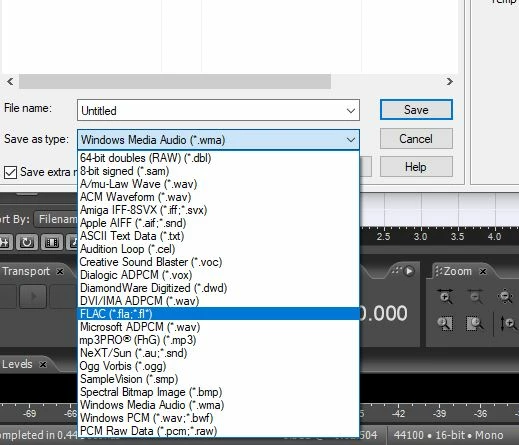
I tried it here - downloaded the filter, put it in the AU3 main folder, created some noise, and went to Save As. I get this:

I went through the whole cycle - saved it, re-opened it - it all worked fine.

If you have an original installation Audition 3 you won't be able to reinstall it, as the activation server has been out of it for years. There is a 'free' version of it available that you can install, though - see the FAQs. But really you shouldn't need to - it appears to work correctly, at least here.

2 replies

Kevin-Monahan
Community Manager
Community Manager
August 16, 2018

Get this working yet, RickInNJ? Let us know.

Thanks!
Kevin

Kevin Monahan - Sr. Community and Engagement Strategist – Adobe Pro Video and Audio
SteveG_AudioMasters_
Community Expert
SteveG_AudioMasters_Community ExpertCorrect answer
Community Expert
August 8, 2018

I tried it here - downloaded the filter, put it in the AU3 main folder, created some noise, and went to Save As. I get this:

I went through the whole cycle - saved it, re-opened it - it all worked fine.

If you have an original installation Audition 3 you won't be able to reinstall it, as the activation server has been out of it for years. There is a 'free' version of it available that you can install, though - see the FAQs. But really you shouldn't need to - it appears to work correctly, at least here.