
Known Participant
June 25, 2022
Answered

how to adjust volume of a selection as a ramp - shape volume

  • June 25, 2022
  • 1 reply
  • 7231 views

I want to adjust the volume of a selection so that it gradually gets louder or softer.

One repeating feature of voice files is that people often lower their volume as they complete a sentence. It starts out strong, but then the volume fades. 

I moved from Goldwave to Audition. Goldwave had a feature called "shape volume" that allowed you to move points on a bar up and down across the length of a selected sound wave. So, you could select 5 seconds of a clip, then move the volume from 1 to 5 across the 5 seconds - so that the sound wave would get progressively louder.  I could then "correct" the voice file so that the person's voice (sound wave) would go from fadeing in volume to steady in volume.

Is there a way to do this in Audition? 

My compression SORT OF corrects for this, but is is global. I am wanting to do this for short selections of 3-10 seconds without changing the rest of the file.
 

This topic has been closed for replies.
Correct answer EuanWilliamson

As I play with this, I am finding a very strange result. When I raise part of the volume using gain envelope, the other parts of the waveform are being reduced.
see video here.
https://www.dropbox.com/s/hn1lr3hywva3s1m/audition%20gain%20envelope%20issues.mp4?dl=0


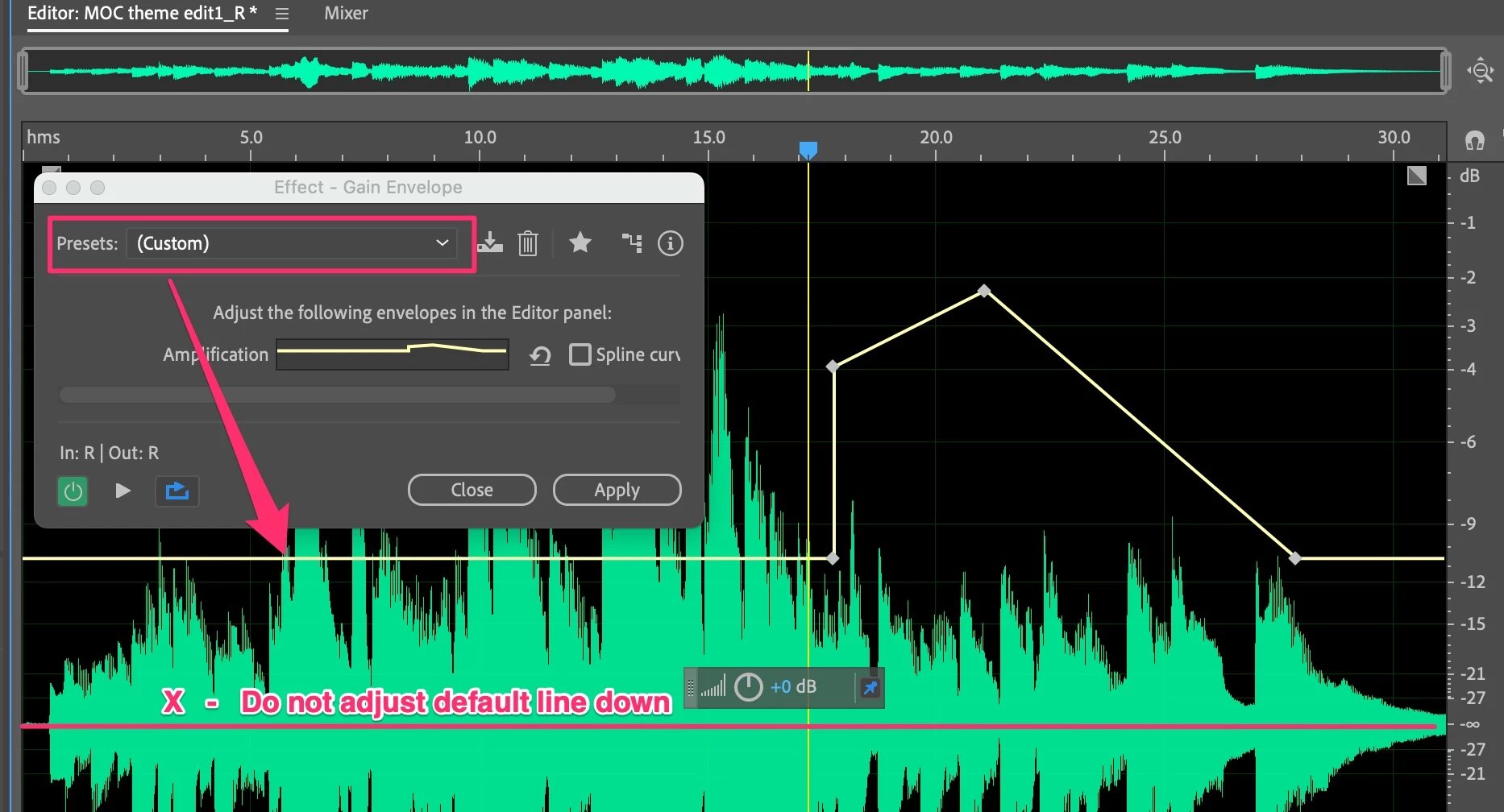
Ah, you are introducing this by moving the default gain line down.

Please see this:

I've recreated something similar with a similar gain envelope shape.

I added the effect and choose default under presets in case there was a previous custom one in the effect.

The default creates a yellow envelope line as shown by the red arrow.

Do not move this down to the red line shown as you have done.

Where the default paleces the line has neither gain or attentuation.

Move your line up for gain and NOT down which attenuates.


I see that you are working in the waveform view.

By using multitrack you can experiment until you get it right


1 reply

EuanWilliamson
Community Expert
Community Expert
June 25, 2022

Please see this video explanation about volume envelopes.

https://youtu.be/6ap2WjI46B4


Best regards, Euan.
Known Participant
June 25, 2022

That looks awesome! Do you know how I can get that volume envelope line to be visible in the wave form editor? I am not using the multi-track editor.

EuanWilliamson
Community Expert
EuanWilliamsonCommunity ExpertCorrect answer
Community Expert
July 3, 2022

As I play with this, I am finding a very strange result. When I raise part of the volume using gain envelope, the other parts of the waveform are being reduced.
see video here.
https://www.dropbox.com/s/hn1lr3hywva3s1m/audition%20gain%20envelope%20issues.mp4?dl=0


Ah, you are introducing this by moving the default gain line down.

Please see this:

I've recreated something similar with a similar gain envelope shape.

I added the effect and choose default under presets in case there was a previous custom one in the effect.

The default creates a yellow envelope line as shown by the red arrow.

Do not move this down to the red line shown as you have done.

Where the default paleces the line has neither gain or attentuation.

Move your line up for gain and NOT down which attenuates.


I see that you are working in the waveform view.

By using multitrack you can experiment until you get it right


Best regards, Euan.