
How to level out sound with loud "S" noise.
Hi, I'm new to audition, and I'm recording my voice for narration over an animation. I'm recording it so that each sentence is a separate sound file (to sync the animation easier). Because of this, I need each sound file's volume to be as close as each other's as possible to make it all flow in the final animation with all sentences put together.
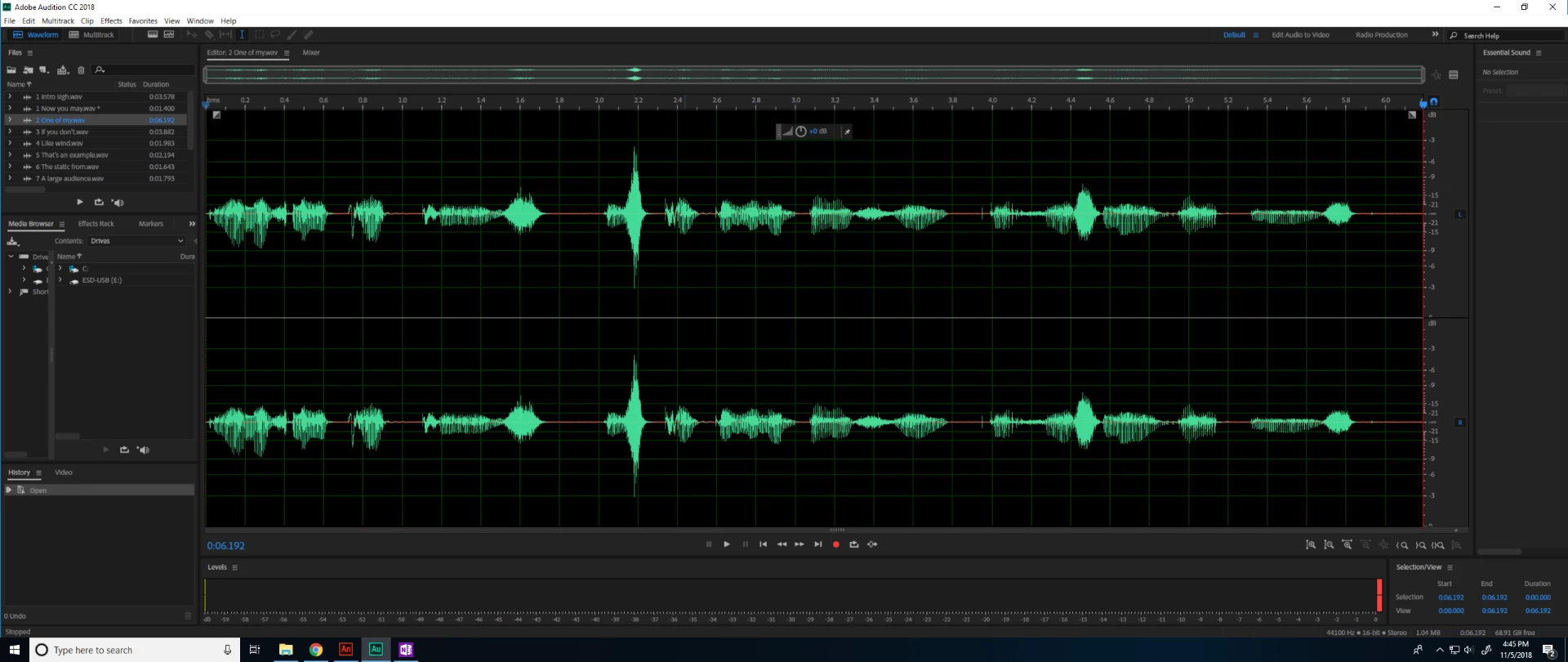
My approach was to make all the audio files aim for -1 in the levels meter as the max. However, one of the sentences' waveform looks consistent except for a few spikes in volume, which happen when I say the "S" sound. Therefore, when I lower the volume so that the max of the wave hits -1, this causes the rest of the sentence to be quieter than the others. If I raise the volume to match the other sentences, the "S" sounds peak over the 0 and mess up the audio.
I already have a bunch of effects applied to each audio file (it's a Favorites with all the same presets for each file). They all reach about -6 max volume. I'm now trying to go back and edit each file to aim for -1 max volume. My question is: What is the ideal effect to apply to these--on top of everything I already applied--to get these spikes down to match everything else, without messing up the overall sound? Like, I don't want the audio to sound super compressed for example.
Thank you for your help.
(Screenshot shows that one spike towards the middle).
 Alternatively there are also Deesser presets in the Dynamics Processing or Multiband Compressor. Or if you are adventurous you can just go in and select the 'SSS' bit and reduce it's level.
 AdChoices