
Known Participant
October 17, 2017
Question

I'm having trouble selecting audio in Audition. Why?

  • October 17, 2017
  • 1 reply
  • 3626 views

Hi all.

Before I file bug reports, I thought I'd ask if some basic functionality has perhaps been buried in obscure UI.

In what I would think is a fairly common scenario, I've selected a problematic section of an audio file and pressed the M key to create a region (or range as Audition calls it). What I want to do is overwrite an accidentally-spoken syllable with room tone from a nearby portion of the file. The length of the file can't change at all.
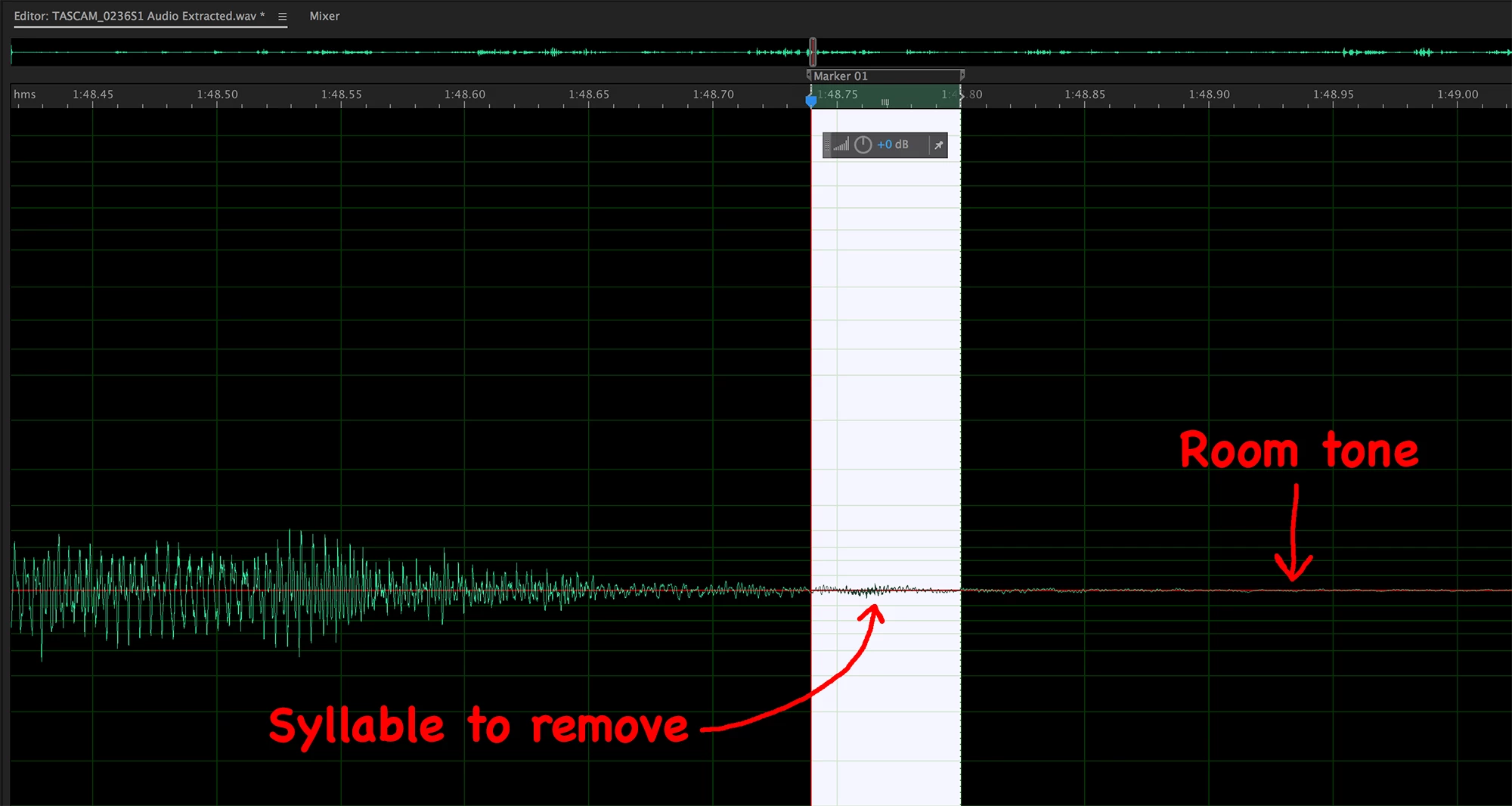
These are the problems I encountered:

1.  Double-clicking within the region doesn't select the audio between the markers. This is unexpected and inconvenient. Isn't that one of the major purposes of setting up a range, to make it readily selectable?

2.  Although there are hotkeys to move the playhead to the previous or next marker, holding the Shift key while doing so doesn't extend the selection (as a workaround for problem #1).

3.  Related to #2, using Shift to extend the selection seems to be broken for all keyboard navigation.  For example, if you press and hold Shift while pressing the right arrow, the selection isn't extended as the playhead moves.  This seems like a pretty glaring bug, doesn't it?  I hope it's a bug, because otherwise this would defy decades of GUI convention and pointlessly hobble users.

4.  I can't find any way to move the selection.  I'm talking about the selection highlight itself, not the audio within it.  In this example, I want to drag the selection to the right, in order to copy exactly enough room tone to overwrite the unwanted syllable.

5.  I can't find any way to paste-overwrite the selection; pasted material isn't confined to the current selection.  This prevents me from simply copying an ample (but inexact) amount of room tone and pasting it into the selected range (as a workaround for #4), because any paste operation changes the file length.

This topic has been closed for replies.

1 reply

SteveG_AudioMasters_
Community Expert
Community Expert
October 17, 2017

https://forums.adobe.com/people/Mobius+Strip  wrote

Hi all.

Before I file bug reports, I thought I'd ask if some basic functionality has perhaps been buried in obscure UI.

These are the problems I encountered:

1.  Double-clicking within the region doesn't select the audio between the markers. This is unexpected and inconvenient. Isn't that one of the major purposes of setting up a range, to make it readily selectable?

It isn't easy to find the information about this, I grant you, but everything is working correctly in Audition - if you use it the way it's intended to be used! I do have a short video clip showing how to make selections, extend them, etc but the damn forum software won't let me post it. Suffice it to say that everything to do with manipulation is above the waveform display, and not on it:

If you click on either of the grey handles on the marked selection (or in the item in the Markers window) it will select the range. You can extend it in either direction by pulling the handles below (surrounding the green selected area), and if you position the cursor in there so a hand is showing, you can drag the whole selection in either direction.

The cut and paste options are comprehensive, and if you use the spectral display, you can restrict your cutting and pasting to selected spectral areas as well.

The whole thing works pretty well, but don't expect it to follow the conventions that some other software you might be familiar uses - it's never been like that.

ryclark
Participating Frequently
October 17, 2017

I was a bit puzzled by your comments as I have been doing what you want to do to replace unwanted audio with roomtone for many years when restoring film soundtracks where it is vital to keep the audio in sync with picture. Then I realised that I always work in the Spectral Frequency Display when undertaking such operations.

So if you work in the Spectral Frequency view then you can have direct on display grab and move the selected area using your mouse which, as you have discovered, doesn't work directly on the Waveform view. Also it is not necessary to use markers for selecting the audio, unless you wish to come back to that exact selection in the future. You should also find it is a lot easier to distinguish between the wanted and unwanted audio for this type of editing. Hopefully you will find it much quicker editing your audio in this way.

Known Participant
October 18, 2017

https://forums.adobe.com/people/Mobius+Strip  wrote

So Audition is violating guidelines from your own source. Like it or not, those guidelines haven't changed since the '80s and there's absolutely no reason for them to.

You seem to have overlooked the words 'such as'. Nowhere does that statement say that you are required to be able to extend a selection using the shift key - it merely suggests the possibility. When read in conjunction with the rest of the document, it becomes clear that this is not de rigueur. Adobe, as you've already discovered, has a bit of form when it comes to this, and it would appear from comments made in the past that one of the driving forces behind this is that they actively don't want to do what others do. One of the side-effects of this (and I believe that they regard this as a benefit) is that it makes the ergonomics of using other software seem strange after using theirs.

Incidentally, I'm not condoning this in any way; I'm merely trying to explain why it is, and in fact why Adobe think that there's a good reason for it, although only from their POV, admittedly.


Thanks for the replies, everybody.

SteveG(AudioMasters)  wrote

You seem to have overlooked the words 'such as'. Nowhere does that statement say that you are required to be able to extend a selection using the shift key - it merely suggests the possibility.

First, how did I "seem to overlook" "such as?" That means "for example," so what? The sentence could very well say, "All Microsoft-approved applications must allow keyboard users to make extended selections such as selecting two or more items in a list or highlighting several paragraphs of text."  So there we have the phrase "such as" in a statement of requirement. One has nothing to do with the other.

Second, you can cite guidelines, but when I do so they're just vague "possibilities?" That's not the tenor of the documentation at all. They are guidelines, and explicitly state

A well-designed keyboard UI allows keyboard users to make extended selections such as selecting two or more items in a list or highlighting several paragraphs of text

They go on to provide guidance on a comprehensive set of selection situations. Not exactly "behold the wonderland of possibilities!"

And finally: There's absolutely no benefit to defying this convention. It's not as if Adobe has re-used these hotkeys for some innovative new approach; they currently do nothing. Not to mention that this convention is observed elsewhere in Adobe's own applications, so not only is Audition inconsistent with the vast majority of GUI applications on every platform, but with Adobe's own.

Incidentally, I'm not condoning this in any way; I'm merely trying to explain why it is, and in fact why Adobe think that there's a good reason for it, although only from their POV, admittedly.

Understood, except for the last part: I've yet to see any justification for this missing functionality, let alone a good one.

ryclark
Using the Shift key with the Left or Right arrow keys moves the In point of the selection to the left or right whilst Shift+Ctrl moves the Out point of the selection on the Waveform view.

Thanks, ryclark. But that's still a problem, regardless of whether there is a Mac-specific bug here or not.

1. If your playhead is just sitting there in the waveform with no selection, and you press Shift + right arrow, does it extend a selection to the right?

2. If you set a couple of markers and use Alt-arrow to navigate to one and then Shift-Alt-arrow to navigate to the next, is the range between then selected?

3. If you click and drag from left to right in the waveform to make a selection, and then use Shift-arrow to adjust that selection, does the right end of the selection move? Because that's what you should be adjusting if you dragged from left to right; the right edge is the active end of the selection. If you dragged from right to left, the left edge (In point) should be the active one. Otherwise, how are you supposed to adjust the Out point? You should see similar behavior if you select part of a line of text in your favorite text editor and adjust the selection with the arrow keys. I just tried Word, and it worked as I described.

Thanks for the further info about the spectral view. Audition switches to the marquee tool by default when you enable it for some reason, even though only the standard insertion-point tool is shown in the waveform pane. I'll experiment with your method and see how I like it. Unfortunately, the spectrum pane still suffers from the same selection problems as the waveform pane, except for being able to move the selection. Looking at it again, this brings up an obvious question: Why can't you drag the selection in the waveform pane in exactly the same way you can in the spectral one?