Known Participant
December 11, 2016
Answered

Increased size

  • December 11, 2016
  • 1 reply
  • 1516 views

Hi all!

If you open any file and save it as wav, it size increases by 2 bytes. If you then open this wav any other editor (eg SF) the size of the return to the past. Previously, such an increased sound Premiere exported. In Premiere CC 2017 this bug fixed. What this? Bug or not?

Sorry for my english.

    This topic has been closed for replies.
    Correct answer Charles VW

    There is no difference — 44.1 or 48. Of course, I was preparing for the BD is 48k. This error has been detected is at 48k. This problem is not only represented by a file. You can try to prepare any file in the audition, and import it into EasyBD. In the compilation step fails.


    There are other ways to export WAV files for legacy programs that don't support Wave files fully.

    Audition will write different types of WAV files (older version of the spec vs newer version of the spec) depending on your settings.  For something more deterministic, please try the following options:
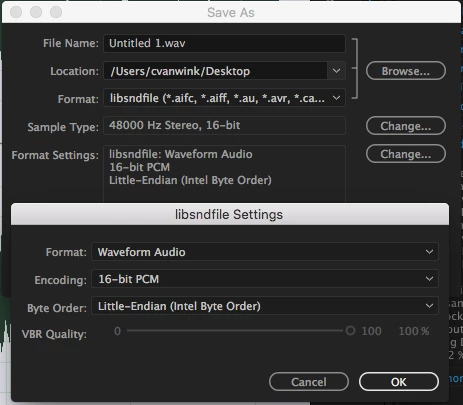
    If you think the files Audition is writing are invalid, here are two open-source tools that are good for checking:

    1 reply

    ryclark
    Participating Frequently
    December 11, 2016

    Is this happening when you are opening a .wav file in Audition and then resaving it? Does it matter that the file size is increased by 2 bytes as long as the .wav file is fully compatible and opens OK in any other software? It could be down to metadata saved within the .wav file which can occupy a lot more than 2 bytes I would have thought.

    Known Participant
    December 12, 2016

    If open and resave it .wav, then it increases. But this is not Metadata, I uncheck to save Metadata. And these files does not accept EasyBDlite by DVDlogic. If open mp3 and save it  as .wav in Audition and another editor (Wavelab, Samplitude, SF) is Audition saves 2 bytes longer than the others.

    SteveG_AudioMasters_
    Community Expert
    Community Expert
    December 12, 2016

    alexeya12010198 wrote:

    If open and resave it .wav, then it increases. But this is not Metadata, I uncheck to save Metadata.

    That doesn't stop metadata being saved, only cue data. The metadata value could easily alter that much - Audition is likely to alter the XMP values just because you opened the file. And that's a part of file management in general - nothing you can do about this, and it's absolutely nothing to be concerned about. If you look at the amount of metadata that can potentially be saved, then it's pretty easy to see how this could happen.