
Known Participant
February 4, 2017
Answered

Insane noise problem

  • February 4, 2017
  • 3 replies
  • 1005 views

I'm pretty confident there's no hope of making this tape "sound good". I'm hoping, though, that possibly it might be gotten to the point where somebody who really cared about the speakers could, with concentration, hear what they were saying; or perhaps that somebody willing to suffer for a while could manage to make a transcription of what's said.  (It was recorded on a small portable cassette recorder 40 years ago; from the changes that the noise goes through I think it must have been patched into the room sound system, rather than relying on the built-in mic; then it was transferred with a decent stereo cassette deck into a Zoom H2n digital recorder, and now I'm trying to deal with it.)  (Most of the tape is much better than this; whatever was causing it, probably problems patching into the house sound feed, got resolved after a few minutes.  I'm trying to rescue what I can from those few minutes.)

I can just about hear the voices under the noise playing it straight; I can even make out the words in loud portions sometimes (this is still playing it straight; I can do somewhat better with Audition tools of course).

The thing that gives me hope is that the noise appears to be very regular and very spiky.  This lead me to many ideas of how to eliminate it -- none of which work as well as I had hoped.  Hence my appearance here .

Here's the signal, with the noise spikes (note the vertical and horizontal scales! it's zoomed *way* the heck in):
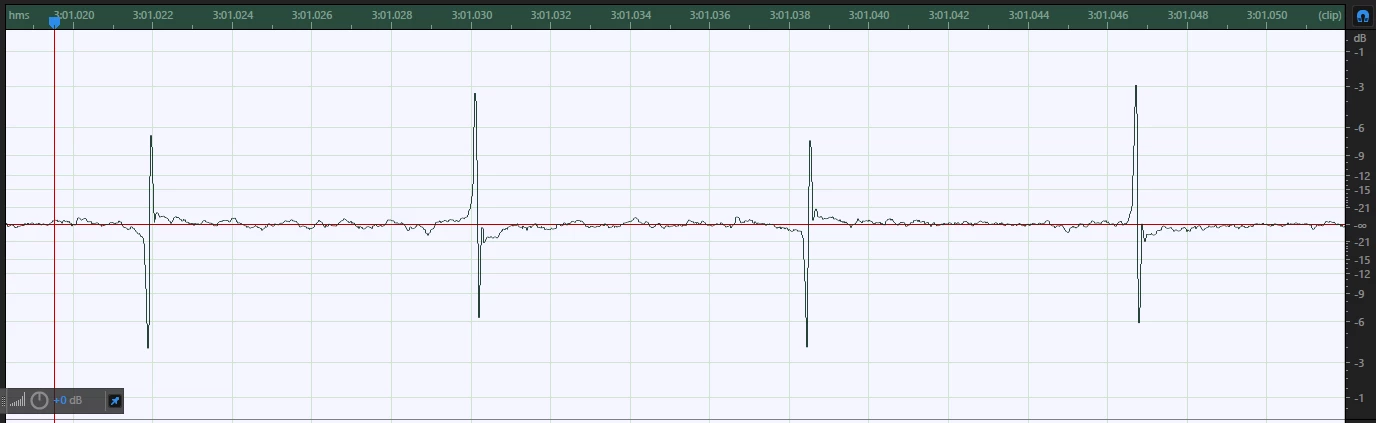
If  I zoom back the time scale, I can see the voice contours under the noise, too, and hear them when I play it. Obviously the level of the actual voice is tiny.

Those spikes occur at pretty close to 120Hz, but I haven't found frequency-selective methods to be at all effective at disposing of them.  And I don't understand why, either.  (I'm assuming the offset from 120Hz is due to variation in original tape speed, or even perhaps in playback since that deck is nearly as old as the recording. It does vary measurably from place to place on the tape, but it's like 121.97 Hz here and 120.5 there, or some such.)

Looking for the actual vocal peaks and putting in a hard limiter just above that works as I would expect -- the noise is still mostly louder than the voices but not by nearly as much, so it's not as painful when I then boost the gain to make the voices properly audible.  So, that helps some, but doesn't solve things.

I've played with various frequency filters, including the de-hummer, and get surprisingly little audible effect (set for values around 120 Hz, and it doesn't seem to matter much where).  Asking it to output the hum shows it's getting some ordinary hum, but it has little effect on these spikes.

I keep thinking that, in theory (if there's a tool available to do this), you could look ahead just a bit for the spike crossing the top vocal peak level, and then simply zero the signal for the amount of time until the spike ends.  I don't quite see how to do that with existing tools, and it would probably still leave audible wreckage behind, but it should take the noise down a lot further than the limiter does, shouldn't it?  Almost an inverse noise gate -- when the level exceeds -15db flat-line it for a few milliseconds.

Seems like this noise has a very distinctive signature, which ought to give one some leverage on removing it.  As I say, the best I'm really hoping for is reducing the pain of listening to this; I have no illusions that it could be made to sound "good".

So...what am I missing?
This topic has been closed for replies.
Correct answer ryclark

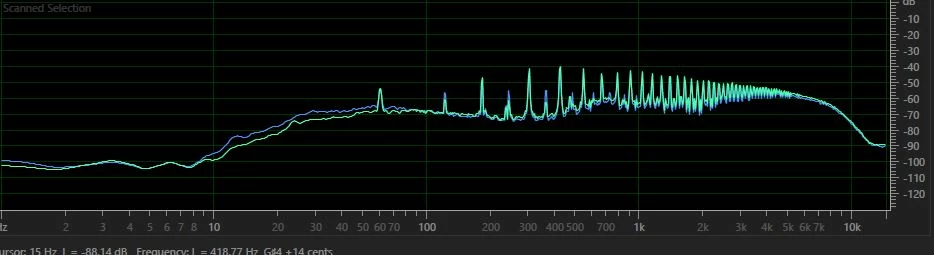
I had a look at the entire file, discovered that the sound removal tool won't touch it, and then had a careful look at the spectrum of the noise, which looks like this (this is a large section analysis):

All those spikes sit pretty still, and judging from the sound (and the fact that there's a very short snippet where the noise disappears of its own accord), I'd say that the most likely cause of this is an extremely dodgy connection between what played this back and whatever re-recorded it. Specifically, it sounds like an earth return fault, where the signal return - what there is of it, that is - has gone via a route that includes most of the street wiring!

How do you get rid of it? The notch filter is probably your best bet, and you'll have to use a lot of instances of it - the effects rack may help here. You'll have to do what I did to analyse the sound, and then zoom in a bit to get all the numbers and relative levels. Concentrate on the largest spikes first, and be prepared to spend a lot of time experimenting. One trick you can use to make sure that you have the filters set at the correct frequency is to push them positive, and sweep them slightly - you'll very easily hear what you need to set them at, and then drag the one you're working on negative. If you want a clue to what the actual numbers are, it's every harmonic of 60Hz up to about 6kHz. The even harmonics are at a lower level than the odd ones, so you might want to treat these separately in a separate instance of the notch filter.

How well this will actually work depends upon how accurately you can carry this process out, and there may well be something to be said for not attempting to go all the way with this, as you'll possibly lose too much of the original.

Anyway good luck - you're going to need a big dose of that...


The other problem is that because what ever the fault was any wanted audio sounds like it is just capacitive breakthrough, thus it is heavily high pass filtered and contains no lower frequency energy. So there is virtually nothing left even if you can completely eliminate the 'buzz'.

3 replies

dd-bAuthor
Known Participant
February 10, 2017

And thanks to everybody who looked at this problem and made suggestions!  I know more than when I started, which is the best possible outcome.

(Well, perhaps the ​best possible​ outcome involves my discovering I didn't really screw up the master tape, and getting a good recording of the whole show -- but that's not, actually, possible.)

dd-bAuthor
Known Participant
February 10, 2017

I did go in and manually wipe out each spike, doing by hand what I described a filter potentially doing.  It worked well enough, got rid of most of the noise and made it easier to hear the underlying signal. 

Which allowed me to confirm ryclark's prediction that there wouldn't be anything useful left under the noise.

(The places where I can hear words through the noise -- because the actors were shouting, basically -- I can recover those words more clearly with this technique, but they are sparse enough not to amount to anything.)

The noise definitely sounds like connection problems.  It's on my master tape, which is why I think the original recording was made patched into the room sound system, and it took a while to debug that connection at the start of the performance.  (An official or professional recordist would have been able to get there, set up, and debug early, but I had no official status, was just able to ask for a favor at the sound board, at the last moment.)

Bob Howes
Inspiring
February 5, 2017

Best bet would be to post a short sample of the sound for use to listen to/play with.  Unfortunately you'll have to do that on something like box.net or Dropbox.com because you can't post audio files directly here.

ryclark
Participating Frequently
February 5, 2017

Also it might be easier to isolate and identify the noise looking at the audio in the Spectral Frequency display in Audition. You could post a screen grab of the Spectral view here as well to help us identify the noise. There you should be able to see how it varies over time and make it easier to deal with. However whatever you do is going to be a rescue job with not ideal results due to the major difference in level between the wanted and unwanted signals.

dd-bAuthor
Known Participant
February 6, 2017

I've played with frequency filters of several kinds, including the dehummer, and tried frequency-domain editing in the Spectral Frequency Display, and have gotten nowhere at all. I've used those tools for other things quite successfully.  It's been a while, and I was a pure math student not applied math, but...doesn't a single sharp spike like this noise contain frequencies all over the place?  I knew the FFT math in theory long ago :-) .  Anyway, what I've tried hasn't helped, but I'm not very experienced with this level of audio either.