
Legend
July 8, 2020
Question

Match Loudness and Match Clip Loudness

  • July 8, 2020
  • 2 replies
  • 1622 views

Hello Everyone.


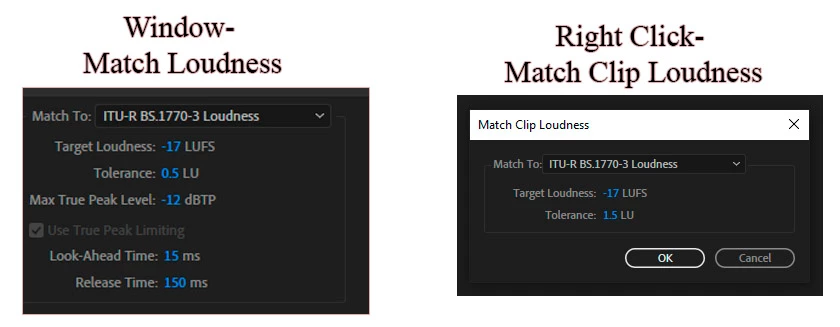
If I right-click on my Clips, I can choose Match Clip Loudness. Also, Inside the Window- Match Loudness, I can drag my Clips and use this Feature. I noticed Match Clip Loudness has Target Loudness and Tolerance. and I noticed, Window- Match Loudness has additional Features such as Max True Peak Level, Look-Ahead Time, and Release Time. Which one is better to use?

Thank you very much.
This topic has been closed for replies.

2 replies

Inspiring
July 8, 2020

The supplimental [Loudness Normalization] Limiter included in the Match Loudness module makes all the difference. Basically Loudness Normalization is measurement, gain, and limiting (if necessary). When you define an Integrated Loudness target and a True Peak ceiling - the source audio is measured in it's entirety. Gain is added (or subtracted) based on the measured (I) loudness relative to the defined (I) target. If any such added gain results in True Peak ceiling overshoots - the limiter engages and maintains compliance. 


Consider this - you may have a finished piece for broadcast with ATSC A/85 compliance requirements (-24 LUFS/ -2 dBTP). You are also asked to create an alternate master for online streaming. Maybe -16 LUFS/ -2dbTP. That's a significant amount of supplimental added gain. Without the limiter (and of course depending on available headroom) - you run the risk of overshoots and/or clipping. 


In any case the multitrack Match Clip Loudness option (ITU-R BS.1770-3 mode) does not include an option to define a True Peak ceiling. If the source audio requires significant gain to meet your defined (I) target - there's no fail-safe. Overshoots, clipping, distortion, etc. (and non-compliance) may be unavoidable.


-paul.

@produceNewMedia. 

SteveG_AudioMasters_
Community Expert
Community Expert
July 8, 2020

Basically any version of this is just a desperate attempt to automate what your ears should be able to tell you... and it doesn't work very well either.

Legend
July 9, 2020

Dear Steve G_AudioMasters

Thank you very much.

My background Is In photo and Video. Sound can be very Tricky.

I really Truly like Audition.

SteveG_AudioMasters_
Community Expert
Community Expert
July 8, 2020

I don't think it makes any difference - unless you are desperate to play around with the minor parameters, of course.