

pp4841592
Inspiring
April 25, 2018
Answered

Meta Album Cover Art Audition does not work ...

  • April 25, 2018
  • 1 reply
  • 10489 views

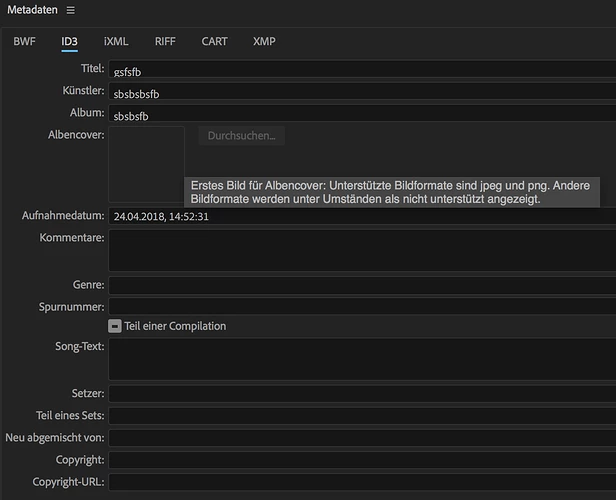
Unfortunately, the Meta Cover Image does not work for me. In both Multitrack and Waveform view, the image browser is greyed out and not clickable, I can not select an image. What can this be? I ask for help.

Thanks.
This topic has been closed for replies.
Correct answer SteveG_AudioMasters_

pp4841592  wrote

thanks for your answer. I wanted to add the album cover image to a .wav and an .aiff file in waveform editor, but this does not work. The image can only be added to .mp3 files. With .mp3 I can add and change the image.

This is essentially correct. There's no agreed format for this to happen with .wav or .aiff that I'm aware of, and even if there was, Audition doesn't currently support it - it will only work with MP3 metadata.

1 reply

ryclark
Participating Frequently
April 25, 2018

Does the .mp3 file already have an album cover saved within it that you can't see? Or are you trying to add an image to the metadata in Audition?

pp4841592
pp4841592Author
Inspiring
April 25, 2018

Hi ryclark​,

thanks for your answer. I wanted to add the album cover image to a .wav and an .aiff file in waveform editor, but this does not work. The image can only be added to .mp3 files. With .mp3 I can add and change the image.

Thanks.

SteveG_AudioMasters_
Community Expert
SteveG_AudioMasters_Community ExpertCorrect answer
Community Expert
April 25, 2018

pp4841592  wrote

thanks for your answer. I wanted to add the album cover image to a .wav and an .aiff file in waveform editor, but this does not work. The image can only be added to .mp3 files. With .mp3 I can add and change the image.

This is essentially correct. There's no agreed format for this to happen with .wav or .aiff that I'm aware of, and even if there was, Audition doesn't currently support it - it will only work with MP3 metadata.