
Legend
August 1, 2022
Answered

Multitrack: Play Overlapped Portion of Clips " Not Showing"

  • August 1, 2022
  • 1 reply
  • 596 views

Hello Everyone.

I was watching a 2018 Audition Tutorial on when you stack  Two Audio on top of each other, you can Right-Click and Choose to Send Clip to Front/Back. Also, The Tutorial Explains Inside Multitrack, there Is Play Overlapped Portions of Clips. But I don't see that under Multitrack.

Thanks.
This topic has been closed for replies.
Correct answer SteveG_AudioMasters_

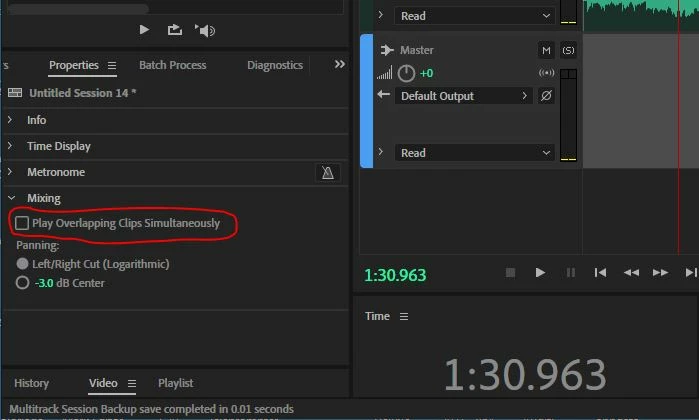
It's a Session Properties option. In your multitrack session, you need to select something like the Master track (in other words not any of the audio you are using) so that the Properties box shows the session properties, rather than any track properties, and twirl down the Mixing options:

1 reply

SuiteSpot
Inspiring
August 1, 2022

There is an option in Preferences > Multitrack clips > Bring clips to front when selecting them

Legend
August 1, 2022

Dear Suite Spot.

The option that I explained: Play Overlapped Portions of Clips, It allows you to play both clips that are overlapping on top of each other at the same time. the option you described Brings clips to the front when selecting them, It only brings the back Clip to the Front. I can right-click on my Clip and choose: Bring Clip To Front or Send Clip To Back

SteveG_AudioMasters_
Community Expert
SteveG_AudioMasters_Community ExpertCorrect answer
Community Expert
August 3, 2022

It's a Session Properties option. In your multitrack session, you need to select something like the Master track (in other words not any of the audio you are using) so that the Properties box shows the session properties, rather than any track properties, and twirl down the Mixing options: