
shifrao62330362
Participant
April 13, 2020
Answered

no option to re-link mediato adobe audition session/ no file asset

  • April 13, 2020
  • 2 replies
  • 3418 views

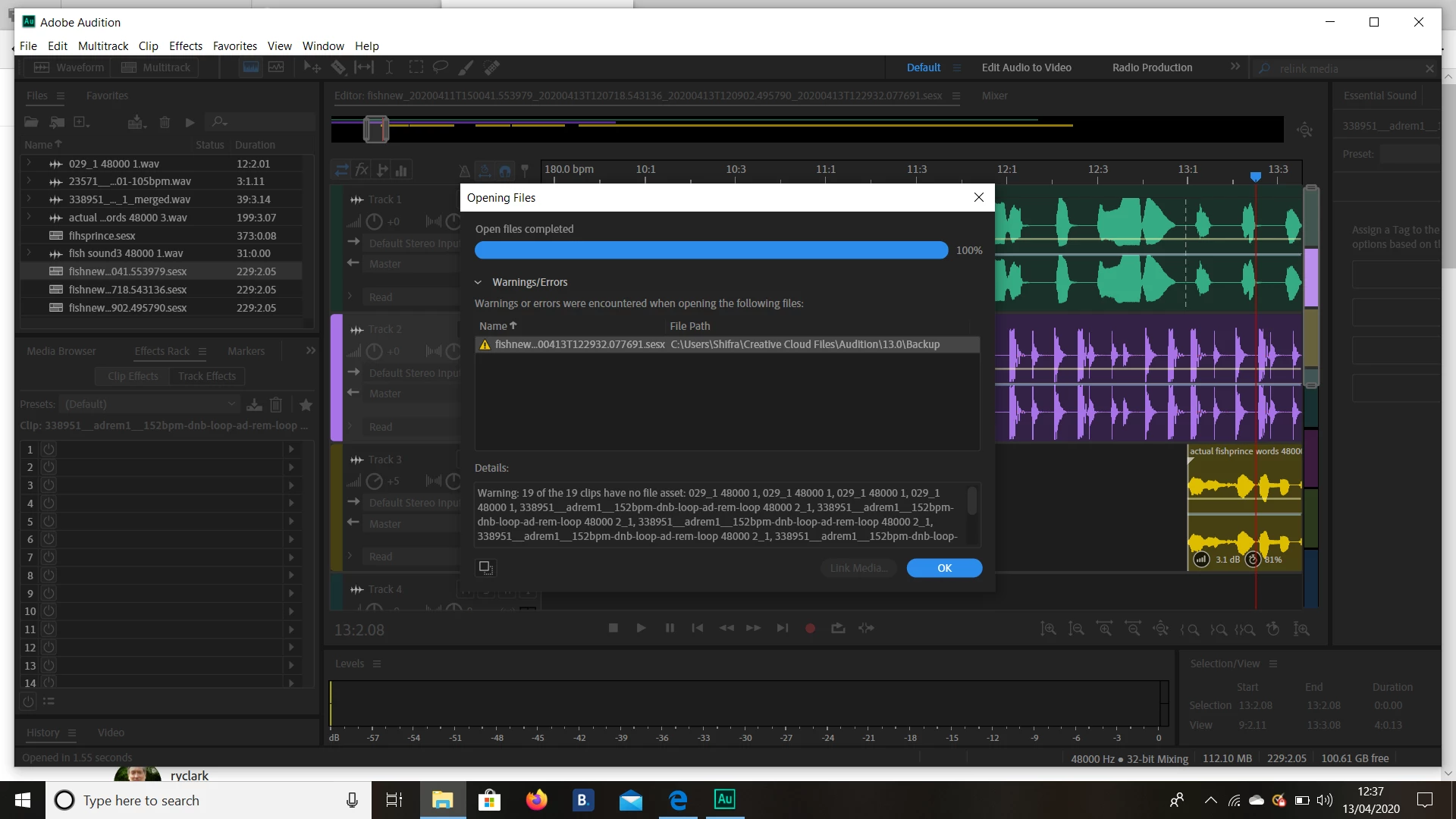
Hello! I get this message when I try to open the latest version of my session (which I had saved many times) after opening after my computer shut down. The media is all saved on my computer but perhaps not in the same file as the session.. it doesnt give me the option to relink the media (the button is not active). In the backup files it has only versions from two days ago and after the computer shut down which is very strange..

I have lost a day's work :((

Any help of how I can relink the files or find the lost sessionnwould be massively appreciated! 

Thanks 

Shifra
This topic has been closed for replies.
Correct answer SteveG_AudioMasters_

The reason that there's no backup link showing is that this clearly isn't where the session proper was stored - it looks like the remote backup location that you've saved a copy of the session file in, but the audio itself wouldn't be there - that would (or at least should...) be located on your local drive. The use of the word 'backup' is slightly misleading here - the devil's in the details. It is very much only the session file that gets backed up, not the audio. Unfortunately I suspect that the backup file only contains the relative links to the files, not the absolute ones. What this means effectively, if that's the case, is that the backup file only makes sense if it's put back into the location that the main session file is in.


I think that what this amounts to is that you need to find the last session on your local disk, initially, and take it from there. If that doesn't work, report back. If all else fails, SuiteSpot can look at your session file and should be able to give you a path to where the file thinks the audio is - at which point you'll be able to relink it.

2 replies

Participant
December 13, 2021

Oh my gosh! I've lost my entire session after hours of work and a deadline looming. I have been saving it during my edit.  Please, please help!

SteveG_AudioMasters_
Community Expert
Community Expert
December 13, 2021

All the answers we have to this are already in this thread, I'm afraid. Audition won't have destroyed the files; you just have to locate them and relink them. We have no clues about your directory structure at all, so we can't be of any more direct help - except to say that you need to keep a cool head, and don't panic; they will be there somewhere.

Participant
August 22, 2022

How about re-linking VST's? ... Having the same problem, however, just with the VST's needing to be re-linked?

Also, any reasons for audition consistently freezing/crashing/not responding regarding using VST's? ... The reason I'm having to re-link them is because the session would not open unless I disabled all VST's in audition before opening the session. Then, once I opened the session I had to manually input the missing VST's into the effects rack... Meaning I was starting again from scratch in regards to mixing and mastering.

Note that I tried everything before this, reinstalling, updating, shutdowns, restarts etc... Now I've gotten to the point where I have multiple copies of this session. Also, I tried clearing cache, not enabling preferences on re-install; no solution; just more problems arise the more I follow googles troubleshooting scholars...

Currently using the beta version as I have tried everything, I can, really looking for a solution urgently. Even debating an alternative DAW if I continue to waste my time and efforts...

PC specs are more than adiqate, already tested every aspect and the buffer was adjusted for mixing after recording (also tried all other routes of configuration, device class, sample rate, allocating maximum memory specifically to audition)

VST's im using may be the issue? ... = X ... Same files, scanning same locations, they load perfectly, something software realted to audition is not playing nice when building stack. Perhaps the flow process? ... Using busses and sends with effects going through both is delaying audition? Because it was delaying at first for a while, then completely freezing, got to the point where I couldn't open the session. and now i'm struggling with VST, which i'm guessing is whats triggering this?
-- Basically --
"How to" - Auto re-link VST to effects rack with the customization that was previously inputted.
"Why...." - Audition is turrtling around, then freezing/crashing/not responding when building a stack of VST's
"What" - Do I do to create a fast and reliable work flow using VST's on multiple tracks and buses.

Thanks in advance!


SteveG_AudioMasters_
Community Expert
SteveG_AudioMasters_Community ExpertCorrect answer
Community Expert
April 13, 2020

The reason that there's no backup link showing is that this clearly isn't where the session proper was stored - it looks like the remote backup location that you've saved a copy of the session file in, but the audio itself wouldn't be there - that would (or at least should...) be located on your local drive. The use of the word 'backup' is slightly misleading here - the devil's in the details. It is very much only the session file that gets backed up, not the audio. Unfortunately I suspect that the backup file only contains the relative links to the files, not the absolute ones. What this means effectively, if that's the case, is that the backup file only makes sense if it's put back into the location that the main session file is in.


I think that what this amounts to is that you need to find the last session on your local disk, initially, and take it from there. If that doesn't work, report back. If all else fails, SuiteSpot can look at your session file and should be able to give you a path to where the file thinks the audio is - at which point you'll be able to relink it.

shifrao62330362
Participant
April 13, 2020

Woah that was much easier than expected-- I've got it back thanks so much!