
Inspiring
January 6, 2025
Answered

Not Snapping to Zero Crossings?

  • January 6, 2025
  • 1 reply
  • 808 views

I have Snapping set up with everything unchecked except for Zero Crossings. But the edges of a selection snap to tons of different places in between zero crossings. I can't figure out what it IS snapping to. 


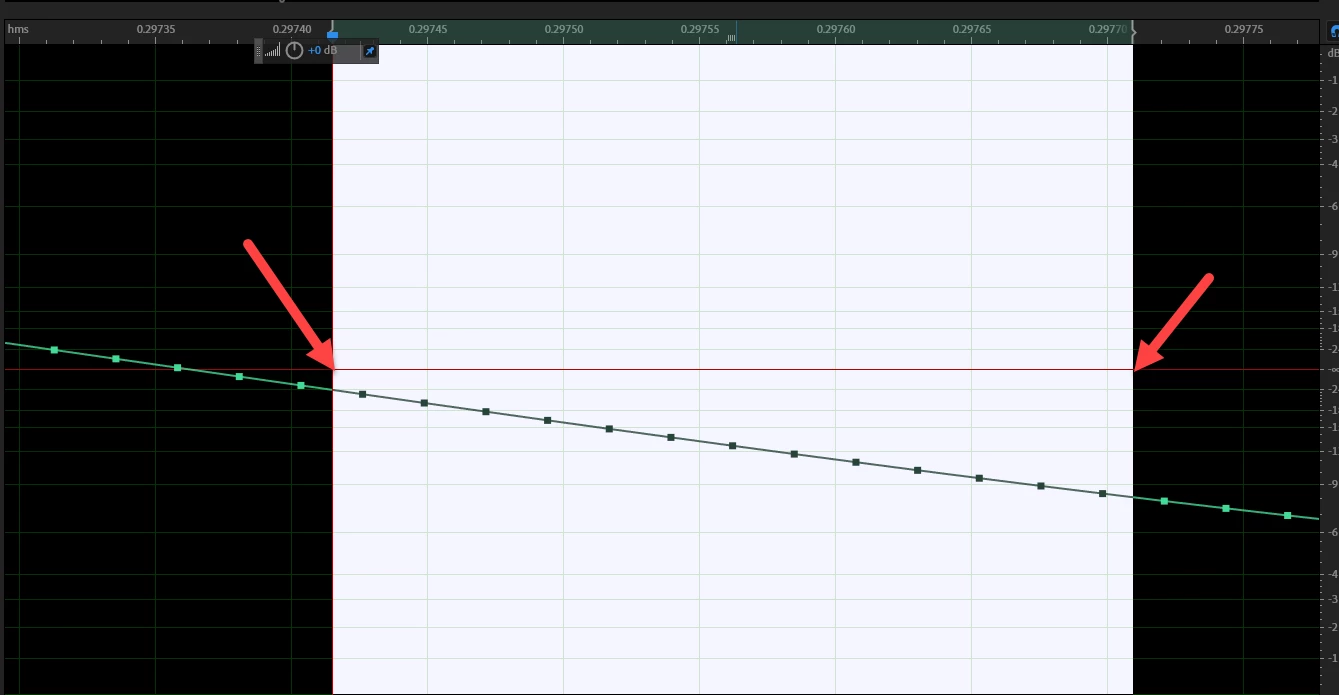
In this image, I dragged to create a selection, and I expected the edges of the selection to snap only to zero crossings (I marked the edges of a selection, which are clearly NOT zero crossing points). But as you can see, this didn't happen.


What am I missing here? Is there a way to have AA ONLY snap to zero crossings and nothing else?
 

Correct answer SteveG_AudioMasters_

did you find a solution?


For some reason I didn't look at the video - but when I did, the reason for this was obvious; he hadn't checked 'enabled' at the top of the snapping list, so it wouldn't work anyway - it takes two checks to enable any of the snapping options.

1 reply

SteveG_AudioMasters_
Community Expert
Community Expert
January 7, 2025

If there are no zero crossing points in your selection, then it's not possible to snap to them!

Inspiring
January 7, 2025

I get that. And yeah, that screen pic could have been better. But my point is that if the ONLY thing it is set to snap to are zero crossings, how am I able to create a selection between 2 crossings? In most programs if you don't drag far enough to include a thing that is supposed to be snapped to, you won't be able to create a selection between them. the edges of the selection jump to the snap points as you cross them. But before that, there is no selection. However, I can see as I drag to create the above selection that the edges are snapping to SOMETHING that is NOT zero crossings. So how/why is that possible when I told it not to snap to anything but zero crossings. I hope this is making sense. I'll make a video later today.

Inspiring
January 7, 2025

If it's a stereo waveform, all bets are off...


It's mono. One thing that might help describe the issue is that if I am dragging the edge of a selection as it approaches the zero crossing, it will continue to snap incrementally (why it's snapping and what it's snapping to I still don't know) and often willsnap to a point just left or right of the actual crossing. You can still see space.