
D.M.P studio
Known Participant
May 26, 2018
Answered

Panning not working

  • May 26, 2018
  • 7 replies
  • 6834 views

Im using adobe cc and cannot seem to get panning in multitrack to work. Its hook3d up to a presonus studiolive 24.4 mixer...and all my settings in the mixer are correct. I can pan if i do so on the mixer...but thats just an overall for the entire mix. I can see in auditon when i pan, the meter for the specific track im panning  will show its panned correctly but i still get sound out of both speakers. However, if i pan all the way to the left..the sound cuts completely out. What am i missing here? Can someone tell me what the basic audio setting ls for channel mapping should be...or maybe something else that could be causing this is?
    This topic has been closed for replies.
    Correct answer SteveG_AudioMasters_

    stevestals  wrote

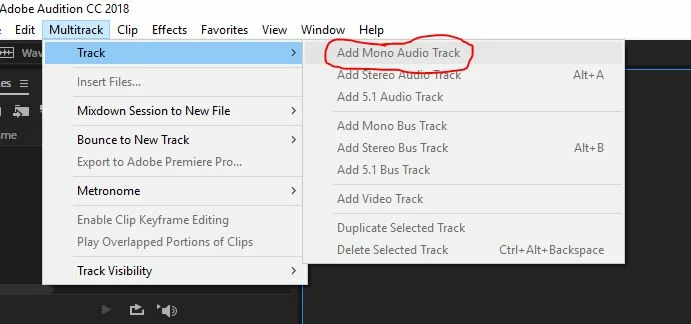
    Place them as mono meaning change the input to mono on the track? Could u circle the exact thing ur talkin about in the picture. I thought i at somepoint had switched it from mono stereo for the input jus to see what would happen

    No it doesn't mean changing anything about the input - that's irrelevant. What it means is that to be able to pan a mono signal (which I believe yours are, judging from the waveforms) it has to be in a mono track - so there's only one waveform visible in the track itself - because that's all there will be - one mono waveform. What you have is what we sometimes call 'glorious mono' - which is two mono tracks in a stereo waveform.

    When you create tracks that you want to pan, you have to do this:

    And that will create mono tracks in your stereo session. You can then pan the mono signal to wherever you want it in the stereo field.

    7 replies

    D.M.P studio
    Known Participant
    May 28, 2018

    Im just wondering what could possibly be plugged in wrong...ive got both my monitors plugged right into the specific control room monitor inputs on the mixer. ive also tried inserting the trs cables into other areas of the mixer but I get no sound. its prolly something really simple and stupid that im missing on the mixer

    SteveG_AudioMasters_
    Community Expert
    Community Expert
    May 28, 2018

    The relevant bit in the manual is this:

    You should be doing one of two things, I suspect. If you have a FireWire connection to the mixer, then you could route the signals to that, and monitor that way - or if you have audio outputs from your sound device, then they should go to the 'tape' inputs. And the monitors are obviously connected to the output of the monitor bus.

    D.M.P studio
    Known Participant
    May 28, 2018

    ive tried every single suggestion and nothing seems to work. .i even hooked my laptop up just to see the settings on my other version of audition and everything is the same. now im actually starting to think its got something to do with the settings in my mixer  which I don't see how. ughh! if anyone is familiar with this presonus studiolive 24.4 mixer let me know!

    SteveG_AudioMasters_
    Community Expert
    Community Expert
    May 28, 2018

    Get the stereo output from your sound device and feed it straight into a monitoring system without anything else in the way. If it sounds okay then, then it's definitely something you're doing with the mixer. That said (and having confirmed pretty much that it's not Audition), I'm having a rethink about something you said earlier:

    "I can see in auditon when i pan, the meter for the specific track im panning  will show its panned correctly but i still get sound out of both speakers. However, if i pan all the way to the left..the sound cuts completely out. What am i missing here?"

    I think you may be feeding both channels of your Audition stereo output to just the right channel input. If you pan that, then yes you will get some output in both - until you reach the point where the right signal is effectively reduced to zero, and there's nothing connected to the left channel. It fits the scenario, but I doubt whether it's a mixer issue per se - more likely to be a wiring or plugging error. Well that's what I'd be looking for initially, anyway.

    D.M.P studio
    Known Participant
    May 28, 2018

    Ok...so i would like to just create and entire new multirack session where i have the ability to pan. I have tried switchintg between mono and stereo and still get the same results. In the current session that im unable to pan i have also switched the master output from stereo to mono and i still get the exact same results

    D.M.P studio
    Known Participant
    May 28, 2018

    so that actually didnt work either....and im just now realizing that my tracks..even wen i mixdown the entire session are coming out with two wavs instead of one...whats going on here?!?!

    ryclark
    Participating Frequently
    May 28, 2018

    That's because you are mixing down to a stereo Master audio file which consists of a left and a right waveform. This you would have to be doing if you want to be able to pan mono audio between left and right outputs.

    D.M.P studio
    Known Participant
    May 27, 2018

    Place them as mono meaning change the input to mono on the track? Could u circle the exact thing ur talkin about in the picture. I thought i at somepoint had switched it from mono stereo for the input jus to see what would happen

    SuiteSpot
    Inspiring
    May 27, 2018

    Make sure the output of the track is set to Master

    And make sure your master track is set to a stereo hardware output

    D.M.P studio
    Known Participant
    May 27, 2018

    So your saying the INPUT has to be set to default stereo output? I pretty much switch it to my mixer for when im recording vocals. before this fresh install of audition I never had to switch it back. so on track 3 for example...the input is set to studiolive ch1, and the output is set to master..so if im understanding correctly I just need to switch the input from studiolive ch1 to default stereo out right?

    D.M.P studio
    Known Participant
    May 26, 2018

    hey, so that was me just messing around trying to figure out what was wrong...I had switched it. but the other tracks do not pan either...especially track 3 which is overdubs. I tried multiple times and still nothing. the output should be master...and the input is from the mixer. what else could be wrong?

    SteveG_AudioMasters_
    Community Expert
    Community Expert
    May 27, 2018

    All of your tracks look like mono, only placed in stereo tracks. If you do this, then you can't pan them as such, only alter the balance between each channel. To get these to pan, (so you could place them in positions in the stereo field), they need to be placed as mono tracks - then you can pan these into the stereo master track.

    SteveG_AudioMasters_
    Community Expert
    Community Expert
    May 26, 2018

    Can you post a screenshot or two of how you've got your session set up? As long as you have a stereo session set up, panning should work fine; mono tracks should pan across the stereo field, and stereo tracks can be balanced across it.

    D.M.P studio
    Known Participant
    May 26, 2018

    yea im really not seeing what the issue is,.this is a audition on a brand new computer. everything seems to be working fine except for the pannig issues. as i said...the mixing settings are fine though

    ryclark
    Participating Frequently
    May 26, 2018

    I notice from your picture that Track 2's output is routed to (01M) StudioLive Ch1. So Panning won't work. It needs to be sent to Master as your other Tracks correctly are. Any Track that you want to Mixdown or Export as Stereo must be routed out via the Master track which must also be stereo and have it's output selected to the Default or (01S) StudioLive Ch 1/2, for instance.