


- Home
- Audition
- Discussions
- Problem with Sound Max Analog Devices and AA3 when...
- Problem with Sound Max Analog Devices and AA3 when...
Problem with Sound Max Analog Devices and AA3 when recording Internet audio

Copy link to clipboard
Copied
I'm having a problem recording Internet audio with Audition 3 on Windows 7 using Sound Max.
This problem began last week. Before that this combination has been working great for many years without any problems at all.
When I'm recording Internet stream I open "Stereo Mix" channel. I used to adjust the channel 2/3 open and in this point the recording level was fine and the recording used to go smoothly and the result was fine. But now when I open the ""Stereo Mix" only a tiny bit the right channel go "red level" and other channel goes almost the same level. When I play back the recording there is no audio at all but only some static noise.
I can't understand what has happened? Do I need to install AA3 or SoundMax again?
Any help would be very much appreciated.
Tony


 4
Replies
4
4
Replies
4



Copy link to clipboard
Copied
Do previously recorded files play back OK from within Audition and/or other media playing software?
Copy link to clipboard
Copied
Yes they do. No problem playing them back.
Copy link to clipboard
Copied
I succeeded in removing and reinstalling the AA3 to my PC.
However when I try to monitor record level when recording I get the following message and the recording file will be empty without any signal:
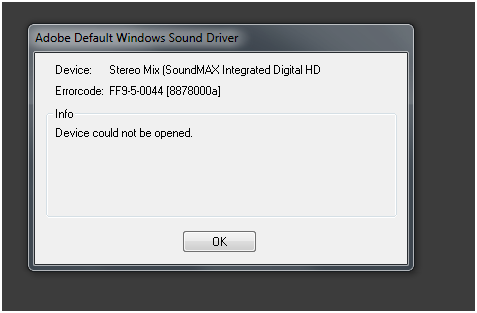
Again I can play back my previously recorded files and AA3 shows playing back levels as well.
So what next?
Copy link to clipboard
Copied
Unfortunately that seems to be down to the Windows audio drivers and any special ones that your PC manufacturer provide for the SoundMAX chip. So you might need to do a bit of online research into SoundMAX drivers.

Get ready! An upgraded Adobe Community experience is coming in January.
Learn more
 AdChoices