
Participant
January 15, 2021
Answered

Reducing Color/Warmth in a Voice Over

  • January 15, 2021
  • 3 replies
  • 1529 views

Hi, I know most folks would want as much warmth/color to the voice as possible but the way I have to treat my mobile setup adds too much of it. I know the setup isn't ideal but I have to work with what it is. What would you guys suggest in terms of processing to reduce warmth/color? This is for standard voice over--woman's voice, natural midtone. Thank you!
This topic has been closed for replies.
Correct answer EuanWilliamson

Thank you, I'll take a listen.


I've had a try:

https://www.dropbox.com/s/40wkeha6wjek5hd/Sample%2048000%201_01.wav?dl=0


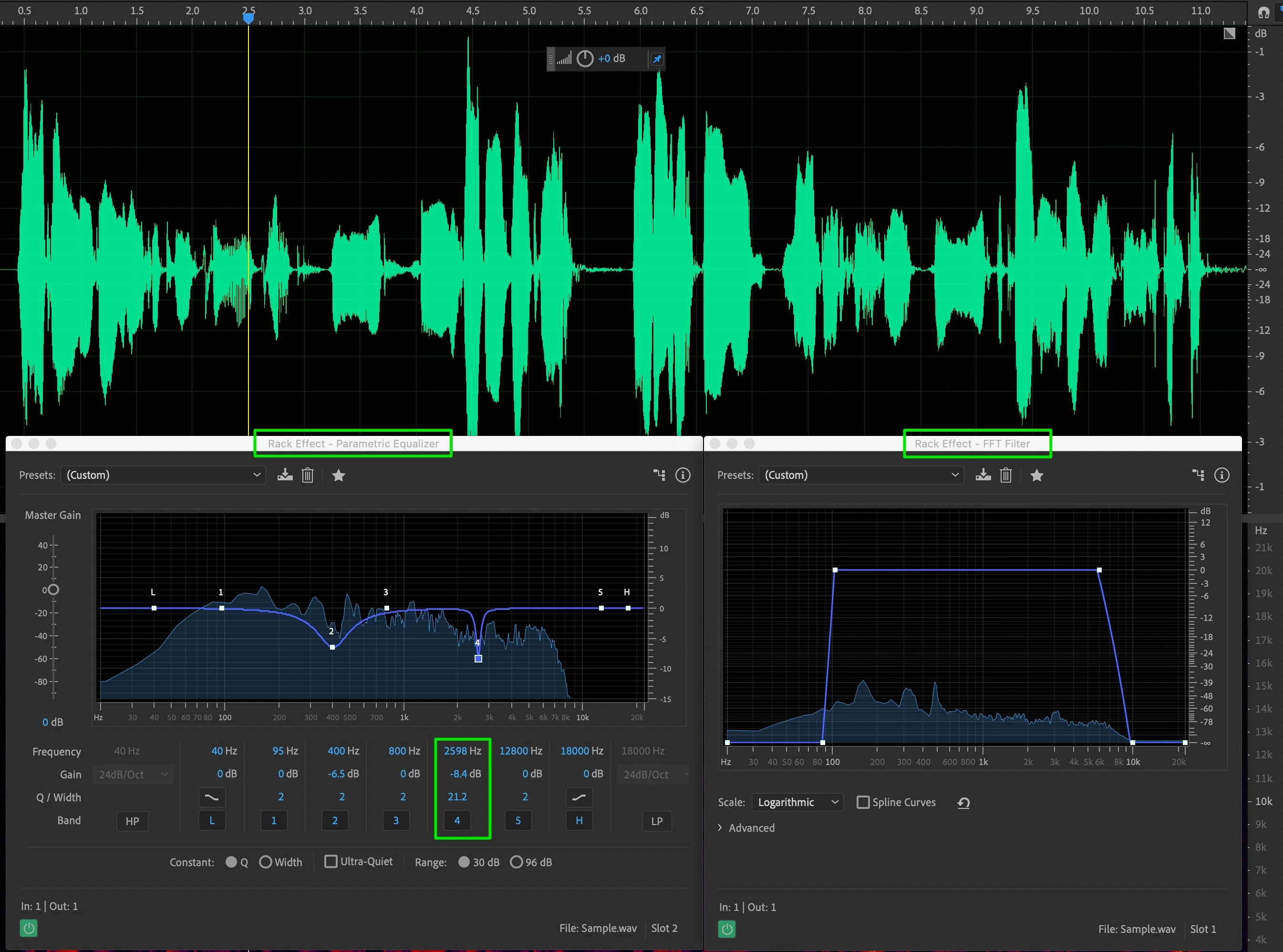
Here's the settings after I normalised the volume:

The FFT filter is to remove any frequencies other than speech.

The green box at node 4 shows a reduction I made to remove

some odd artifacts I could hear.

I added a little Dereverb to help with the echo.

Overall your efforts will be made easier if you record at a higher volume.


Does this help any?


3 replies

EuanWilliamson
Community Expert
Community Expert
January 15, 2021

Hi @jean-marieh41642929 

Perhaps if you would give me a sample of your voice over audio, I could suggest

something more specific.


Best regards, Euan.
Participant
January 20, 2021

Here is a sample. I know there is a bit of echo too. 

https://www.dropbox.com/s/34z6ev226h435lp/Sample.wav?dl=0

EuanWilliamson
Community Expert
Community Expert
January 20, 2021

Thank you, I'll take a listen.


Best regards, Euan.
EuanWilliamson
Community Expert
Community Expert
January 15, 2021

As @SteveG_AudioMasters_ says use a bit of EQ cut.

This link to a Larry Jordan article explains the how to warm a voice but it shows the technique

and the frequencies to consider.

About half way down the page:

https://larryjordan.com/articles/eq-warm-a-voice-and-improve-diction/

Reduce the levels in these areas.


As Steve says about room tone, it does add to the warmth.

You might be able to reduce this using the DeReverb tool although

some experimentation will be needed and you may not like the result.


Best regards, Euan.
SteveG_AudioMasters_
Community Expert
Community Expert
January 15, 2021

DeReverb doesn't, and cannot, remove room tone.

SteveG_AudioMasters_
Community Expert
Community Expert
January 15, 2021

The warmth in any voice comes in the mid-tones, so that's what you'd have to reduce. A gentle EQ cut between about 300Hz to somewhere around 1.2kHz (rather depending on the actual voice - a sample would help here). The slight snag with this is that anything that sounds like 'warmth' is actually a form of distortion - either in the form of room tone (early reflections from the walls) or introduced during the recording process itself - and that is something you can't remove, because there is no undistorted reference point.


The most important thing to consider in the long run though is how you're making the recordings, and what mic you're using, etc. Getting it right at source will save you processing time, and generally sound more natural anyway...