
jaradcollier
Participating Frequently
January 18, 2019
Answered

Silence Audio ABOVE a Certain Threshold?
  • January 18, 2019
  • 2 replies
  • 3283 views

Is there an easy way to silence / mute audio ABOVE a certain threshold? I am familiar with AutoGate and removing noise below a certain threshold.

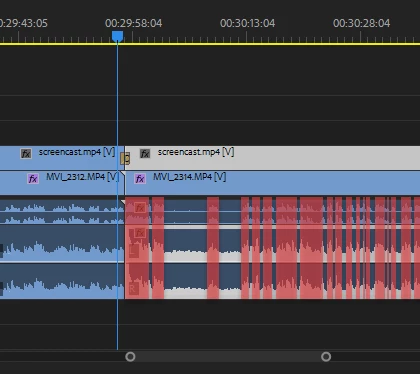
My screencapture above shows audio in Premiere Pro but I do have Adobe Audition so I'm hoping this feature exists?

If so, what exactly are the steps in Adobe Audition CC 2018?

Just in-case you're curious what my use-case is, I have audio of me talking and a screencapture using Camtasia. I want to silence my voice and amplify the underlying audio as much as possible.

This topic has been closed for replies.
Correct answer SteveG_AudioMasters_

dreamweaver_is_c_r_a_p  wrote

I will definitely record this differently in the future but am wondering if such a "silence above a certain DB" feature exists ?

No, the feature doesn't exist.

2 replies

Participant
July 27, 2023


It should exist.  I have the same problem.


ryclark
Participating Frequently
January 18, 2019

Unfortunately anything you try to do of that sort will also remove the underlying audio thus leaving holes in your soundtrack. So not really possible unless you have some suitable audio to fill in the gaps with. What does the underlying audio consist of? If it is part of a continuous soundtrack then you are stuck I'm afraid.

This type of thing can only be made to work if you have separate recordings of the background audio and speech which you can lay as separate tracks in the Multitrack view. which, of course, if you did you wouldn't be having this problem anyway.

jaradcollier
Participating Frequently
January 18, 2019

In my screenshot, it's a screenshot of Adobe Premiere Pro.

What it shows is two audio tracks related to multiple video clips - the collapsed track is the audio containing the good audio I want to keep, the second track expanded contains audio recorded from my Yeti mic on my desk. So I have two audios - 1 good audio and one not so good and I am doing this to sync screencapture up with my talking-head video. I accidentally colored red the good track audio in my screenshot but that track would actually be left alone.

The Yeti screencapture audio however (the second track) is what I want to eliminate the peaks from after a certain threshold. It would be fine to do this because my track 1 audio (good audio) would be there to fill in the gaps (which is exactly what I want).

So I basically do have two recordings of the same content - 1 that captures mainly my talking-head voice only and one that captures the microphone Yeti on my desk that captures the ambient sound in the room which is my voice and the sound that plays out of my speakers.

I basically want to silence my Yeti microphone audio when it's above say -15db. So it's like the inverse / opposite of AutoGate.

I will definitely record this differently in the future but am wondering if such a "silence above a certain DB" feature exists ?

SteveG_AudioMasters_
Community Expert
SteveG_AudioMasters_Community ExpertCorrect answer
Community Expert
January 18, 2019

dreamweaver_is_c_r_a_p  wrote

I will definitely record this differently in the future but am wondering if such a "silence above a certain DB" feature exists ?

No, the feature doesn't exist.