
Participant
March 11, 2021
Question

Special > Vocal Enhancer > Male/Female is broken; bitrate changes randomly in newest edition

  • March 11, 2021
  • 2 replies
  • 1011 views

I got an update yesterday, and now the Effects > Special > Vocal Enhancer > Female (and Male) are broken. How do I fix it?
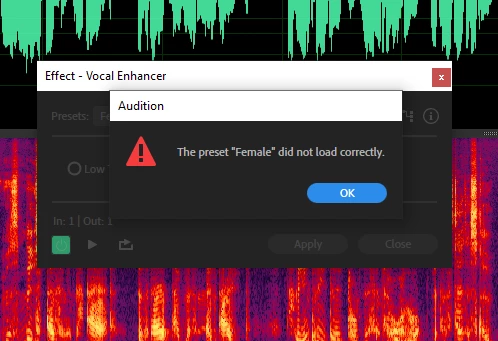
 

Also, I will be recording and the pitch will randomly change, as if there was a birtrate mismatch. Sometimes it occurs in a single file, sometimes it happens when I close one file and open another. Rebooting the computer fixes this, but there has to be a better way. 

This topic has been closed for replies.

2 replies

Participating Frequently
April 15, 2021

I got the same error, and now the Vocal Enhancer has only Low Tone, High Tone, and Music (plus default)...


Restarting with the shift key held doesn't help. I am on the current version - I just checked for updates.


grrrr

SteveG_AudioMasters_
Community Expert
Community Expert
April 16, 2021

That's not an error - that's the new version. From the upgrade details page:

'Effect presets in Chorus/Flanger, DeEsser, and Vocal Enhancer cannot be selected after importing older version prefs in AU 14.0.'


So now it just has the Low, High and Music settings, and any attempt to import previous settings will fail.

Participating Frequently
April 16, 2021
Many thanks.

I suspected as much!

Jim

--

Jim Brulé
*Diving Deeply into Stories:* https://bit.ly/DivingDeeply

Website: https://TransformationalStorytelling.org/
YouTube: https://www.youtube.com/c/JimBrule/
SteveG_AudioMasters_
Community Expert
Community Expert
March 11, 2021

It works fine here, so if you are getting that message in particular, you may have got a corrupted Preferences file; that is where the presets are stored. If you haven't got anything special stored in your presets for any effects in particular, then the easy and very quick way to restore all the preferences to a vanilla state is to restart Audition with the Shift key held down. If that doesn't fix the problem, then uninstall Audition, preferably using the Adobe CCcleaner app.


If you have other effects preferences that you want to preserve, you will have to go through the rather more complicated process of locating the appropriate .xml file and editing that.

Participant
March 11, 2021

Sadly, neither of those things worked. 

SteveG_AudioMasters_
Community Expert
Community Expert
March 12, 2021

The other less than obvious thing to make sure of is that you are running Audition with Administrator rights. Not doing that can cause all sorts of unexpected results...