
Jogen
Inspiring
July 28, 2017
Answered

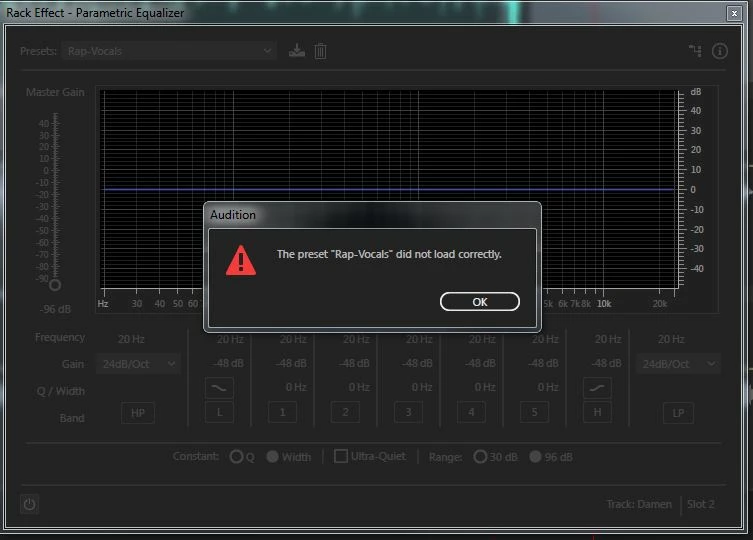
The preset "..." did not load correctly (error message)

  • July 28, 2017
  • 1 reply
  • 7696 views

Hello over there,

most time working in premiere, today I have an audio project with a dozen vocals and a novox music bed.

In EQ effects I can´t chose a preset, see pic below - does anybody knows what to do?

Reinstall Audition?

Thanks in advance,

Jo
    This topic has been closed for replies.
    Correct answer SteveG_AudioMasters_

    All you need to do is trash the EffectPreset file in Preferences, with Audition closed. When you restart it, a new 'vanilla' file with all the original presets will be re-instated automatically. You haven't said whether this is Windows or Mac - the path to the preference folder in Windows is:

    C:\Users\{username}\AppData\Roaming\Adobe\Audition\10.0

    1 reply

    SteveG_AudioMasters_
    Community Expert
    SteveG_AudioMasters_Community ExpertCorrect answer
    Community Expert
    July 28, 2017

    All you need to do is trash the EffectPreset file in Preferences, with Audition closed. When you restart it, a new 'vanilla' file with all the original presets will be re-instated automatically. You haven't said whether this is Windows or Mac - the path to the preference folder in Windows is:

    C:\Users\{username}\AppData\Roaming\Adobe\Audition\10.0

    E.5C55
    Participant
    February 18, 2023

    Hi Steve.

    I got the same error message. Could you please describe the proces to fix this for MAC users?

    Thanks a lot. 

    Blutbad-C
    Participant
    December 7, 2023

    The path, by default, is hidden - you have to unhide the folder before you will see the files.


    Hi there! I'm facing a similar issue with Adobe Audition 2024, and I can't seem to find the mentioned path in the Creative Cloud package. Could you please provide guidance on how to proceed in this case? Thanks!