
eal29
Inspiring
December 2, 2017
Answered

Weird sound captured from Stereo Mix

  • December 2, 2017
  • 2 replies
  • 2118 views

Hi

I'm trying to record sound directly from the sound card, in the Hardware options I changed the recording input to Stereo Mix.

So when the sound starts, there's always some waves that appear in the timeline, even if I'm not hearing anything or the sound is too low, they just appear. I attach an image of this issue. At the top, the waves from the original sound, at the bottom, mi issue.
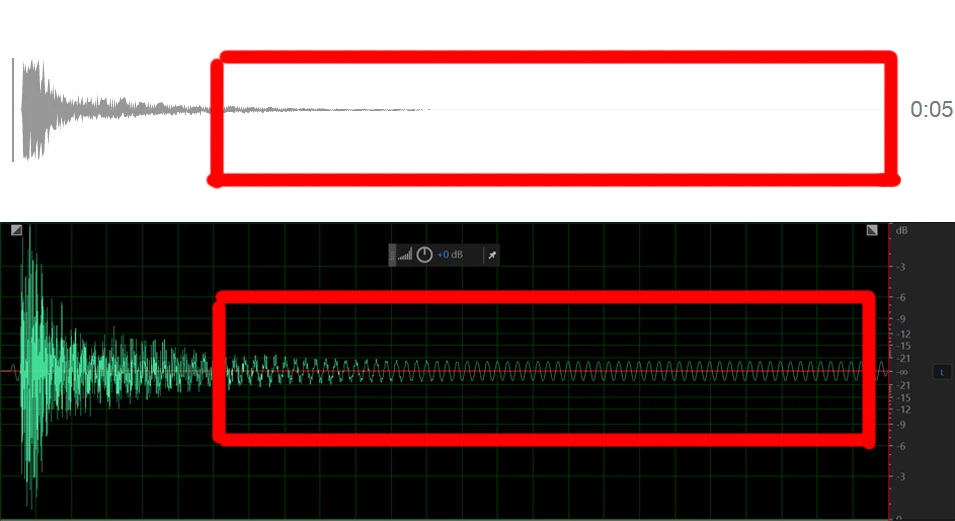
It's a sound that I found on the web, and I just tried to record it, and the parts where the sound is gone, it seems like there's a sound in my recording.

I tried to hear what it was using Hard limiter, and it's kind of a static sound, like some sort of electricity, and without Hard limiter the sound isn't noticeable.

I've checked my connections and it even happens when using only battery and without speakers connected. It's kinda weird, I've disabled all enhancements from the Devices properties, disabled any other software related to audio, and this keeps happening.

I'd appreciate if somebody knows why is this happening.

Thank you.

This topic has been closed for replies.
Correct answer eal29

So why not use the direct download of the original audio file rather than re-recording it?


Yes, that's correct, I guess I caused more confusion.

Those files are only just to prove my issue, those waves in the silence part. Obviously I can download any sound.

The thing is that Stereo Mix keeps registering those low frequency waves, no matter what sound I play.

So in the end that doesn't solve my issue since my question is what are those weird waves.

It might be hardware related.

2 replies

Participant
September 20, 2018

Did you ever figure out what was causing this? I'm experiencing the same issue.

ryclark
Participating Frequently
December 3, 2017

The only way that we are going to be able to help is to be able to listen to the sound and be able to analyse it. Can you post a .wav (not .mp3) file somewhere like Dropbox or Google Drive for us to download an listen to.?

eal29
eal29Author
Inspiring
December 3, 2017

Hi, thank you for your help.

Here is a link to the wav file recorded, the same from the image:

https://goo.gl/9DVPib

SteveG_AudioMasters_
Community Expert
Community Expert
December 4, 2017

Hi, here's how I created the wav file.

I found a sound on the web, and I recorded it following these steps:

I opened Adobe Audition, I checked my Audio Hardware options, in the Default Input tab I selected Stereo Mix, and then I created  a new file (48kHz, 16-bit).

Then I started the recording, and then switched to Chrome and then hit the play button. I stopped the recording when finished and saved the file as wav.


Well, all I can tell you is that Audition records exactly what it's sent from your sound device - nothing more, nothing less. It doesn't have any choice about this - that's all there is. So if you have an extra bit of tone at 17Hz in the same file played, as opposed to downloaded, and your sound device doesn't do this normally, then you have to look either at the device itself when recording like this, or whatever app it is that's playing the file that Audition is recording. Or, since it's 'stereo mix', almost any other source that can generate a sound or tone, and add it into what's being played. On this basis, the first thing to look at is the settings in the Windows mixer, and make sure that it's only recording from a single source. Also, if you've got Audition set to record at one rate, and the sound is being streamed at a different one, then the OS will resample the sound to whatever Audtion's set to (which will be the sound device default, or it wouldn't work), and that's not blameless either - as many have discovered.

Since internal sound devices on all computers are notorious for not being too good, it wouldn't surprise me at all if it was nothing more than an added artifact from it.