D.M.P studio
Known Participant
November 8, 2016
Answered

High volume vocal distortion

  • November 8, 2016
  • 1 reply
  • 1987 views

i have uploaded a vocal recorded on a Neumann u87 along with a Neve 1073 2ch mic pre. and a whole bunch of other outboard gear. im having trouble getting this vocal not to sound sort of muffled when played in my car at high volume. while mixing with my yamaha ms80's i do not hear any muffled sound though. only when the mix is done and its played in headphones or my car. its not really bad, but just slighty the clarity in the vocal sounds a little muffled when volume is pretty high. do you think this is due to the actual recording and i have to re record it, or it can be fixed by putting a limiter on it or something? as i said...playing the vocal by itself through my studio monitors i do not hear any distortion of muffledness at all, what am i missing here?

heres a link to the vocal

Dropbox - RELL VOCALS.mp3

    This topic has been closed for replies.
    Correct answer SteveG_AudioMasters_

    Also, did you mean it was compressed heavily on MY mix, or during the recording process?


    The first few seconds (introduction?) doesn't clip or appear to limit, but the rest of the vocal does - it all appears to stop dead at -11.5dB, so something somewhere has limited it to that level. Normally I'd have expected a better performance from a U87 - have you inserted a compressor on the Neve's insert points?

    This sounds like it was recorded pretty close to the mic - it's almost blasting in places. If you are going to use a U87 that close, you need a good pop screen in front of it, and possibly a pencil strapped vertically to the front of the mic. No that's not mad - it directs any blast to either side of the diaphragm and is an old trick...

    But in general, you are going to get a cleaner recording with more high frequencies if you under-run everything, rather than have it close to the limits, which it sounds as though it is. It's relatively easy to add effects afterwards to alter the sound if you want to. I scanned the log overall frequency response of your track:
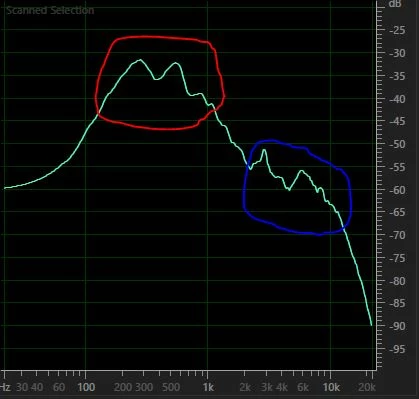
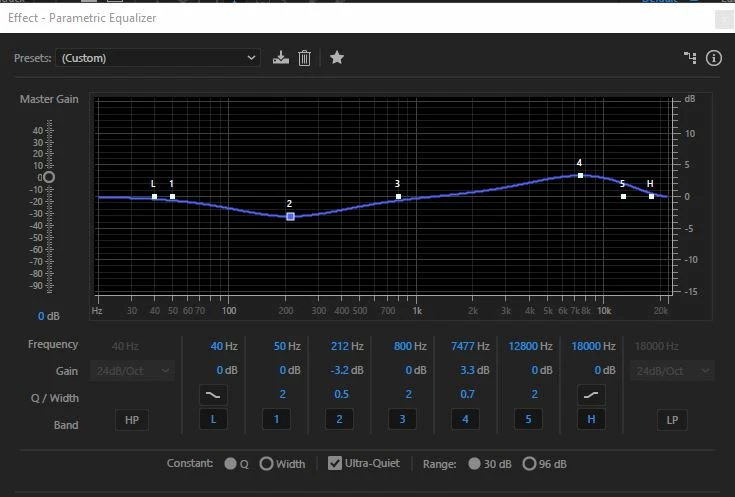
    ... and there are a couple of things to mention. A large part of the slightly 'muddy' sound is due to the response peak that I've outlined in red. This is the 200-600Hz range, and if you have too much of this 'upper bass', everything will boom a bit - not pleasant and doesn't aid clarity. The area of the response that I've indicated in blue is the part that adds 'air' to the sound, especially from about 6kHz upwards, and that's looking a little on the low side. This means that the overall response slopes down to the right at quite a considerable rate - it should be more like 3-5dB per octave, and possibly with a slightly 'scooped' response between 800Hz and 2kHz, although this very much depends on the voice. With this mostly I'd reduce the red area, and just tweak the blue area slightly.

    I had a quick go with the parametric EQ, and I think that these settings improve it somewhat: (YMMV, but this is in the ballpark)

    1 reply

    SteveG_AudioMasters_
    Community Expert
    Community Expert
    November 8, 2016

    This sounds as though it's been through quite a lot, and there's evidence that something in the chain has been running pretty close to overloading. Generally the best thing to do with a vocal of this nature is to record it as clean as possible (ie, just the mic pre) first, and add all the effects and compression afterwards. That way if it goes wrong, you've always got the original clean version to go back to without having to re-record. And that's the snag here - once it's distorted, there's nothing much you can do about it except re-recording it.

    One of the reasons that it sounds slightly 'muffled' is because it has been compressed quite heavily, and quite a bit of the higher frequency sounds have been attenuated - that won't help at all. And also, you are monitoring on MS80's, and because these have a somewhat 'forward' sound (like the NS10s they were modeled on), vocals will appear to have more  'presence' than they really have anyway - which is why they sound slightly duller on headphones, etc.

    Normally I'd be the last person to suggest that you should use headphones to get the sound right, but when it comes to vocals and MS80's, I think that it might be a good idea; it sounds to me (having heard it, and your own observations about it) that this might be a better way to judge it in this instance.

    HTH...

    D.M.P studio
    Known Participant
    November 8, 2016

    heres a copy of the original vocal..dry..no effect...could u gimme some details how YOU might edit this for a cleaner upfront sound? do you think the muffled sound is coming from how i edited the vocal?

    Dropbox - RELL VOCAL.wav

    D.M.P studio
    Known Participant
    November 8, 2016

    Im asking because i honestly thought the editing on the vocal wasnt to bad. I sit back and try and use professional hiphop recordings for vocal referencing