Inspiring
April 16, 2019
Answered

How do I snap sine waves so that they are adjacent?

  • April 16, 2019
  • 1 reply
  • 774 views

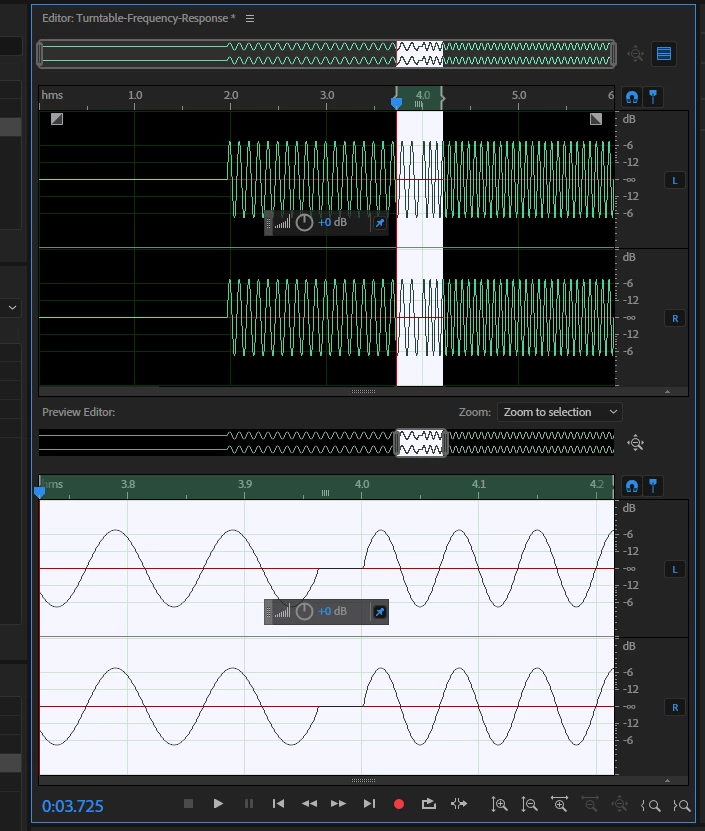
I have created several sine waves end to end, but the waveforms do not abut against each other.

How do I adjust the waveform on the right so that the signal abuts exactly against the end of the one on the left?

This topic has been closed for replies.
Correct answer ryclark

How are you creating the sine waves and joining them together? Sine waves generated within Audition will always start and end at a zero crossing points anyway. So it depends somewhat on what you are doing to join the sine waves together.

Various things that you can do though. First make sure that Snapping is turned on and set to Snap to Zero Crossings. Also in the Edit menu there are various options under Zero Crossings to adjust your selection of the audio in and out points to the Zero Crossing point.

Alternatively if you just want to remove the click that occurs do a very short crossfade between the clips. This should happen anyway if the Preferences/Data Smoothing options are turned on.

Or in your image above select the flat line section of audio between the two sine waves and delete it (with, of course, snapping to zero crossings and smoothing turned on).

1 reply

ryclark
ryclarkCorrect answer
Participating Frequently
April 16, 2019

How are you creating the sine waves and joining them together? Sine waves generated within Audition will always start and end at a zero crossing points anyway. So it depends somewhat on what you are doing to join the sine waves together.

Various things that you can do though. First make sure that Snapping is turned on and set to Snap to Zero Crossings. Also in the Edit menu there are various options under Zero Crossings to adjust your selection of the audio in and out points to the Zero Crossing point.

Alternatively if you just want to remove the click that occurs do a very short crossfade between the clips. This should happen anyway if the Preferences/Data Smoothing options are turned on.

Or in your image above select the flat line section of audio between the two sine waves and delete it (with, of course, snapping to zero crossings and smoothing turned on).